
Smart Connections FAQs
Does Smart Connections cost anything?
#Smart Connections Core is free for Obsidian. You can install Smart Connections for free. Optional advanced workflows are available through Pro plugins.
Do I need an API key?
#Not for Smart Connections Core semantic retrieval.
Core can surface related notes using the default local semantic retrieval path without an API key. API keys only matter if you intentionally enable provider-backed workflows or integrations that require them.
See Getting Started.
Does Smart Connections send my notes to the cloud?
#Smart Connections Core retrieval uses local embeddings by default. Provider-backed workflows are separate and explicit. A configured cloud embedding provider receives eligible source text during embedding. A cloud chat provider receives the prompt and context for that request.
Review:
What data does Smart Connections collect?
#Your notes are used by the plugin inside your vault for local retrieval by default. Website, subscription, support, and provider-backed workflows may involve operational data or user-selected context as described in the Privacy Policy.
If you enable a cloud provider, review that provider's terms too.
Does Smart Connections work offline / without internet?
#Connections can stay useful offline after local indexing for the local retrieval path.
Internet may still be needed for installation, updates, model downloads, documentation, subscription services, or provider-backed workflows. Remote integrations remain separate from Core local retrieval.
Can I use Smart Connections on mobile?
#Smart Connections is available on mobile. Footer connections are included in Core for note-end use without a sidebar. Available controls can vary by platform.
If Smart Environment loading is deferred:
- Select Load Smart Environment.
- Wait for Smart Environment ready or Ready.
Will it slow down my vault?
#Initial indexing can use more resources in large vaults. Limit the work with source eligibility, exclusions, result type, and result limits. Then evaluate the current vault with one representative retrieval task.
Use:
Pro includes local performance-index workflows described on the Pro page. To evaluate the effect in your vault, compare several runs of the same representative retrieval task before and after the change, using the same vault snapshot and machine. Index readiness and coverage do not establish the speed of your task.
How do I install Smart Connections?
#- Install Smart Connections from Obsidian Community Plugins.
- Enable Smart Connections.
- Open one real note.
- If prompted, select Load Smart Environment.
- Wait until Smart Environment shows Smart Environment ready or Ready.
- Run the command for your edition:
- Core:
Smart Connections: Open: Connections view - Pro:
Smart Connections Pro: Open: Connections view
Preview one result. If the result is useful, drag it into the note or open it.
Core is enough for this workflow. Pro activation is not an installation prerequisite; verify setup with a meaningful note and one inspectable result.
What is the first thing I should do after installing?
#Open one real note with meaningful text.
Open Connections.
Preview one result.
If the result helps, drag it into the note or open it.
You know it worked when one useful related note from your own vault becomes actionable before you reorganize anything.
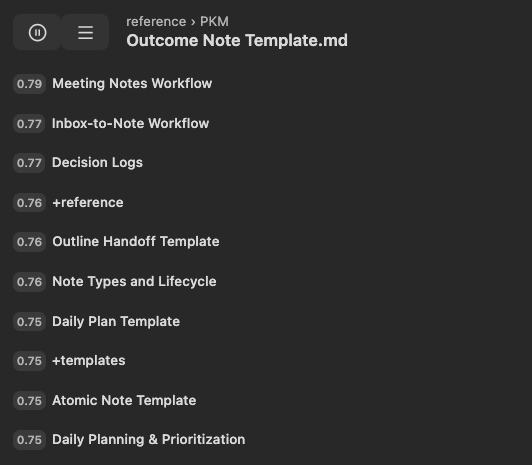
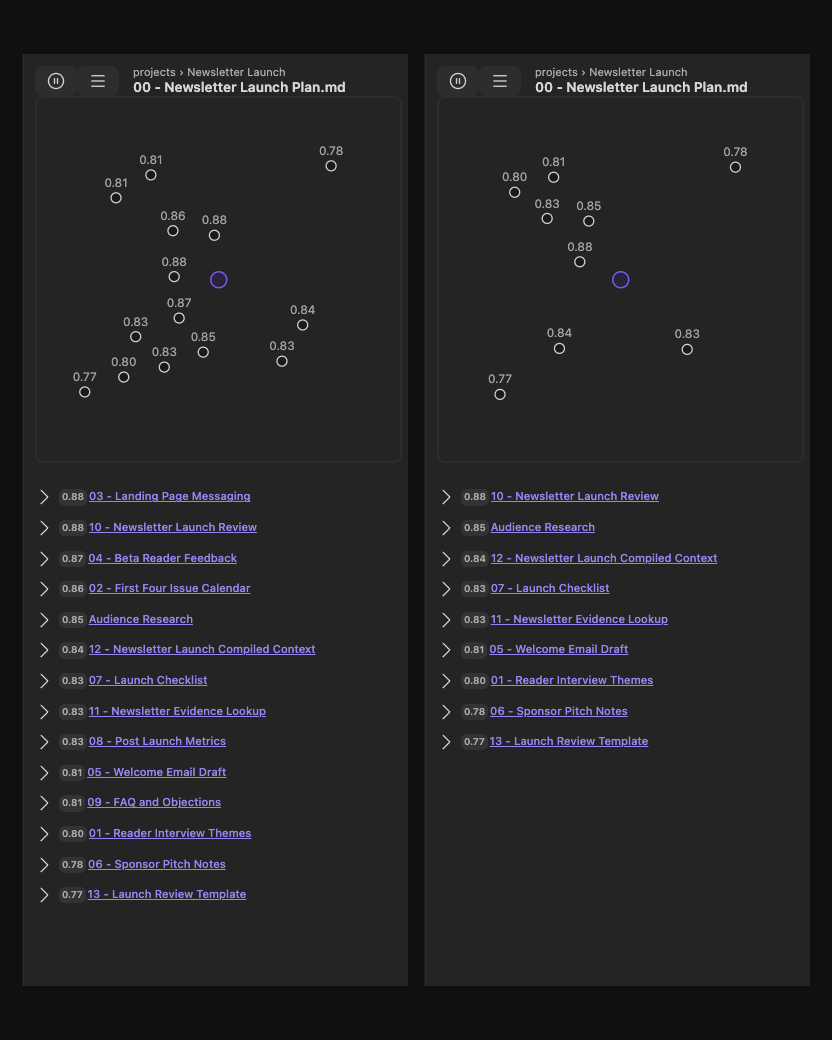
This Pro 4.8.3 example has Graph style set to None. The result list remains available. The first-win workflow also works in Core: start with a meaningful note, inspect one result, and decide whether to use it.
What is the difference between Connections and Lookup?
#Connections is note-first.
Lookup is question-first.
Use this rule:
Current note -> Connections.
Question -> Lookup.
Exact phrase -> Obsidian search.
Learn more:
How is this different from keyword search?
#Smart Connections surfaces notes by meaning, not just matching exact words.
Use Connections when the note you are looking at is the anchor. Use Lookup when a question is the anchor. Use Obsidian search when the exact word, filename, heading, tag, syntax, or regex matters.
Does Smart Connections replace exact search?
#No.
Connections complements exact search. It is for related notes from the current note. Lookup is for question-first semantic search. Obsidian search remains the right tool for exact phrases, filenames, headings, tags, syntax, and regex.
Do I need to reorganize my vault first?
#No.
Your vault can be useful before it is perfectly linked, tagged, or organized in folders. Start with one working note. Preview one result. Then drag or open the useful result.
Does Smart Connections replace backlinks?
#No.
Backlinks show links you already made. Connections can surface semantically related notes even when no link exists yet. When a result is useful, drag it into your note to turn relevance into an explicit link.
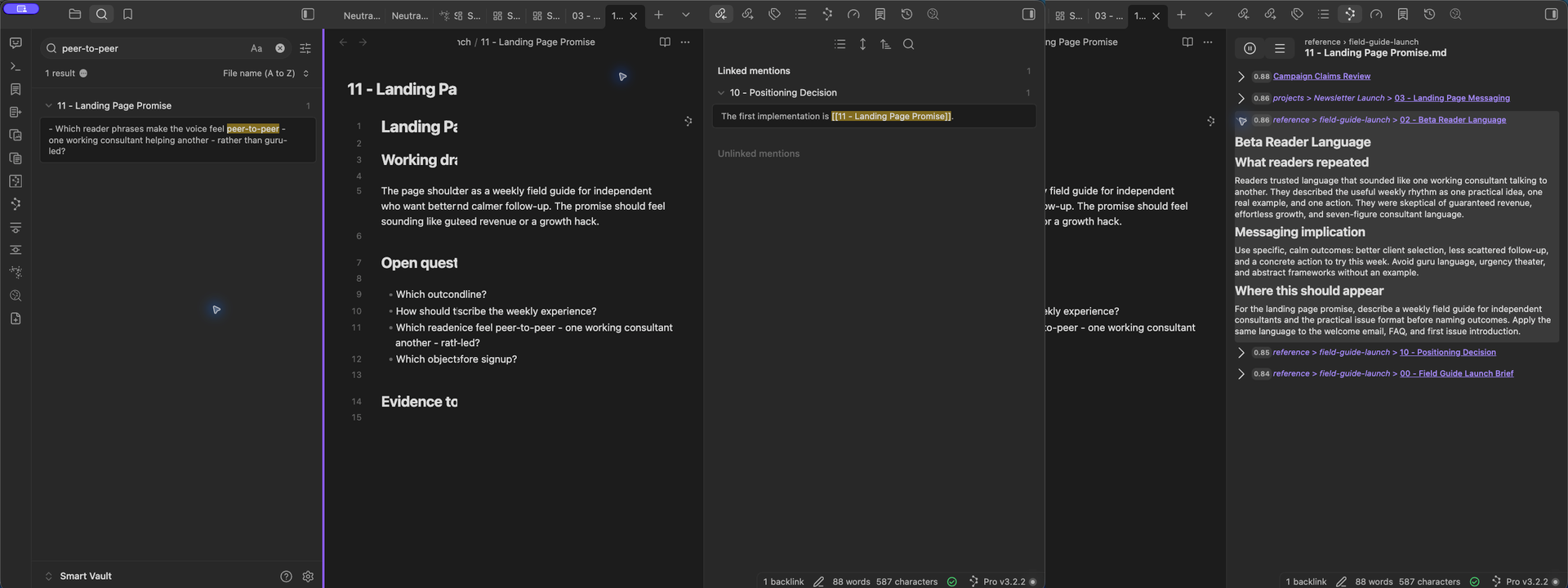
Exact search reflects the words entered. Backlinks reflects relationships already authored. Connections can surface a meaning-related source from the note in view.
What does the score mean?
#Score is a ranking signal, not a grade.
Higher scores generally mean that a result is closer to the current Connections target. The selected scoring path determines this value. Preview the result before you act on it.
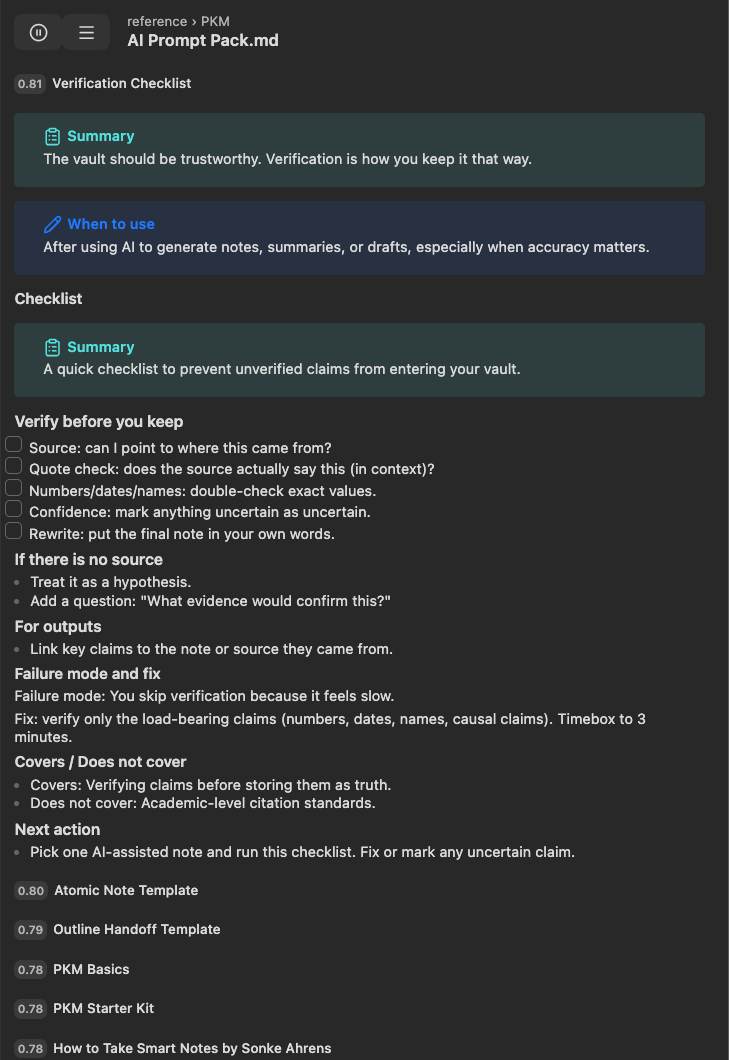
The target, source identity, score, and actual source text remain available for review with the graph hidden. This Pro example uses Latest with formatted text on.
The semantic neighborhoods can also show an embedding Cosine label. That label may differ from a configured or rounded list score. Node position and apparent size are not exact screen-space measures of relevance.
A high score is a reason to inspect the result, not a command to use or link it.
See Connections settings.
What are Pro plugins / what does Connections Pro add?
#The Connections view, Footer connections, and the 2D similarity map are included in Core. Inline connections and Connections in Bases require Pro. Connections Pro also adds 2D semantic neighborhood (Pro) and 3D semantic neighborhood (Pro), optional note-link arrows, the Latest result style, and advanced filtering, scoring, and ranking controls.
When there is no previous result-style choice and Latest is available, Pro uses it as the fallback. Existing explicit choices are retained; upgrading does not force every user to Latest. Show formatted text controls source rendering, not the note's saved contents.
Examples include:
- Inline connections inside the editor
- Connections in Bases
- path and frontmatter filters
- exclude inlinks/outlinks
- scoring algorithm selection
- ranking and reranking
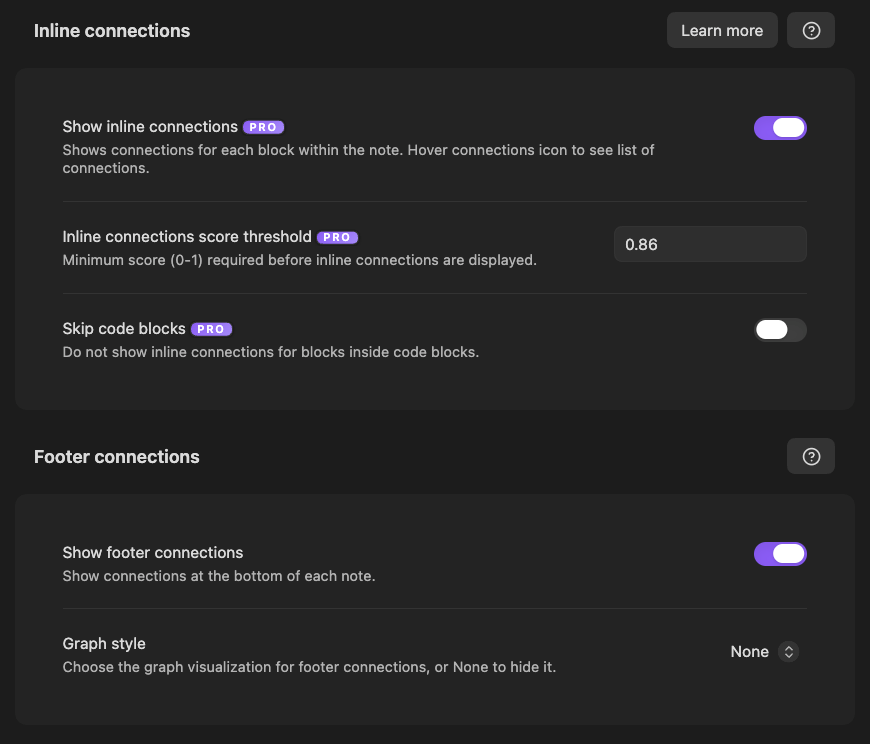
The separate controls are:
- Show inline connections, its score threshold, and Skip code blocks.
- Show footer connections enables the Footer surface; its Graph style chooses None or a graph component.
This Pro 4.8.3 capture has Inline on at 0.86, Skip code blocks off, and Footer enabled with no graph. These are captured values, not universal defaults or proof of a threshold's effectiveness.
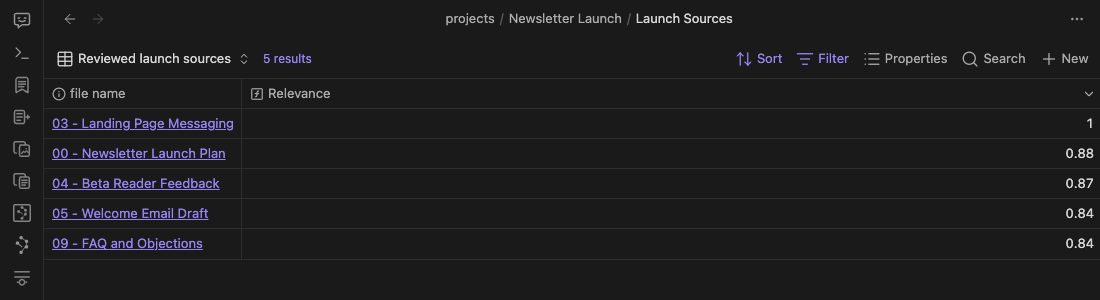
The Bases image is an earlier Pro 4.8.1 example. Inline controls and Connections in Bases require Pro; Footer remains included in Core even when Pro is active.
See Pro plugins.
Is Footer connections Core or Pro?
#Footer connections are included in Smart Connections Core and remain available when Connections Pro is active. Enable Show footer connections for note-end results. In the Footer's Graph style, choose None to hide only its graph or choose a component to display one. The sidebar and Footer keep separate component choices.
Use Footer when you want related notes at the bottom of the note without managing a sidebar.
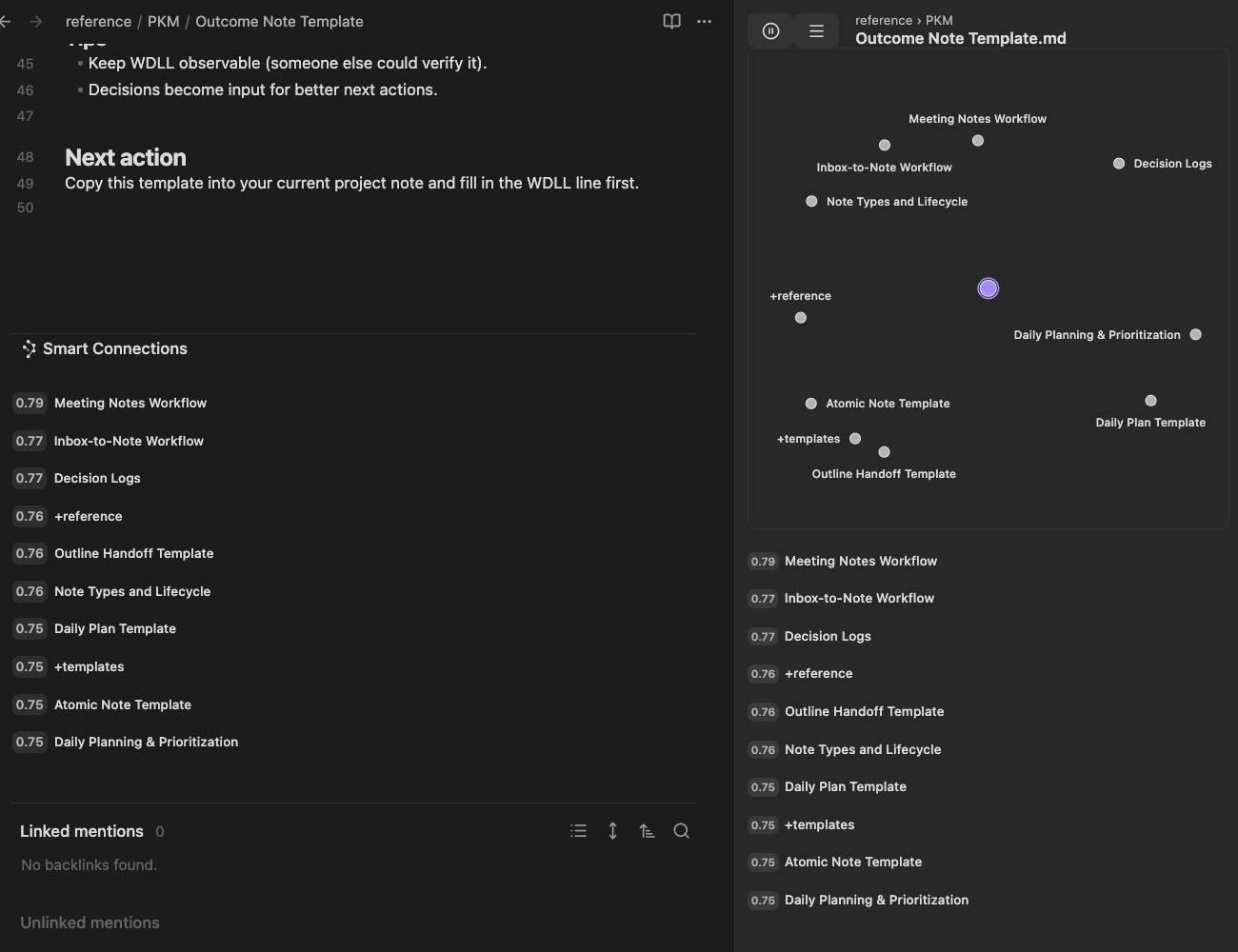
Pro 4.8.3 desktop example: Footer results remain visible with its graph set to None, while the sidebar graph is present. Footer remains included in Core. Collapsing the Footer bar is different from disabling it.
To change the Footer component in place, right-click a Footer result, then choose Settings > Graph style. The Footer heading folds the surface; it is not the menu entry point. The enablement toggle remains in settings, not in that menu.
See Footer connections.
Which Connections graph styles are Core or Pro?
#The 2D similarity map is included in Core. Pro adds two distinct choices: 2D semantic neighborhood (Pro) and 3D semantic neighborhood (Pro). They present Connections candidates around the current note; they are not a whole-vault view or a different retrieval result.
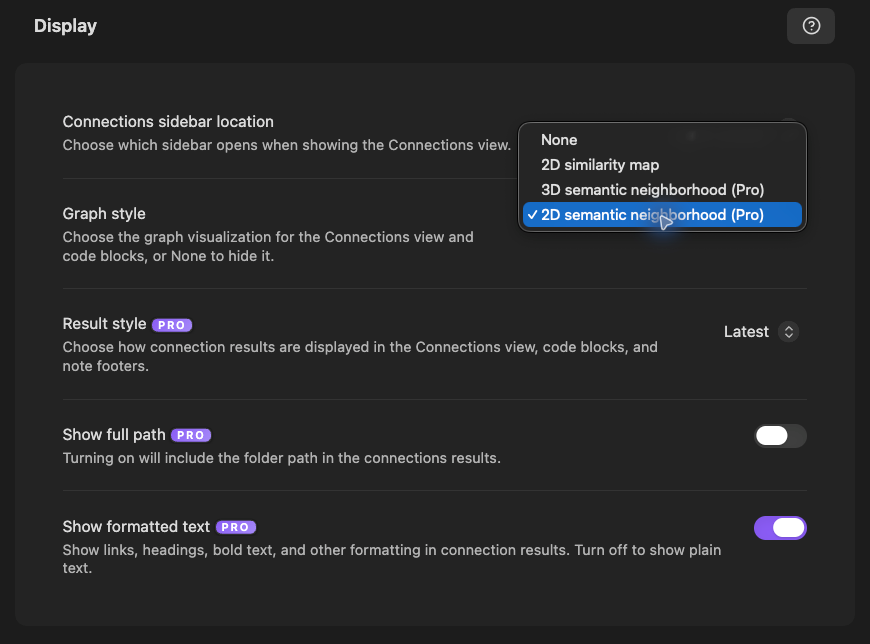
Graph style is one choice: None hides the graph; selecting a component makes it visible. There is no additional visibility toggle. Use Settings > Graph style in the Connections menu or the selector in Display settings. Footer has its own choice, documented above. None hides a graph, not the result list or the entire Footer.
In Pro, right-click the graph and use Show note links or Hide note links to control arrows for existing authored links. The graph menu also offers Graph style, without a separate Show graph action. Dashed inspection guides and name leaders are not authored links, and none of these display controls creates a note link.
Smart Graph is a separate Pro plugin with its own graph workflows. Do not treat the Connections 2D similarity map as Smart Graph.
Where does Smart Connections store embeddings / index data?
#Smart Environment stores local index data in your vault, including under .smart-env/.
Review storage, source, model, and exclusion settings in Smart Environment settings.
Syncthing / third-party sync: what should I ignore?
#If you use Syncthing or similar third-party sync, consider adding .smart-env/ to ignore patterns to reduce conflicts.
How do I exclude folders/files from indexing?
#Use Smart Environment exclusions when you want notes or folders excluded from indexing/embedding.
Use Connections filters when you only want to hide or focus displayed results after the dataset exists.
Start with Smart Environment settings. Then tune Connections settings.
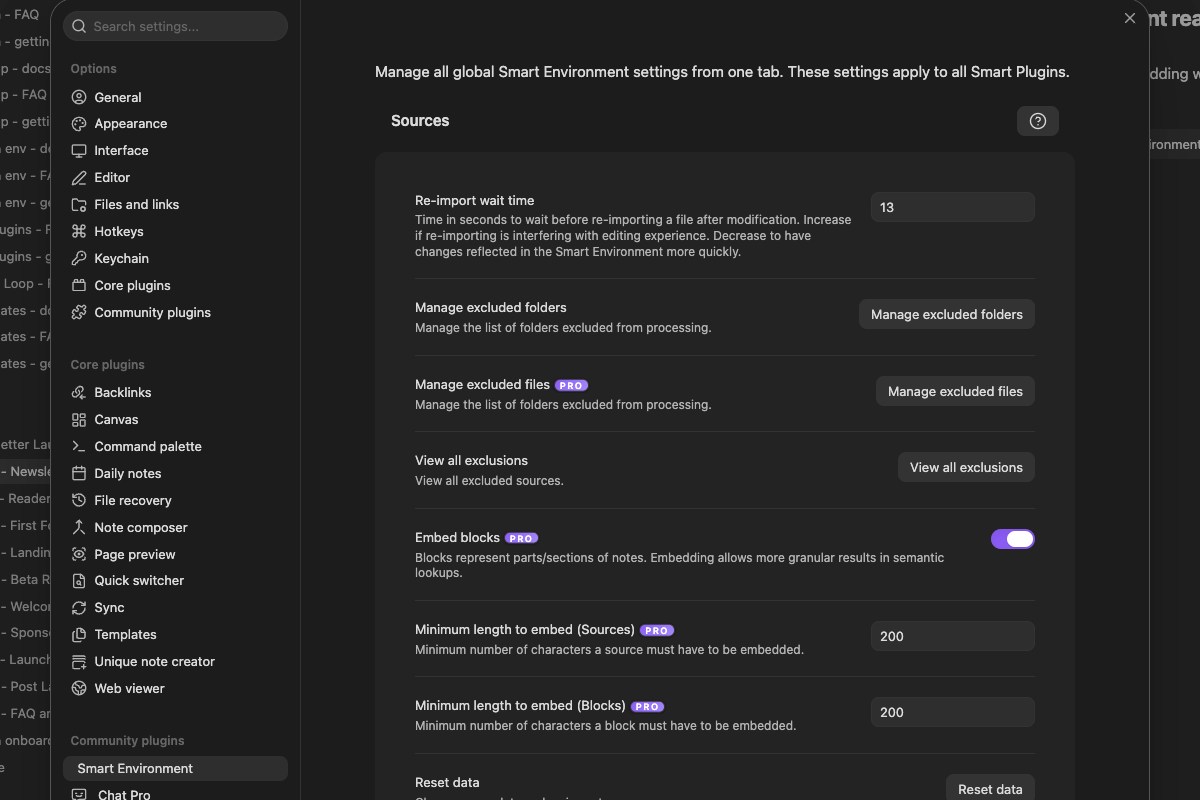
Notice the global source, exclusion, Embed blocks, and minimum-length controls. After you change them, examine the affected note. Then test Connections again.
How do I hide notes that are already linked from the current note?
#In Connections Pro settings, enable Exclude outlinks. It hides notes already linked from the current note from that note's displayed Connections results. It does not delete the links or remove those notes from Smart Environment.
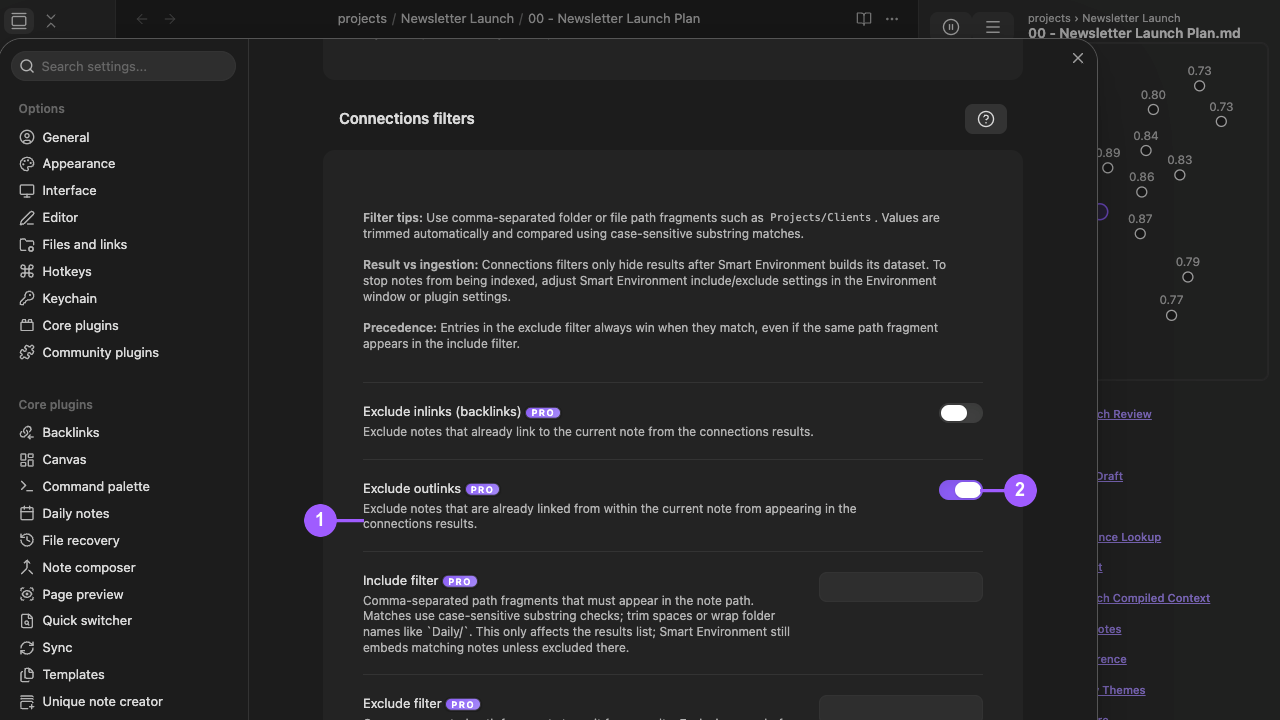
What the numbers identify:
- The exact Exclude outlinks label and its displayed-result boundary.
- The enabled toggle.
Return to the same anchor. Make sure that linked notes are absent. Make sure that unrelated results remain. Disable Exclude outlinks when you want linked notes to be eligible again. See the full procedure.
I installed Smart Connections but do not see results yet. What should I check?
#Use this order:
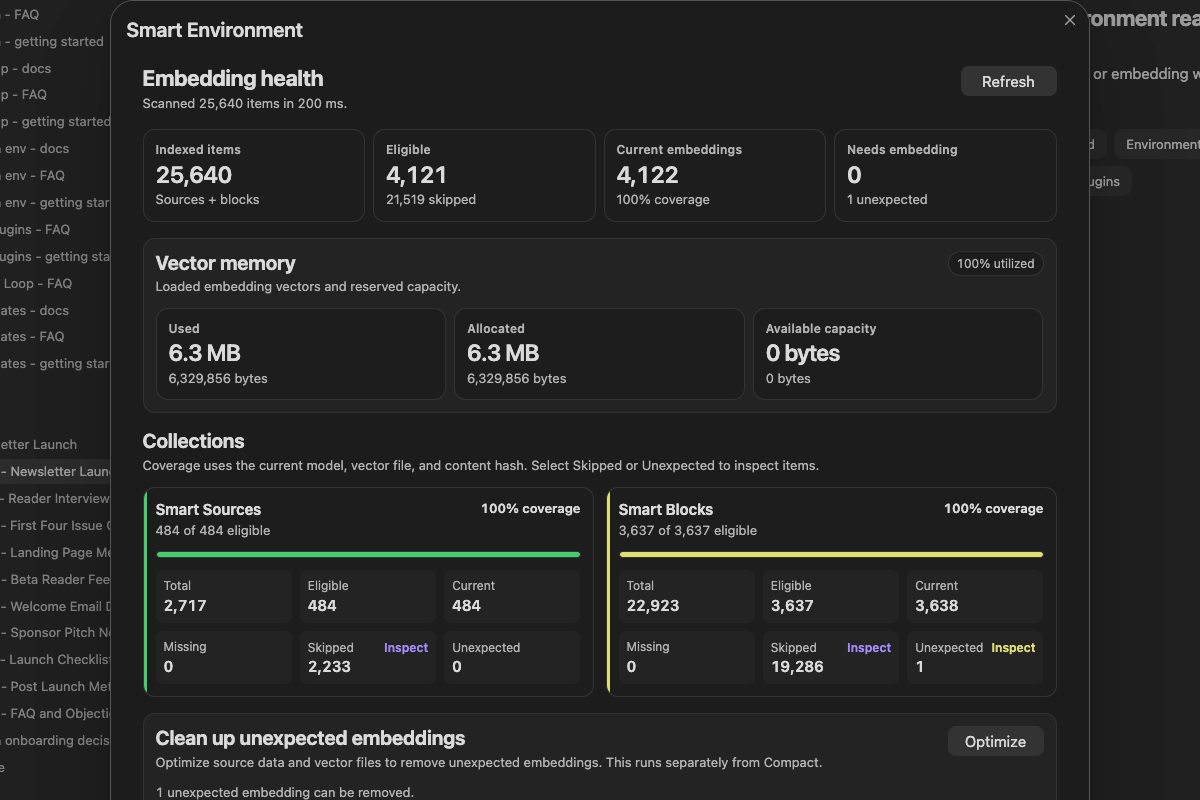
Notice Needs embedding and the Sources and Blocks coverage cards. Finish preparation before changing Connections Pro ranking settings.
Embedding health and coverage provide the quickest vault-wide readiness check.
- Open a real note with meaningful text.
- If the status says Smart Environment not loaded or Idle, select Load Smart Environment.
- If embedding is paused, open the status view.
- If embedding is paused, select Resume embedding.
- If re-import work is queued, select Run re-import.
- Wait for Smart Environment ready or Ready.
- Run the command for your edition:
- Core:
Smart Connections: Open: Connections view - Pro:
Smart Connections Pro: Open: Connections view
- Core:
- Leave auto-refresh running when you want results to follow the active note.
- After major edits or settings changes, select Refresh connections.
If one meaningful note is missing:
- Keep that note active.
- Select Inspect active note from the Smart Environment status menu.
If several notes are missing:
- Open statistics in one of these ways:
- Select Show stats from the status menu.
- Select Environment stats from the status view.
- Check source eligibility.
- Check the current embeddings.
What does Sources vs Blocks mean?
#Sources return whole notes for broader, faster context. Blocks return smaller sections for more precise matches when block indexing is configured.
Set Connection results type in Connections settings. Do not confuse this setting with Change target -> History / Blocks, which changes the reference target instead of the result type.
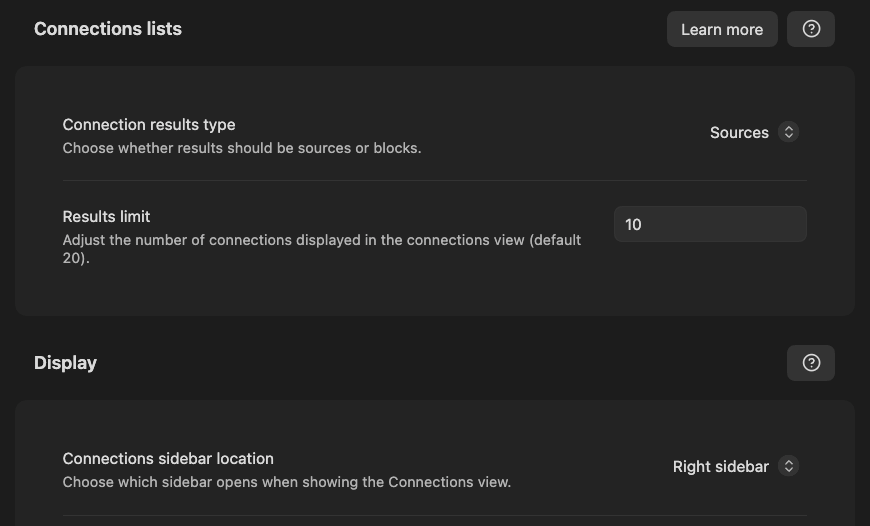
The visible controls:
- Connection results type chooses Sources or Blocks.
- Results limit bounds the visible result count.
- Connections sidebar location controls where the persistent view opens.
Configure this in Connections settings.
How do I tune relevance?
#Do the first win before tuning.
Then adjust the minimum layer that matches the symptom:
In the current Connections menu, open Settings > Scoring algorithm or Settings > Ranking algorithm. The earlier Pro 4.8.1 settings examples below illustrate their separate roles; they are not screenshots of the current menu route. Ranking None preserves scored order; it is distinct from Graph style None, which hides a graph.
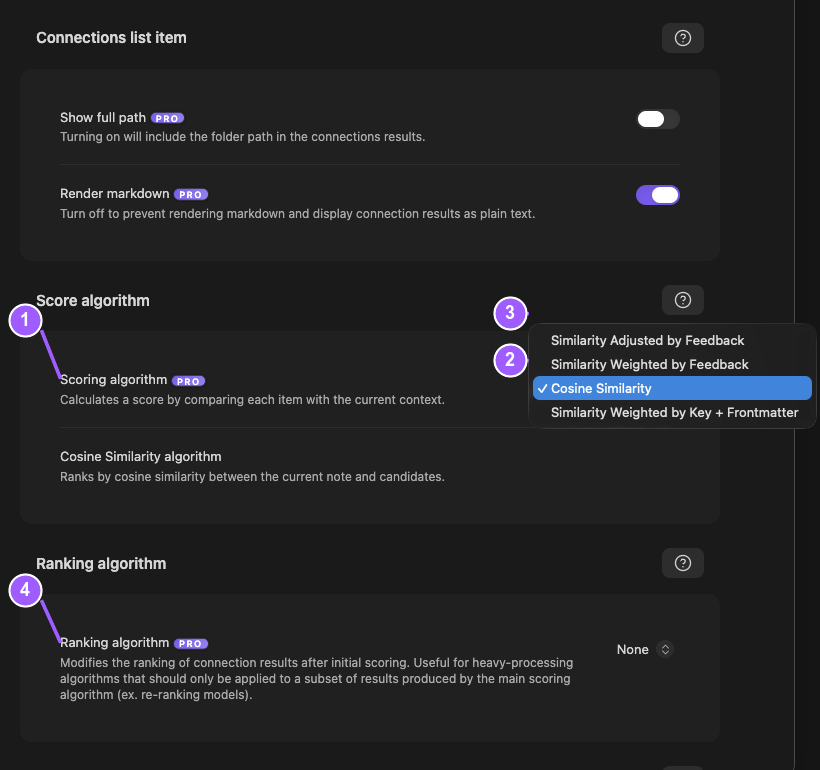
In the scoring image:
- Scoring algorithm is the candidate-fit control.
- Cosine Similarity is selected.
- The menu shows the other shipping scoring choices.
- Ranking algorithm remains a separate step below scoring.
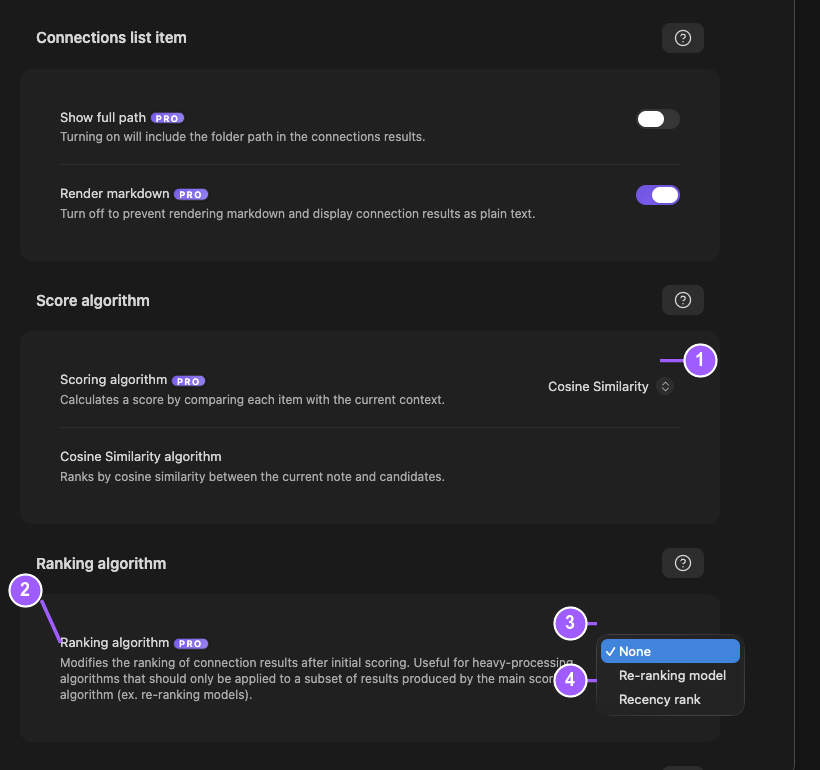
In the ranking image:
- Cosine Similarity remains the selected scoring method.
- Ranking algorithm controls the final ordering step.
- None leaves the scored order unchanged.
- The menu shows the available reranking choices.
Change scoring only after the candidate scope is useful. Add ranking only if the correct candidates are in the wrong order. Compare the same note before and after the change.
| Symptom | Try first |
|---|---|
| Results are too broad | Lower limits, switch Sources vs Blocks, or add filters where available. |
| Results come from the wrong area | Use include/exclude filters where available, or Smart Environment exclusions for indexing scope. |
| Results are relevant but ordered poorly | Use Pro scoring/ranking controls where available. |
| Same low-value notes keep returning | Hide the noise. Then use Connections Pro feedback-aware scoring where available. |
| Similar results look like repeated work | Use Smart Dedupe for review. |
See:
How do I refresh or re-embed a specific note?
#Use Refresh connections when results for the current note feel stale.
For a model or source-rule change:
- Open the Smart Environment status view.
- If embedding is paused, select Resume embedding.
- If re-import work is queued, select Run re-import.
- Use Reset data only when Environment source data must be rebuilt.
I changed embedding models but results did not change. Why?
#Selecting a new Default embedding model does not make its embeddings ready immediately. Wait until the status view shows Smart Environment ready or Ready. Select Environment stats. Make sure that the embedding coverage is current. See the model-change checklist.
What embedding model does Smart Connections use by default?
#Read Default embedding model in Smart Environment settings. Core provides a built-in local Transformers path, but the selected model can differ by release and profile. Use the model marked Current instead of relying on a remembered default or a retained model card.
Where is Smart Chat?
#Smart Chat is a separate Obsidian plugin.
Smart Connections focuses on related notes. Smart Lookup is another plugin for question-first retrieval. Smart Chat handles chat workflows, thread continuity, and provider routing.
Can I mix Smart Plugins with Obsidian Copilot?
#Yes, you can run Smart Connections alongside Obsidian Copilot. If features overlap, adjust the hotkeys. Keep the workflows that you prefer.
Is Smart Connections open source?
#Smart Connections is source-available under the Smart Plugins License. It is not OSI open source because the license includes restrictions on direct general-purpose competing Obsidian offerings.
See the GitHub repository and license page.