Skip to content

Official Smart Plugins site Smart Plugins are independent third-party plugins for Obsidian. Smart Connections is the flagship plugin.

Smart Plugins Pro

Pro plugins for Obsidian from the maker of Smart Connections

Evaluate one recurring task with the Pro plugins available in a 14-day All-access trial.

Choose the contribution your work needs: inline discovery, dynamic context rules, external or media sources, configured API chat, semantic maps, or enabled vault tools for an AI app.

No charge today. Cancel before trial renewal to avoid charges.

Find a useful passage for free

Open a real draft and Core Connections. Read a related passage, then decide whether it helps the draft. The related-note list, result actions, and mini graph are complete free features.

Try the free Connections workflow

Bring project decisions into an AI assignment

Use Connect Pro to read the current sources in a supported AI app, produce a contribution, and review it for the project. Compare the complete route with your current approach, including setup and review. You can evaluate this Pro job directly.

Check the Connect Pro requirements and workflow

Connections Pro

Stay in flow while writing in large vaults

See related material at a paragraph or section and configure the result set for your task.

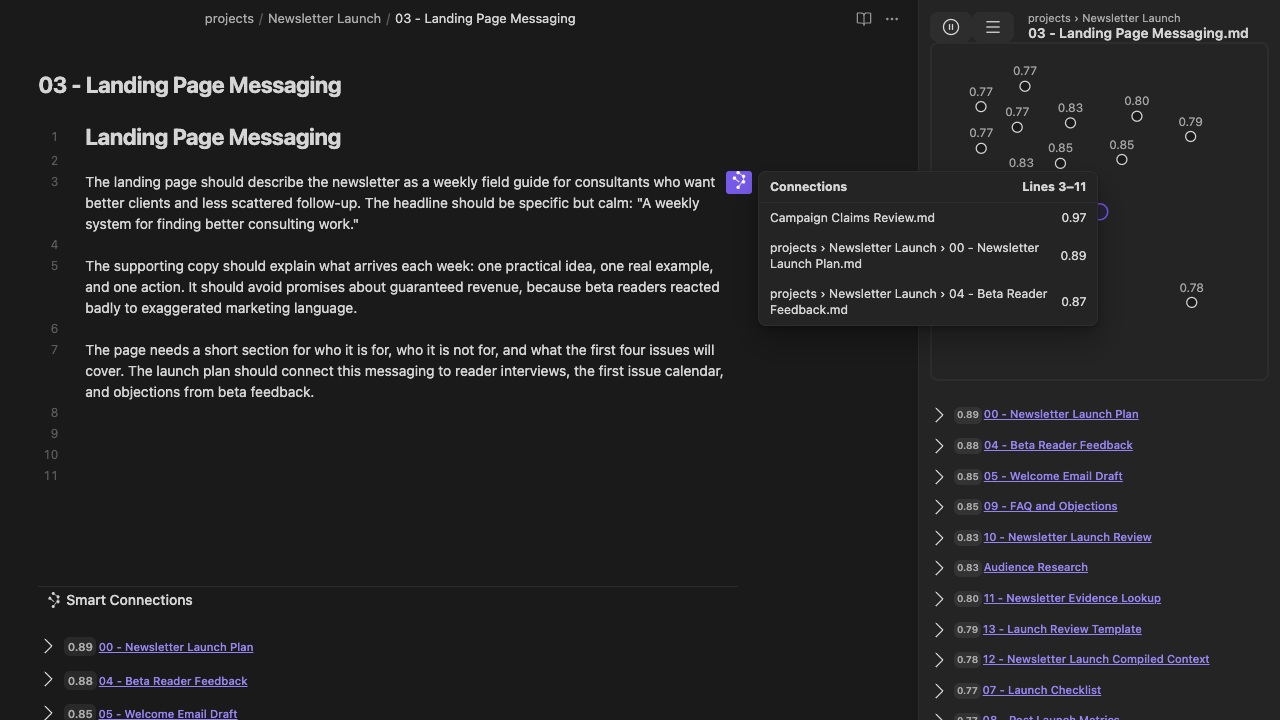
Inline Connections popover beside a newsletter draft, listing related sources for lines 3 to 11.

Paragraph-level connections beside the draft. Earlier v4.8.1 example.

  • Granular inline connections in the editor
  • Local performance index for compatible semantic workflows
  • Ranking and filtering controls for larger or noisy vaults
  • Customizable connections algorithms and filters

Who this is for: writers, researchers, and Obsidian power users with large vaults.

Inspect a related passage where you draft.

Smart Graph

See vault relationships as clusters and hubs

Explore how notes and blocks relate, then move from map-level insight back into writing, lookup, or cleanup.

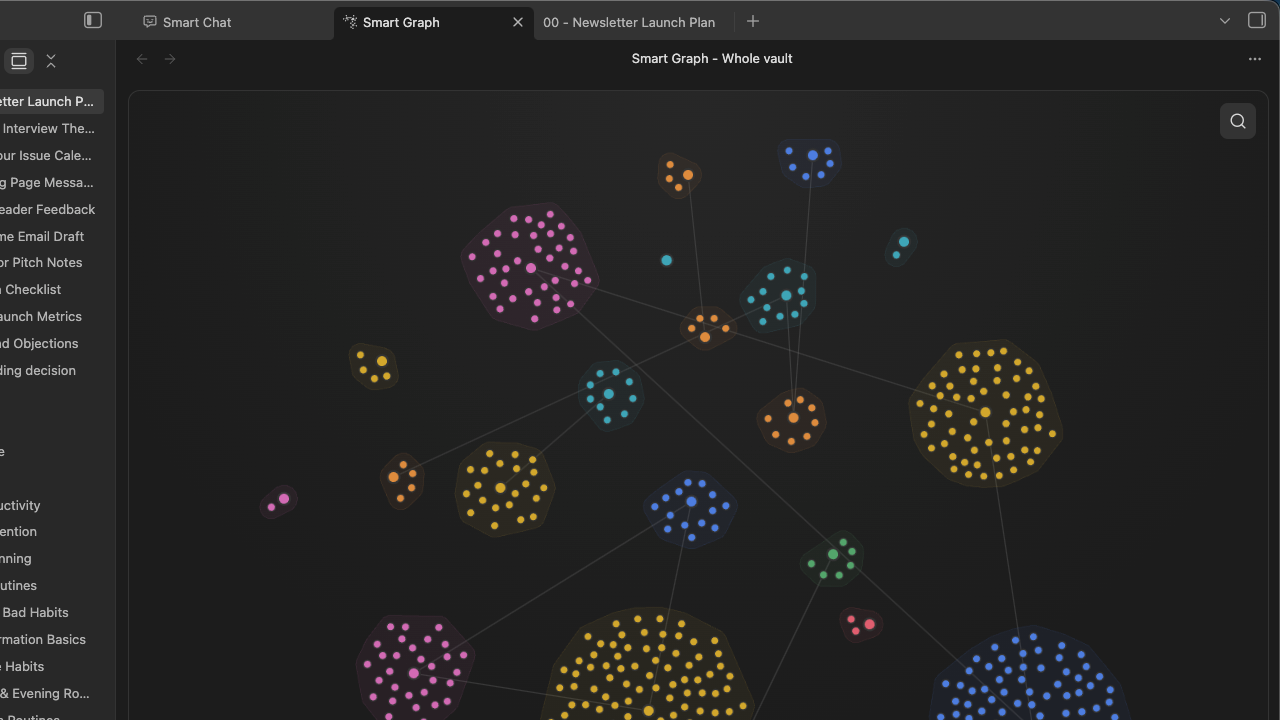
Smart Graph at Whole vault scope shows multiple colored source clusters and sparse inter-cluster bridges.

Explore the whole-vault map as connected source clusters with sparse bridges.

  • Visualize semantic clusters, hubs, and nearby notes
  • Use the local performance index for calculation-heavy vault maps
  • Explore result clusters before tuning Connections, Lookup, or Dedupe
  • Built for large-vault relationship discovery

Who this is for: visual thinkers, researchers, and power users mapping large vaults.

Follow a relationship back to its source.

Context Pro

Add dynamic rules and richer context inputs

Core already names and reuses text context. Pro adds dynamic selection rules and richer inputs when the assignment needs them.

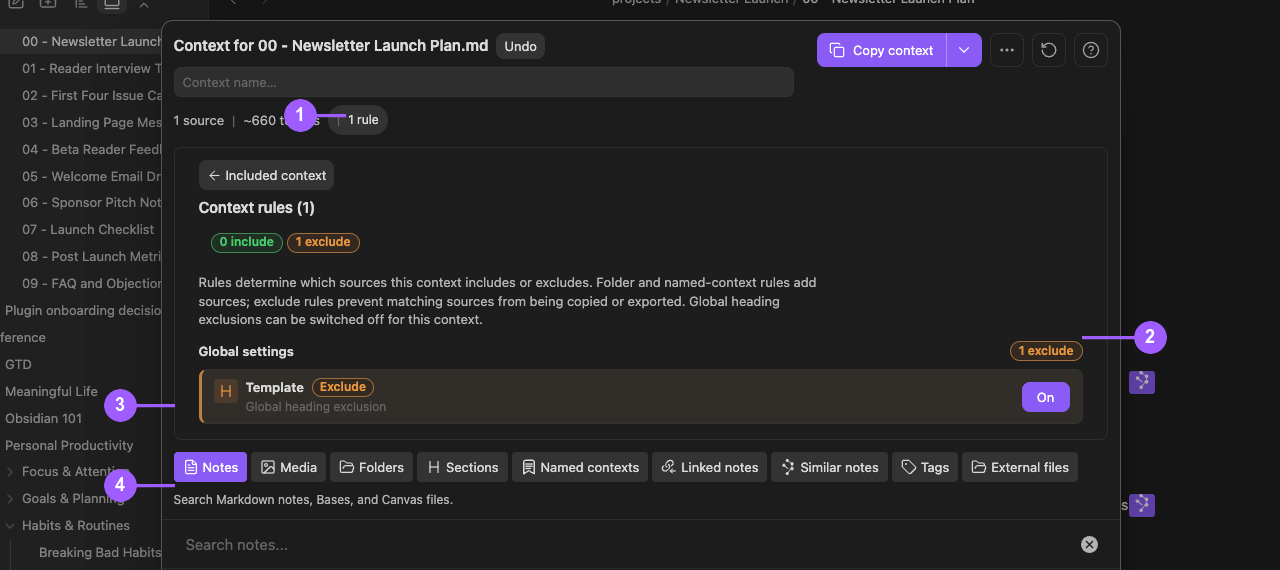
Smart Context Rules shows a Template heading exclusion enabled, one exclusion and an approximately 660-token estimate.

Exclude an unwanted heading from the context bundle before using it.

Shown: 0 include rules, 1 exclusion and an approximately 660-token estimate. This example demonstrates exclusion controls.

  • Dynamic rules, exclusions, and heading controls
  • Add repositories and local files as context
  • Include supported PDFs and images in reviewed exports

Who this is for: developers, analysts, and researchers shipping with AI.

Review what the next assignment needs.

Connect Pro

Use project sources from your AI app

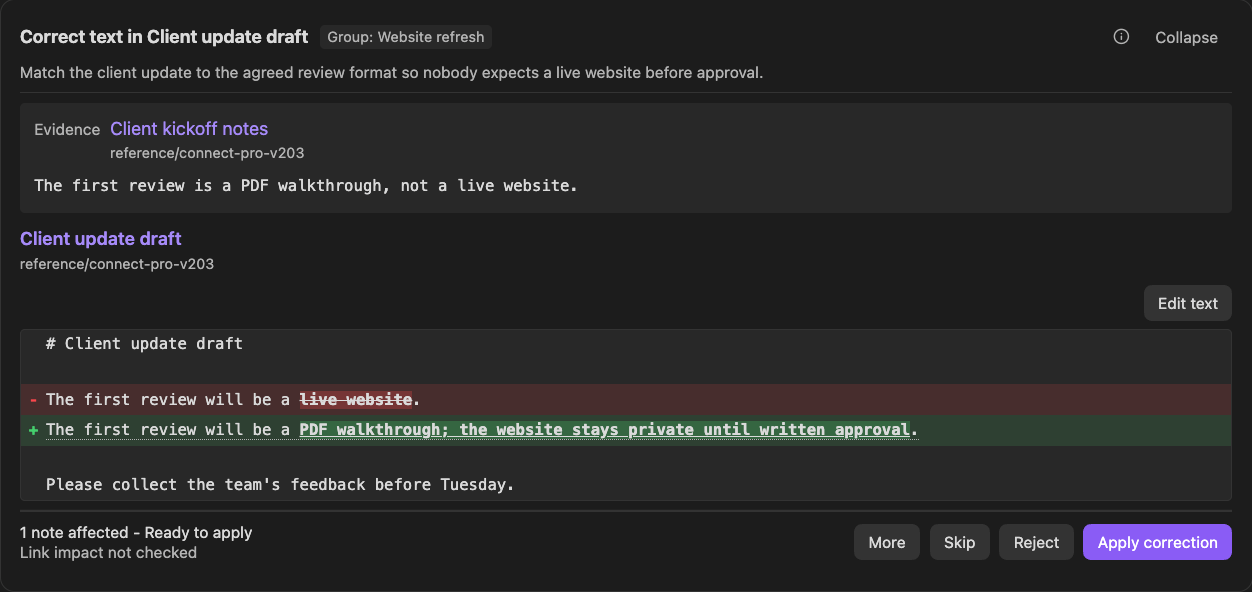
Expose enabled tools from your running desktop vault. The AI app produces the analysis or draft; you decide what belongs in the work.

Connect Pro Inbox shows source evidence, a proposed correction in a red-and-green diff, and Reject and Apply correction controls.

Review the source and proposed correction before applying this Inbox item.

Dedicated proposal tools create Inbox items for review. Other enabled write tools can change data directly.

  • Independent Local MCP, Smart CLI, and separate Remote GPT routes
  • Read sources or queue dedicated proposals for Inbox review
  • Other enabled write tools can change data directly

Who this is for: operators and builders who want chat to do real vault work.

Inspect enabled tools before connecting.

Chat Pro

Choose models and sources inside Obsidian

Keep long-running conversations organized inside Obsidian.

  • Smart Chat API Extension for configured local or cloud models
  • Vault-aware context lookup and review before sending
  • Saved API threads, search by name or recent prompt preview, and per-thread instructions
  • Universal codeblock for supported provider and API thread references

Who this is for: builders who return to the same projects daily.

Return to the thread that serves the project.

Pricing

Choose your Smart Connections Pro trial

Start with 14 days free. All-access includes the available Pro plugins and their local performance index.

Yearly saves ~17%

Yearly selected. Save about 17% (around $61 per year) compared to paying monthly.

Complete free workflows

Core Smart Plugins

$0 forever

  • ✔ Essential product-specific features.
  • ✔ Local-first defaults.
  • ✔ Use a complete free workflow for the task it serves.

All-access Best value · 2 months free

Smart Connections Pro All-access

Configurable workflows, richer inputs, and enabled integrations across the Smart Plugins suite. No charge today. Cancel before trial renewal to avoid charges.

$299/year

~ $25/month · Save $61 vs paying monthly.

  • ✔ Access to all Pro plugins while your plan is active.
  • ✔ New Pro plugins included automatically.
  • ✔ Available Pro plugins include Connections Pro, Context Pro, Chat Pro, Connect Pro, and Smart Graph. Check the Store for the current catalog and access.
  • ✔ Local performance index for compatible Connections, Lookup, Smart Graph, inline connections, and Dedupe workflows.
  • ✔ Connect Pro exposes enabled vault tools through Local MCP, Smart CLI, or the separate Remote GPT connection.

Connect Pro requires a running Obsidian Desktop vault on 1.12.2 or later. Obsidian CLI is required for Smart CLI and native CLI operations, not every Local MCP Smart action.

Start yearly trial

No charge today. Cancel anytime in 2 clicks.

  1. 1) Start your 14-day free trial.
  2. 2) Install or enable your Pro plugins.
  3. 3) Use your vault workflows with full Pro access.
Roadmap pricing (coming soon): single-plugin and 3-plugin bundle options

Those options are in active roadmap planning and are not available for purchase yet.

If you want an update when they launch, join the waitlist:

Join pricing waitlist

Power-user performance

Evaluate performance on the task you repeat

Pro adds a local performance index for compatible semantic workflows. Its effect depends on the task, vault, and machine; a note-count threshold alone does not establish a speed improvement.

Compare the same representative task with and without the Pro index on the same vault snapshot and machine, after each index is ready. Repeat the comparison and include preparation and review effort when judging whether it helps.

Connections and Lookup

Use the local performance index for compatible related-note and query workflows.

Inline connections

Reuse the same local performance layer for paragraph and section-level relationships.

Smart Graph

Calculation-heavy graph workflows use the same local performance layer.

Dedupe scanner

Compatible duplicate-candidate workflows use the local index; review each pair before acting.

The local index does not require a third-party vector database. Check index readiness before comparing results.

Smart Plugins

Choose one contribution and inspect its result

Evaluate: local performance

Compare a repeated task after index readiness on the same vault and machine.

Evaluate: inline discovery

Connections Pro adds paragraph and section relationships plus configurable scoring and ranking.

Evaluate: richer AI inputs

Core reuses named text context. Context Pro adds dynamic rules, external files, and media; Chat Pro adds configured API threads.

Evaluate: connected source access

Connect Pro exposes enabled reads, dedicated review proposals, and direct actions to the route you configure.

Core vs Pro features

Core stays free and product-specific. Pro adds advanced control across the Smart Plugins suite.

Core vs Pro in 20 seconds

Core provides complete free workflows. Pro adds specific controls, richer inputs, configured API chat, local indexing, and enabled vault integrations when a recurring task needs them.

Outcome Core (free) Pro (trial)

Stay in flow while writing

  • Local related-note discovery after indexing
  • Sidebar results and actions
  • Footer connections and the Connections mini graph
  • Granular inline connections
  • Section-level connections
  • Ranking, filtering, and algorithm controls

Evaluate semantic workflow performance

  • Standard local embeddings
  • Related-note discovery in Connections
  • Local performance index for compatible workflows
  • Compare the same task, vault snapshot, and machine after readiness
  • No third-party vector database required

Reuse grounded context for AI work

  • Text context from notes, blocks, and folders
  • Current-note text copy with link depth; direct selected-note and folder copy
  • Name contexts to reuse
  • Add repos and local files as context
  • Dynamic rules, exclusions, and heading controls
  • Include PDFs and images for grounded outputs
  • Render embedded bases into copied context

Keep project chat organized

  • Provider web codeblocks in notes
  • Saved provider links and Active/Done state in Markdown, not transcripts
  • Configured local/cloud models through Smart Chat API Extension
  • Saved API threads; History searches names and recent prompt previews
  • Per-thread instructions and a universal provider/API codeblock
  • Drag notes and files into chat with review

Turn chat into vault actions

  • No remote action bridge
  • Run vault steps yourself inside Obsidian
  • Independent Local MCP, Smart CLI, and separate Remote GPT routes
  • Enabled reads and dedicated Inbox proposals
  • Other enabled write actions run directly

Support and sustainability

  • Free and source-available
  • Great for getting started
  • Priority email support
  • Funds ongoing development

Want the full breakdown? Expand the detailed feature tables by plugin below.

Full feature breakdown by plugin

Smart Connections

Core Smart Connections includes related-note results and the mini graph. Connections Pro adds inline discovery, advanced controls, semantic neighborhoods, and a local performance index whose benefit you can test on your task.

Feature Core Pro
Core features (included in both)

Bundled local embeddings

Included in Core Included in Pro

Real-time connections

Included in Core Included in Pro

Footer connections view (great for mobile!)

Included in Core Included in Pro

Actions for utilizing connections results

Included in Core Included in Pro

Mobile compatible

Included in Core Included in Pro

Smart Lookup (separate Core Store plugin)

Included in Core Included in Pro

Connections mini graph and random walk

Included in Core Included in Pro
Pro-only additions

Semantic neighborhoods and Graph + List controls

Not in Core Included in Pro

Large-vault performance index

Not in Core Included in Pro

Granular inline connections

Not in Core Included in Pro

Smart Dedupe (separate Pro Store product)

Not in Core Included in Pro

Bases Connections functions (score and list)

Not in Core Included in Pro

Advanced control over connections algorithms

Not in Core Included in Pro

Smart Lookup, Smart Graph, and Smart Dedupe are separate Store products. Check their guides and required setup for the workflow you need. Learn more about Smart Connections

Smart Context

Core Smart Context assembles, names, and reuses text bundles with size estimates. Context Pro adds dynamic rules, exclusions, external files and repositories, and supported media exports.

Feature Core Pro
Core features (included in both)

Efficient context building

Included in Core Included in Pro

Copy reviewed text context

Included in Core Included in Pro

Name contexts to save and reuse them

Included in Core Included in Pro

Copy from file navigator

Included in Core Included in Pro
Pro-only additions

Dynamic rules and external context

Not in Core Included in Pro

Let AI see media in your context

Not in Core Included in Pro

Embedded bases rendering

Not in Core Included in Pro

Learn more about Smart Context

Smart Chat

Core Smart Chat uses provider web codeblocks and saves provider links with Active/Done state in Markdown, not full transcripts. Pro adds the universal codeblock and Smart Chat API Extension for configured models.

Feature Core Pro
Core chat in your editor

Inline chat in your notes.

Included in Core Chat Available alongside Smart Chat
Pro-only Smart Chat API Extension and universal codeblock

Universal codeblock and local/cloud API Extension

Not in Core Chat Included in Smart Chat

Per-thread custom instructions

Not in Core Chat Included in Smart Chat

AI-assisted context retrieval

Not in Core Chat Included in Smart Chat

Drag notes and files into chat

Not in Core Chat Included in Smart Chat

Saved API threads and bounded search

Not in Core Chat Included in Smart Chat

Learn more about Smart Chat

Connect Pro

Connect Pro exposes enabled tools from your running desktop vault through Local MCP, Smart CLI, or the separate Remote GPT connection. Local transport does not mean the AI app's model processes content locally.

Feature Core Pro
Pro-only bridge to vault actions
Independent Local MCP and separate Remote GPT connections Not in Core Included in Pro
Enabled Smart CLI and native CLI operations when host CLI support is configured Not in Core Included in Pro
Enabled source reads and dedicated correction, move, or merge proposals for Inbox review Not in Core Included in Pro
Other enabled tools can change vault or Context data directly Not in Core Included in Pro
Explicit connect/disconnect control and status visibility in the plugin Not in Core Included in Pro

Requires a running Obsidian Desktop vault on 1.12.2 or later, active Pro access, and a supported client. Obsidian CLI is required for Smart CLI and native CLI operations, not every Local MCP Smart action. Only dedicated proposal tools hold their source changes for Inbox review. Inspect the enabled tools and permissions.
Learn more about Connect Pro

Core Smart Plugins remain free and source-available. Pro plugins exist to fund ongoing development.

Questions before you start?

Quick answers about setup, privacy, trial control, large-vault performance, Connect Pro requirements, and supporter access.

What if I encounter an issue with the Pro plugin?

Pro subscribers get priority email support, just reply to your welcome email. Please include any screenshots that help show the issue.

What's the process to cancel a subscription?

Use this manage your subscription link. Cancel before the end of the 14-day free trial to prevent charges. Your welcome email also includes this link.

What if I have not received my key after starting a trial?

Your Pro plugins license key and manage-subscription link are in your welcome email. If it did not arrive, email brian@smartconnections.app and we will resend access details.

Do you offer a student discount?

Yes. Student discounts are currently reviewed manually. Sign up for a free trial and reply to your welcome requesting the student discount. Please include a screenshot of your student ID or other proof of enrollment.

Is Pro complicated to set up?

Setup depends on the job and plugin. Choose a complete free workflow or go directly to the relevant Pro contribution. Configure only its required index, provider, source, or connection, then inspect the result.

Will Pro help if my large vault feels slow?

Pro adds a local performance index for compatible semantic workflows. The effect depends on the task, vault, and machine. Compare the same representative task with and without the Pro index after each index is ready, on the same vault snapshot and machine. Repeat the comparison and include preparation and review effort.

Are free Core plugins going away?

No. Core Smart Plugins remain free and source-available. Pro plans fund development while keeping the free experience strong.

Does Pro upload my notes?

Pro access does not upload notes by itself. A configured cloud embedding or ranking provider can receive eligible source text for that operation. Chat and connected AI apps may send prompts and returned sources to their provider. Review the selected sources and provider; Local MCP is local transport, not a local-model guarantee.

What is Connect Pro?

Connect Pro makes enabled vault tools available to a supported AI app through Local MCP, through Smart CLI, or through the separate Remote GPT route. Read sources, inspect context, or request dedicated proposals for Inbox review. Other enabled write tools can change data directly; Inbox does not intercept every write.

Does Connect Pro require anything extra?

Keep the intended vault running in Obsidian Desktop 1.12.2 or later with Connect Pro enabled and Pro access active. Local MCP needs a supported client on the same computer; Remote GPT has its own connection. Obsidian CLI is needed for Smart CLI and native CLI operations, not every Local MCP Smart action.
Do I need all Pro plugins to get value?

No. Start with one workflow that already matters in your day-to-day vault work. All-access includes every Pro plugin, but you can keep your focus narrow and only expand when you actually need the next workflow.

Can I switch which Pro plugins I use during the trial?

Yes. During the 14-day All-access trial you can test the Pro plugins available to your account in the live Store. Complete one relevant result before switching so you can identify what helped or failed.

What if I am not sure Pro is for me yet?

Choose one real task during the 14-day trial. Compare its result, setup, preparation, review, and repair with your current approach, including AI tools you already use. A genuine later occasion of use helps assess whether the contribution repeats.

Is Pro only for developers?

No. Pro is built for anyone shipping meaningful work in Obsidian. Developers, writers, researchers, and operators use it to keep context organized and workflows in one place.

What if I am already a supporter?

Everyone that supported the project prior to 2026 is automatically grandfathered in to the All-access plan. Use your existing supporter key to log in and gain access to Pro plugins.