Smart Dedupe
Review duplicate and near-duplicate blocks before they become repeated work or repeated context.
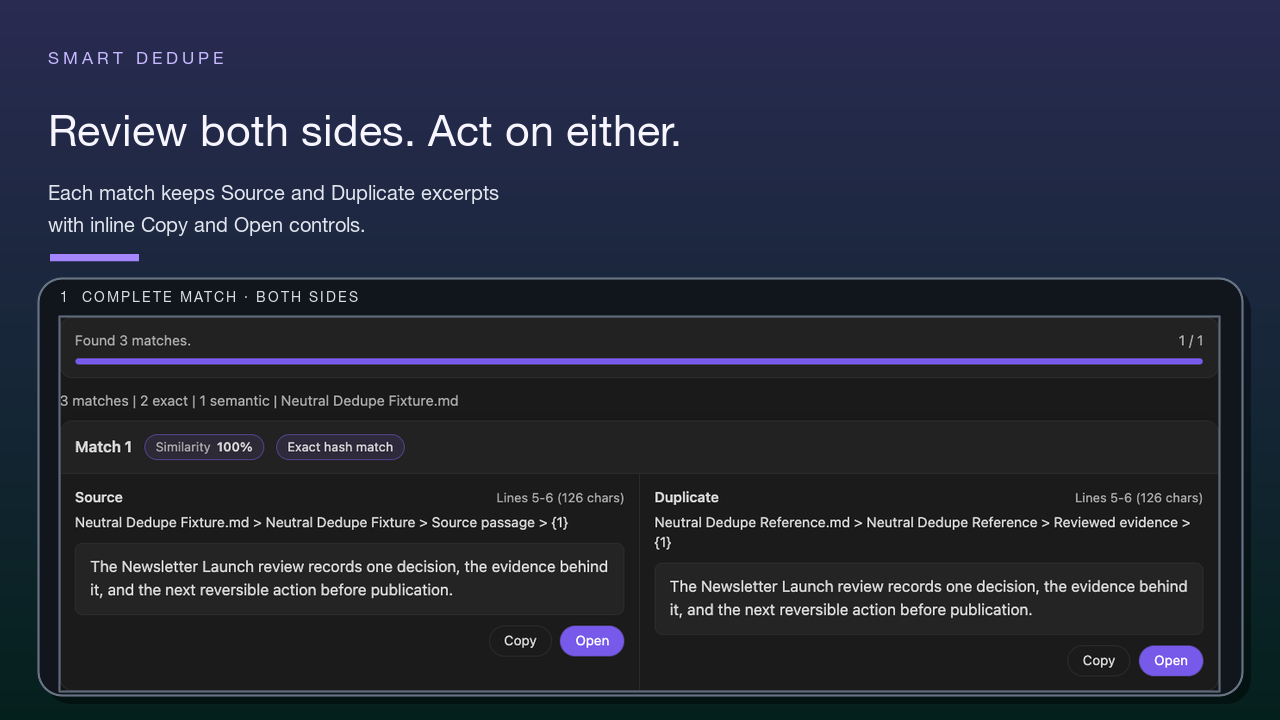
Smart Dedupe surfaces likely duplicate and near-duplicate blocks across your vault, shows side-by-side previews, and helps you decide what should stay separate, be merged manually, archived, or ignored.
It is review-first:
- likely matches are candidates, not conclusions
- similarity creates a question; review turns it into a decision
- cleanup decisions stay human-owned
- Smart Dedupe should not be framed as automatic deletion or automatic merging
It is scope-first:
- start with one current note, project folder, or dense topic area
- review one strong match before trying broad cleanup
- stop after one useful decision if that is enough for the session

Smart Dedupe is a Smart Connections Pro feature.
What this solves
Use Smart Dedupe when you want to:
- catch repeated paragraphs before they spread
- find the older version of something you just rewrote
- clean up drift across project notes
- identify "same idea, different wording" blocks
- reduce repeated or irrelevant context that makes AI harder to review
Practical outcomes:
- less duplicated writing
- fewer conflicting versions of the same reasoning
- faster consolidation when a vault grows
- clearer source material before you build Smart Context bundles
Dedupe is not about making every note unique.
Good cleanup preserves useful neighbors while reducing repeated decisions.
Your first win
Your first win is not a clean vault.
Your first win is this:
One likely repeated block has been reviewed side by side and turned into a decision.
Start small enough that the first session feels safe.
A good first session can be only one reviewed pair.
Quick start
- Open any note or choose one small scope where repeated work already hurts.
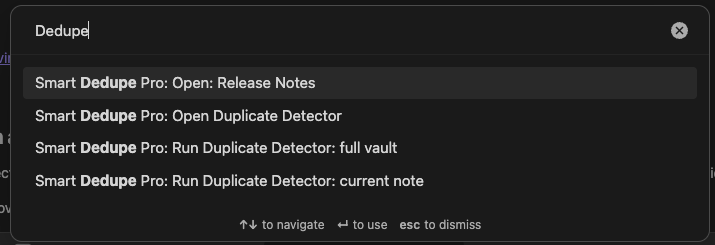
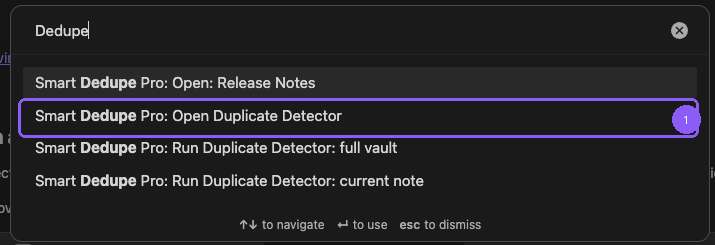
- Run a duplicate command from the command palette.
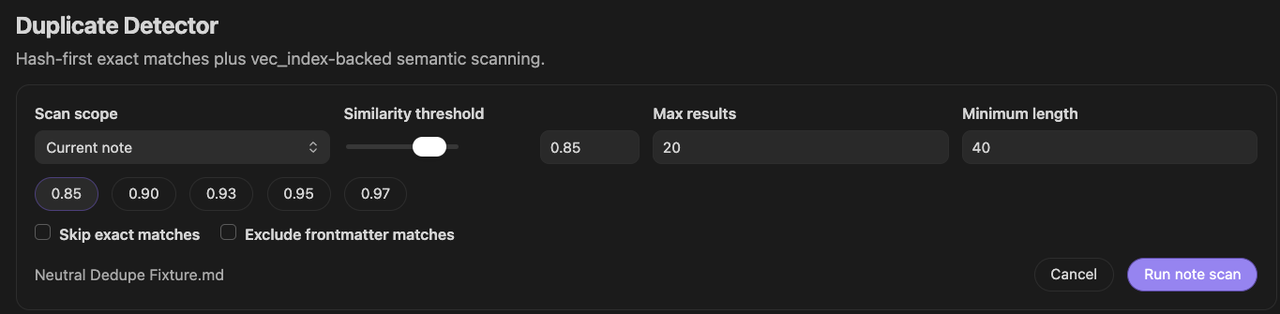
- Choose scan scope and settings.
- Start with a strict threshold, such as
0.90, for stronger candidates. - Review one strong match side by side.
- Open the source notes if needed.
- Decide whether the material should stay separate, be merged manually, archived, or ignored.

Always verify before changing anything.
A high score is not a command to merge.
It is a reason to review.
Choose scan scope
Current note
Compares blocks in the active note against blocks in the rest of your vault.
Use this when:
- you just rewrote something and want to find the old version
- you are refactoring a note and want to remove drift
- you want a focused first Dedupe pass before scanning broadly
Full vault
Finds the top duplicate block pairs across your entire vault.
Use this when:
- you want the "best duplicates anywhere" list
- you are doing a broader cleanup pass
- you already understand how to review matches safely
Same-note pairs are skipped so results focus on duplicates across different notes.
For a first session, start smaller if possible: one note, one project, or one dense topic area.
Broader cleanup: one-click vault scan
Use the ribbon icon to launch a full-vault scan.

This is the fastest way to get a "top duplicates anywhere" list.
Use it after you understand the review flow.
Do not make broad cleanup the first test if a smaller scope already contains repeated work.
Configure settings
The threshold modal controls strictness, speed, and result volume.

Block similarity threshold
This is the main "how duplicate is duplicate" control.
Use this as a starting point:
| Threshold | What to expect | Best use |
|---|---|---|
0.97-1.00 |
strongest candidates, often exact or near-exact | safest first review |
0.93-0.97 |
strong candidates, usually small edits | focused cleanup |
0.90-0.93 |
good default range, requires judgment | first broader pass |
0.85-0.90 |
broad similar range, more false positives | paraphrase hunting |
Max results
Stops after the top N matches.
- Keep it small, such as
20, for fast, focused work. - Increase it when you are doing a deeper cleanup pass.
Exclude frontmatter matches
Use this when:
- frontmatter duplication is not useful
- you want content matches, not metadata matches
Exact match minimum length
Exact hash matches only surface when both blocks meet a minimum block length.
This reduces noisy matches from tiny repeated snippets such as short headings, bullets, or boilerplate fragments.
While it scans
Vault scans show a progress modal with:
- comparisons done and total
- results found and max results cap
- cancel button
Closing the modal while scanning minimizes it to a bottom-right indicator you can restore.

Vault scans can be cancelled and still return partial results.
Review matches and act
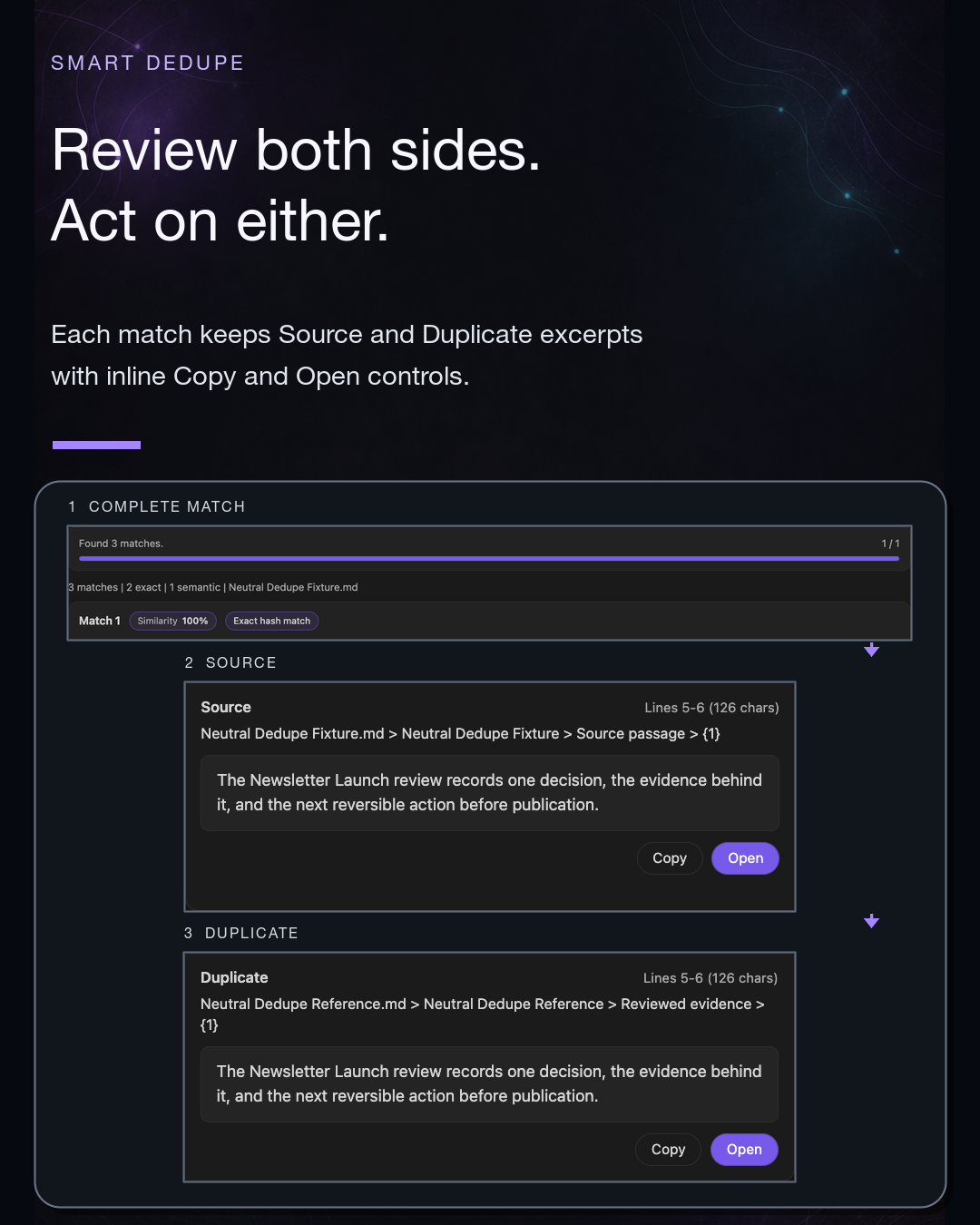
Results show:
- side-by-side previews
- a similarity score per match
- Copy and Open actions
Opening a match minimizes the results modal so the list stays accessible while you work.

Decision vocabulary
Use these as review decisions.
Some may be explicit UI actions in your current version. Others are manual decisions you make after opening the notes.
| Decision | Meaning | Safe first-use phrasing |
|---|---|---|
| Keep separate | Similar notes serve different jobs. | These are useful neighbors, not duplicates. |
| Merge manually | One note should absorb the useful parts of another. | Merge only after review. |
| Archive | One note no longer belongs in active work. | Archive instead of deleting when uncertain. |
| Ignore | Candidate is not useful to review again. | Keep the distinction and reduce future noise. |
Avoid public copy that promises automatic merge, automatic delete, or perfect duplicate detection.
Dedupe vs Connections
Related notes are not automatically duplicates.
Use the right surface for the job:
| Need | Best surface | Why |
|---|---|---|
| Current note -> related material | Smart Connections | The current note is the anchor. |
| Question -> semantic retrieval | Smart Lookup | The query is the anchor. |
| Exact phrase -> lexical search | Obsidian native search | Exact words, tags, headings, filenames, or regex are the anchor. |
| Landscape -> topic shape | Smart Graph | You need clusters or neighborhoods. |
| Duplicate cleanup -> review | Smart Dedupe | You need to decide whether repeated material should stay, merge, archive, or be ignored. |
| Repeated context -> AI cleanup | Smart Context | You need a cleaner bundle before delegation. |
If similar notes are both useful, keep them separate and use Connections or Graph to understand the neighborhood.
If repeated notes are making AI context bloated or hard to review, use Dedupe before rebuilding the context bundle.
Cleaner context after Dedupe
Dedupe can improve AI workflows when repeated material makes context hard to inspect.
A safe cleanup loop is:
- Scan one bounded scope.
- Review one likely repeated match.
- Decide what should stay distinct and what should be consolidated manually.
- Rebuild the relevant Smart Context bundle.
- Review the new bundle before sending it to AI.
Cleaner source material can make context packs easier to review.
It does not guarantee better AI answers.
Related:
Smart Context Clipboard
Smart Context Builder
How it works
High-level pipeline:
- Fast pass: exact text matches are detected first using a content hash when available.
- Exact hash matches only surface when both blocks meet a minimum block length.
- Semantic pass: remaining candidates are scored with cosine similarity over block embeddings.
- Speed controls:
- skips same-note pairs
- stops early once Max results is reached
- Cancel anytime: vault scans can be cancelled and still return partial results.
This explains why Dedupe can find repeated meaning without treating every similarity as sameness.
Troubleshooting
No results
Try:
- lowering the threshold, such as
0.90 -> 0.88 - increasing Max results
- waiting for indexing and embeddings to finish if your vault is still processing
- using a richer scope with enough blocks to compare
Too many weak matches
Try:
- raising the threshold, such as
0.90 -> 0.95 - scanning a smaller scope
- excluding frontmatter matches
- reviewing only the strongest 1-3 pairs in the session
Vault scan feels slow
Try:
- starting from the current note instead of the whole vault
- raising the threshold
- lowering Max results
- checking Smart Environment readiness before scanning broadly
Detailed large-vault performance claims should stay routed through performance docs and current benchmarks.
FAQ
Does 1.00 similarity mean an exact duplicate?
Often yes, especially when hash matching triggers, but always confirm before deleting, merging, or archiving anything.
Can I cancel a scan?
Yes. Full-vault scans can be cancelled and still return partial results.
What is a good default threshold?
0.90 is a strong starting point for likely duplicates.
Use higher thresholds for safer first review.
Use lower thresholds when you are intentionally hunting paraphrases.
Will this delete my notes?
Smart Dedupe should not be framed as automatic deletion.
It surfaces matches for review. Any destructive or modifying action should be explicit, confirmed, and documented before it appears in public copy.
How does it know two blocks are duplicates?
Treat results as likely matches.
Semantic similarity can show overlap, but you confirm whether the material is duplicate, overlapping, or meaningfully distinct.
What if two similar notes are both useful?
Keep them separate.
Good cleanup preserves nuance while reducing noise.
Is this just Connections?
No.
Connections surfaces related notes while you work.
Dedupe reviews repeated work for cleanup decisions.
Will this improve AI output?
Cleaner source material can make context packs easier to review and can reduce bloat.
It does not guarantee better answers.
Will scanning a large vault be slow?
Start with one scope.
Avoid speed guarantees unless benchmarked for the exact workflow.