
Find notes by meaning with Smart Lookup
This page is retained temporarily and may contain outdated details. Use the current Smart Lookup search documentation for current behavior. Start with Getting started with Smart Lookup for the shortest verified workflow.
Smart Lookup searches your Obsidian vault by meaning, not only by exact words.
Type an idea, topic, or question. Lookup returns a ranked list of notes or note sections that may contain useful source material, even when your notes use different wording.
To receive a written answer based on your notes, first verify the useful results, then continue to Get a written answer from the notes you found.
- Click the Smart Lookup magnifying-glass icon, or run
Smart Lookup: Open: Lookup view. - Describe the idea you want to find.
- Leave Auto-submit enabled, or click Lookup.
- Expand or preview 1 to 3 promising results.
- Open the result that helps your work.
You know it worked when:
One result contains useful material related to your query, even though the note may use different words.
Quick start
1. Open Smart Lookup
Use either route:
- Click the Smart Lookup magnifying-glass icon in Obsidian's ribbon.
- Press
Ctrl/Cmd + P, then run:
Smart Lookup: Open: Lookup view
The Smart Lookup view opens in the sidebar with a query box that says:
Describe the idea, topic, or question you want to explore...
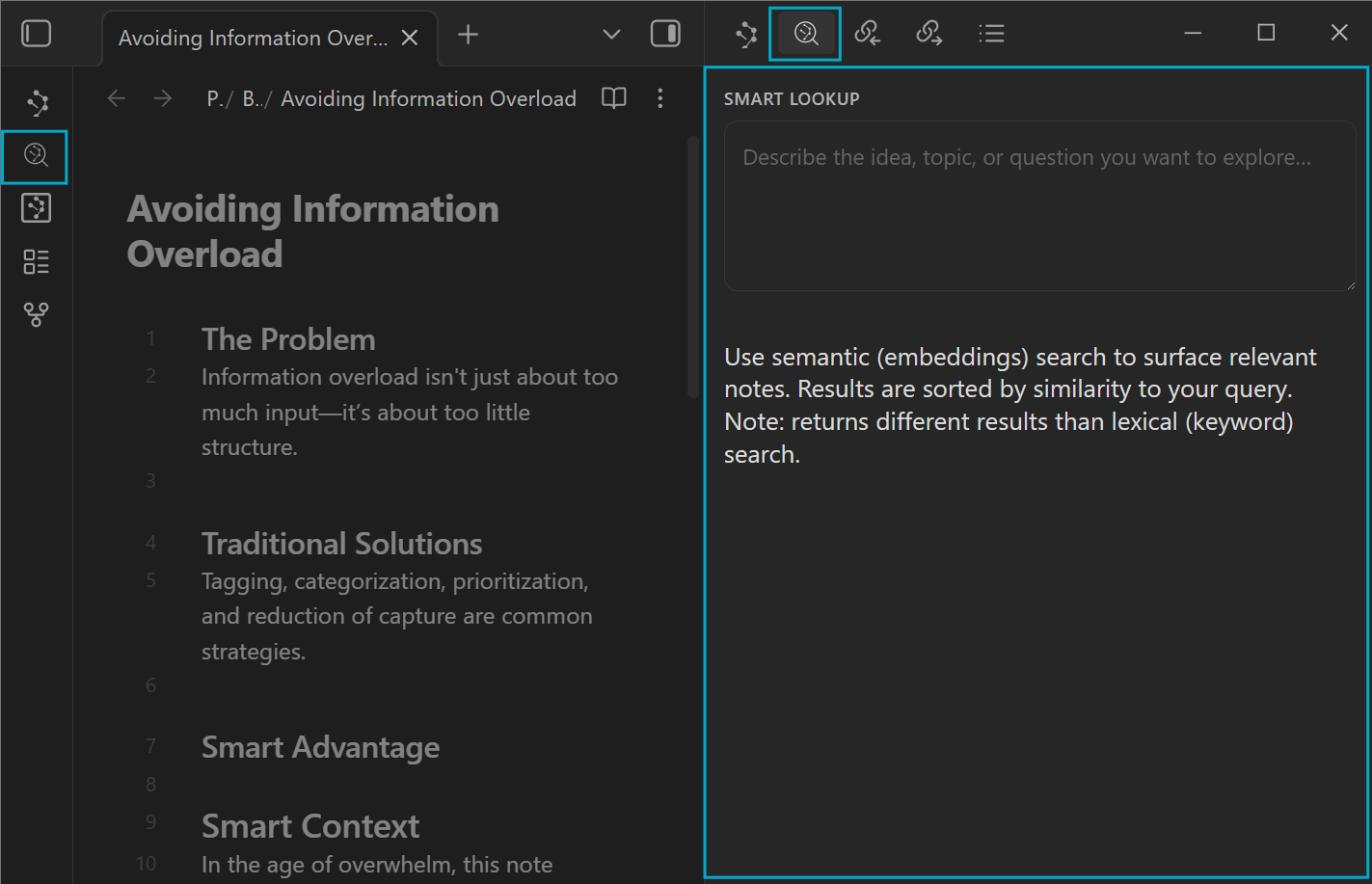
Confirm Smart Connections is enabled, then restart Obsidian after installing or updating it.
If the command still does not appear, the instructions do not match your installed build. Do not keep looking for a control that is not there. Use Help opened from that build or verify which version supports Smart Lookup.
2. Describe what you want to find
Use ordinary language. A useful pattern is:
subject + context + distinguishing detail
Examples:
preventing information overload while researching
prior decisions about the Smart Context Builder
customer onboarding friction and activation
A question also works:
What have I written about information overload and focus?
Lookup uses the question to find likely source notes. The result is still a list, not a composed answer.
3. Run the search
- With Auto-submit enabled, pause briefly after typing and the results update automatically.
- With Auto-submit disabled, click Lookup.
Use one clear intent per query. A longer prompt is not automatically a better search.
4. Verify the strongest candidates
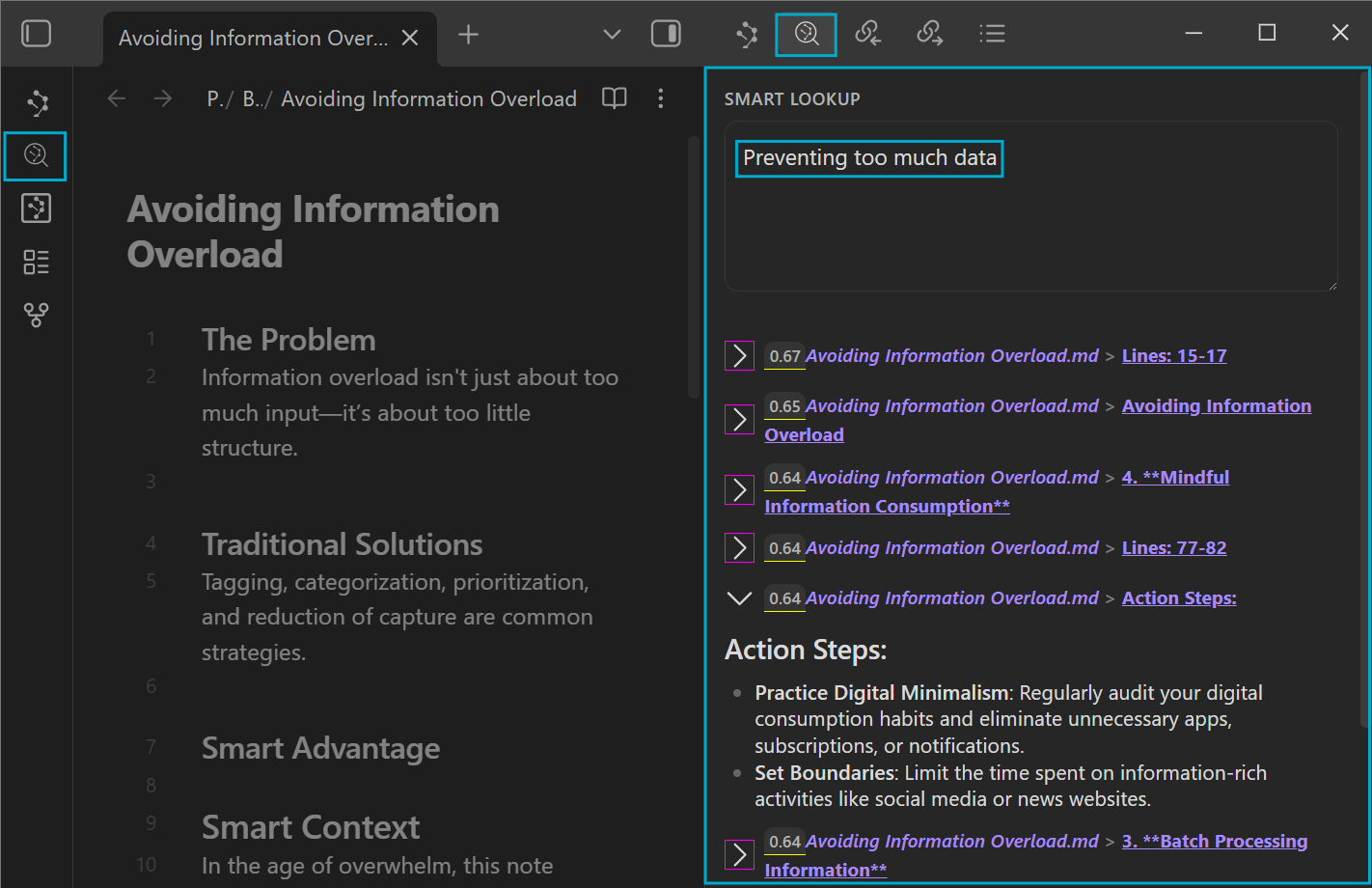
Start with the first 1 to 3 results.
- Click the arrow beside a promising result to expand its excerpt.
- Read enough to confirm why it matched.
- On desktop, hold
Ctrl/Cmdwhile hovering the result to use Obsidian's preview when available. - Click the result title when you need the full note.
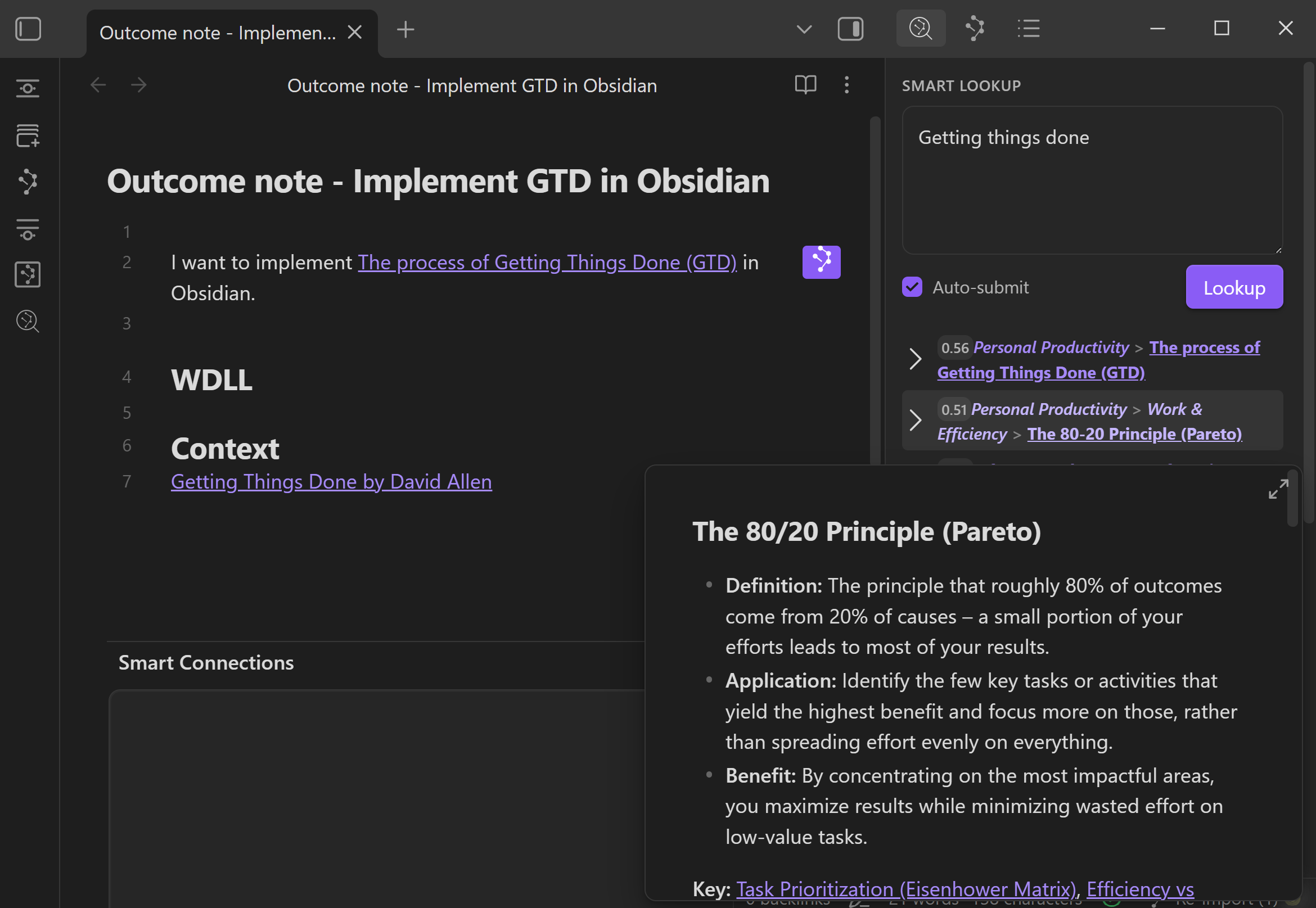
Treat each result as a lead to inspect, not a conclusion to trust.
5. Use the result
A useful result should change the work, not remain in a result list.
You can:
- recover an idea, decision, example, or constraint from the source
- add a normal Obsidian link to the note you are working in
- drag one verified result into a supported destination where available
- open the list-level More actions menu and choose Open in Context Builder to review the current result set
- choose Explore in Smart Graph when the result set should become a graph scope
A purposeful link is easier to reuse:
## Context

- [[Useful result note]]
	- Use for: [why this note matters to the current question or outcome]
There is no verified per-result button literally named Add to Context.
The current list-level handoff is More actions -> Open in Context Builder. Use that action to review the result set before copying or sending it.
Choose the result you want
| What you want | Use | What it returns |
|---|---|---|
| Notes that match an idea you type | Smart Lookup | Ranked notes or note sections |
| Notes related to the note already open | Smart Connections | Ranked results based on the current note |
| An exact word, title, heading, tag, syntax, or regex | Obsidian search | Exact text matches |
| A written answer based on selected notes | Smart Chat API Extension or Smart Context plus your AI tool | A generated answer after source review |
Idea or question -> Smart Lookup finds sources.
Current note -> Smart Connections finds related sources.
Exact words -> Obsidian search finds exact matches.
Written answer -> AI uses the sources you approve.
Write better Lookup queries
Describe the material you want to find, not the report you want an AI to write afterward.
| Too broad | More useful |
|---|---|
focus |
focus while researching information overload |
GTD |
getting things done task prioritization |
Smart Context |
prior decisions about the Smart Context Builder |
onboarding |
customer onboarding friction and activation |
Avoid using Lookup as though it were a chat prompt:
Summarize my notes and recommend the best next actions.
Search for the source material instead:
notes about project risks, unresolved decisions, and next actions
Then give the summarizing or recommendation instruction to the AI workflow that receives the verified notes.
If results are too broad, add one distinguishing detail. If they are too narrow, remove the least important detail.
How to read Lookup results
Depending on your result settings, a row may show:
| Detail | Meaning |
|---|---|
| Score | Relative similarity to the current query |
| Note title | The source file containing the result |
| Heading path | The section where the matched material appears |
| Line range | The approximate source lines for a section result |
| Expand arrow | Opens an inline excerpt for verification |
Use the score to decide what to inspect first.
Do not assume that a high score makes the source correct, that the first result is the only useful result, or that scores from different queries are directly comparable.
Preview before opening. Open before trusting. Link only when the result improves the current work.
Get a written answer from the notes you found
For a vault with hundreds or thousands of notes, use this flow:
search the local index -> verify a small source set -> send only approved sources -> review the answer
Do not send all 1,500 notes to a model for every question.
Answer inside Obsidian with Smart Chat API Extension (Pro)
- Open Smart Chat API Extension.
- Add the notes you verified, or use Smart Chat's Lookup context action.
- Review the proposed source list and remove anything that should not guide the answer.
- Ask the question.
- Compare the response with the attached sources before adding anything to a trusted note.
Answer with the AI tool you already use
- Verify the useful Lookup results.
- Open the list-level More actions menu.
- Choose Open in Context Builder.
- Remove anything unrelated, stale, duplicated, or untrusted.
- Copy the reviewed context bundle.
- Paste it into ChatGPT, Claude, Gemini, or another AI tool and ask the question.
Prompt starter:
Use only the attached notes as source material.

Question: [your question]

Name the notes or sections you relied on.
If the sources do not contain enough information, identify the exact missing note, fact, or decision instead of guessing.
Core Smart Lookup can search the local Smart Environment index after your notes are prepared.
A cloud provider receives note content only when you explicitly attach, copy, paste, or send approved sources through that provider-backed workflow.
Useful workflows
Recover an idea without remembering its words
- Describe the idea.
- Expand the top results.
- Open the note that confirms the match.
- Add the recovered insight or a purposeful link to the current work.
Find prior decisions before repeating work
- Search for the topic plus
decision,tradeoff, or the project name. - Preview the strongest candidates.
- Open the source containing the actual reasoning.
- Add the useful decision or constraint to the current note in your own words.
Prepare source-grounded AI context
- Search for the evidence the assignment needs.
- Verify the useful results.
- Use More actions -> Open in Context Builder.
- Remove noise before copying.
- Ask for the outcome only after the source set is reviewable.
When results are weak
| What happened | Try first | Why |
|---|---|---|
| Results are too broad | Add 1 or 2 distinguishing details. | The query needs more context to separate nearby topics. |
| Results are too narrow | Remove one detail or use a broader phrase. | Too many constraints can hide useful neighboring notes. |
| You need an exact phrase | Use Obsidian search. | Exact words, titles, tags, headings, and regex are lexical jobs. |
| You are starting from one open note | Use Smart Connections. | The current note should determine the results. |
| Results run while you are typing | Turn off Auto-submit and click Lookup manually. | Auto-submit runs after a short pause. |
| Results do not update after typing | Enable Auto-submit or click Lookup. | The query has not been submitted yet. |
| Whole-note results hide the useful passage | Change the result type from Sources to Blocks. | Blocks return smaller note sections. |
| Results are empty or stale across several queries | Check Smart Environment readiness, exclusions, and embedding progress. | Lookup depends on prepared source embeddings. |
If this is your first run, verify readiness before judging result quality:
Optional: Sources vs Blocks
Start with the default result type and find one useful result before tuning.
Lookup reuses result-list configuration from Smart Connections, so some changes can affect both retrieval surfaces.
| Result type | Best when | Tradeoff |
|---|---|---|
| Sources | You want broad whole-note discovery. | Easier to scan, but you may need to open the note to find the exact passage. |
| Blocks | Long notes hide the useful section. | More precise, but creates more granular candidates and depends on block preparation. |
Start with Sources. Use Blocks when the correct note appears but the useful section is buried inside it.
For the current controls, see Smart Connections settings.
FAQ
Why did a result appear without my exact words?
That is the purpose of searching by meaning. Use Obsidian search when exact wording matters.
Should I trust the first result?
No. Expand or preview it, open the source when needed, and decide whether it actually helps the work.
Where is Add to Context?
There is no verified per-result button literally named Add to Context. Open the list-level More actions menu and choose Open in Context Builder to review the current result set. Drag one verified result into another supported surface only when you want that single result.