
How I link notes without spending time organizing or searching in Obsidian
A link belongs when it tangibly improves the note.
I want useful notes to appear while I am working, mainly so I don't forget about them.
I want to be able to find relevant ideas, sometimes buried in a long note, without remembering exact keywords or just-in-case organization.
What I am trying to avoid
I do not want linking to become a separate organization project.
I do not want to stop working so I can organize folders, tags, or maps of content just-in-case it helps me find something someday.
I do not want to hunt through the vault because I remember the idea of something but not the exact words.
I do not want to add links just because a result looks related.
I do not want my notes to look connected while the actual work stays unclear.
What I do instead
I let the note I am already working in surface related notes, Smart Connections.
When I have a specific question, I use Smart Lookup.
Either way, I preview before trusting a result, then add the link only when it improves the current note.
| Need | I use | Anchor |
|---|---|---|
| Find notes related to the note I am already working in | Smart Connections | Current note |
| Find notes by asking a plain-language question | Smart Lookup | Question or idea |
| Find an exact word, filename, tag, or heading | Obsidian search | Exact text |
My default rule:
Current note -> Smart Connections
Question -> Smart Lookup
Exact words -> Obsidian search
I still use search when exact text matters.
What I am avoiding is turning search, folders, tags, and manual linking into a prerequisite for progress.
The rule I use
A result is worth linking when it helps the current note do its job.
That usually means the result helps with one of these:
- clarifying what done looks like
- remembering a prior decision
- adding useful context
Related is not enough.
The link has to improve the note.
Why this preserves control
Smart Connections and Smart Lookup surface notes using semantic relevance.
They do not decide what belongs in my notes.
I still decide whether the result matters, and I try to write the reason in my own words.
- [[useful related note]]
	- Use for: [why this note matters to the current outcome]
If I cannot write why the link belongs, I usually do not add it. At minimum, I put them under a Context heading to indicate they're likely useful to AI as context.
When I use this workflow
I use this workflow when I am trying to:
- clarify a finish line
- find prior thinking without remembering the exact words
- make sure I'm not forgetting a related idea
- build context before delegation
For Outcome notes and Smart Loop, this is especially useful when clarifying What Done Looks Like.
A related note can remind me of a constraint, example, source, prior decision, or edge case that might shape the outcome before I delegate the work.
The exact workflow
Readiness check
Before using this workflow:
- Smart Connections is installed and enabled.
- Smart Lookup is installed and enabled.
- Smart Environment has indexed enough of the vault for related results to appear.
- The current note has enough meaningful text for related results to be useful.
If the current note is empty, I add a few lines about what I'm working on for Smart Connections to become useful.
Note: Smart Lookup does not depend on the current note like Smart Connections.
1. Open the note
I start from the note that owns the current work, my outcome note.
For an outcome note, that might mean I am working on:
## Desired outcome

## What done looks like

## Context

## Next action
The better the note describes the work, the more useful the related results become.
2. Use Smart Connections
I use Smart Connections when I want related notes to appear from the note I am already looking at.
The question is:
What else in my vault is related to this note?
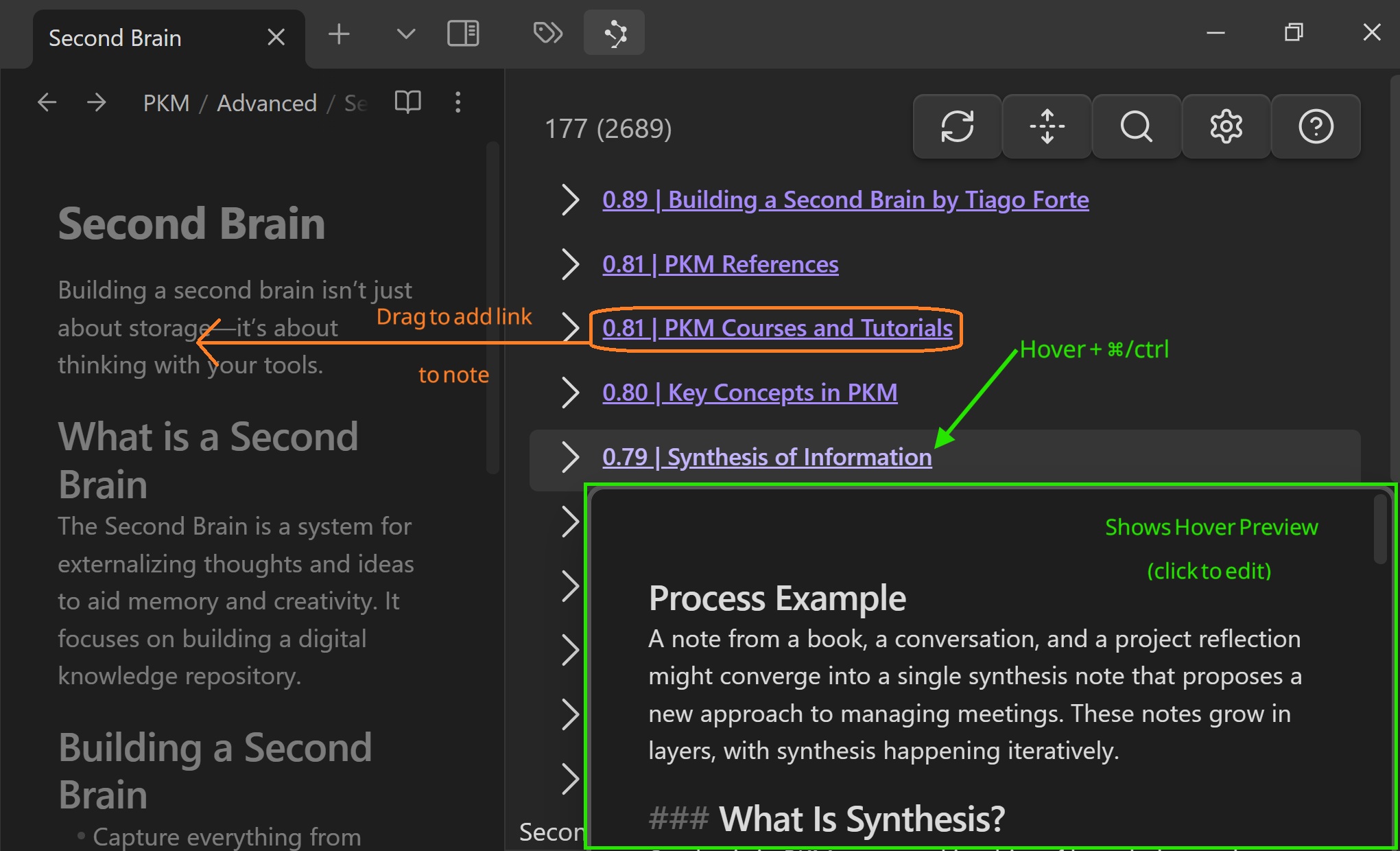
This is the workflow I use when I do not want to break focus.
I can keep writing while Smart Connections gives me peripheral vision into notes I might otherwise forget.
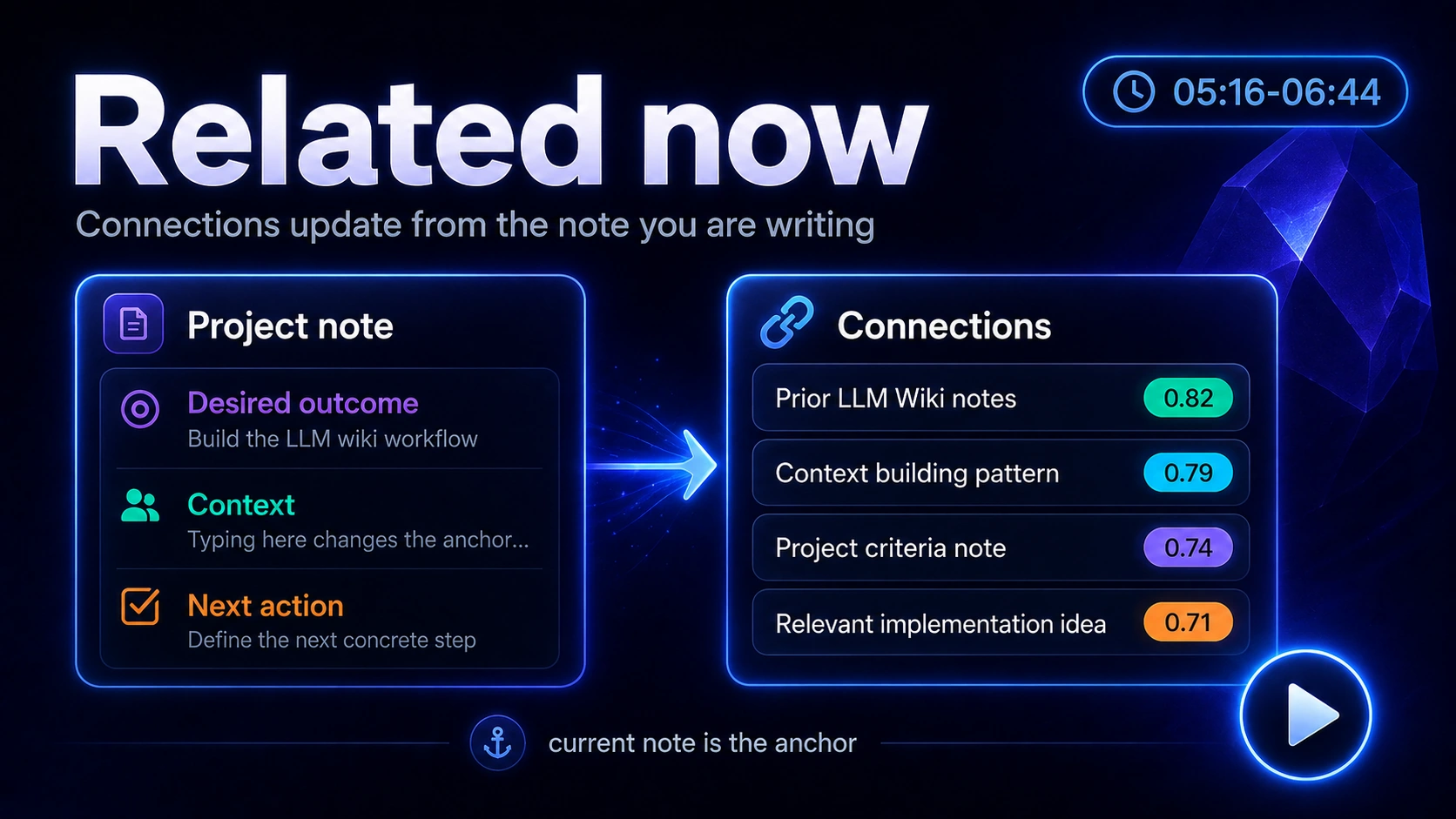
Callum starts with a thin note, adds meaningful text, and related notes appear. That is the linking workflow: let the current note surface candidates, then decide what actually belongs.
3. Preview before linking
The displayed score is only a relative signal. It is not a reason to blindly trust the result. So I preview promising results before I act on them.
By holding ctrl/cmd while hovering the result I can quickly see the entire note without opening another tab. This works in both Smart Connections and Smart Lookup.
4. Drag the useful result into the note
When a result is useful, I drag it into the note to create a link.
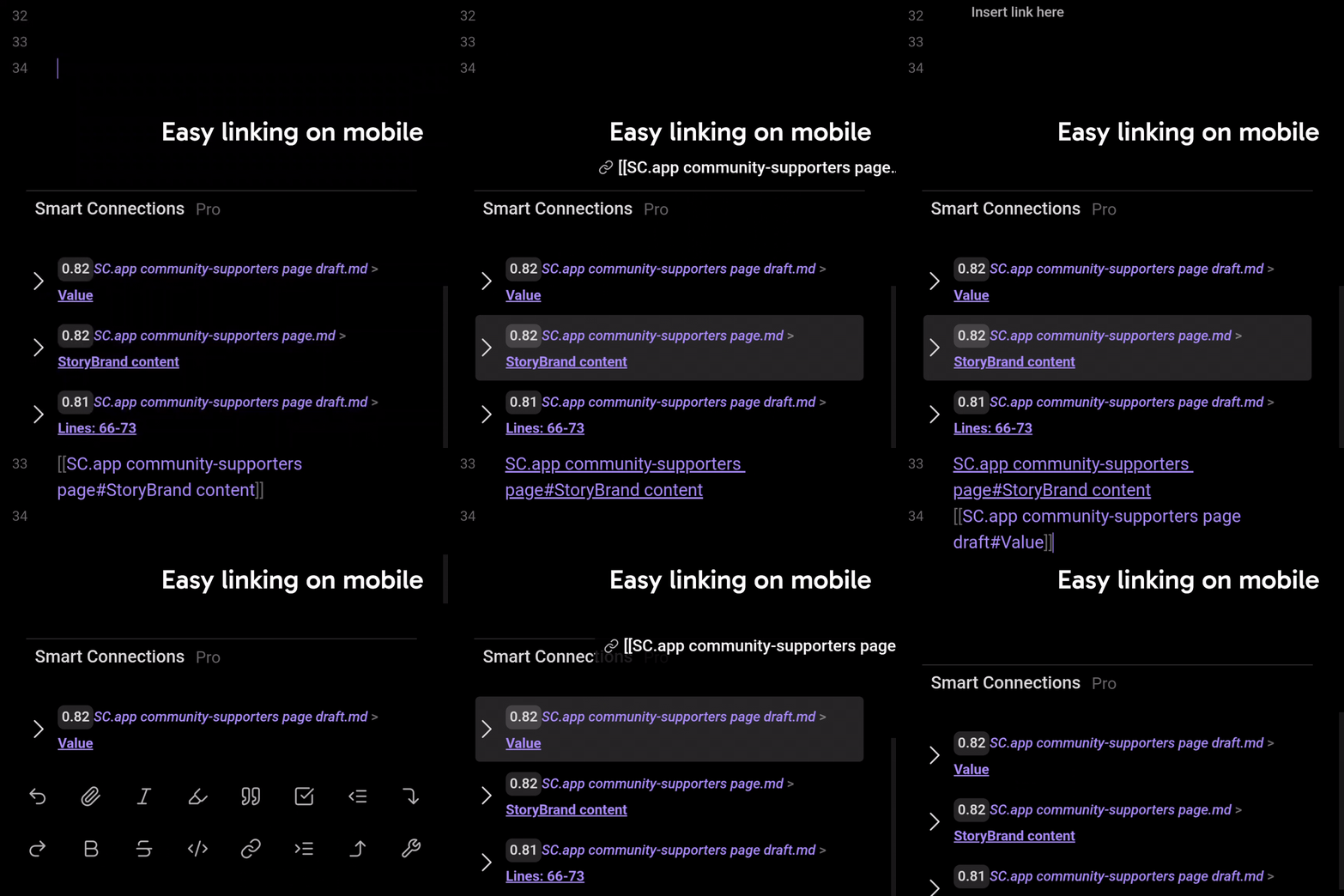
I try not to include the link by itself, ideally a quick line about why the linked note matters is also included.
5. Use Smart Lookup for search without remembering keywords
I use Smart Lookup when I remember the idea, but not the exact words, title, folder, or tag.
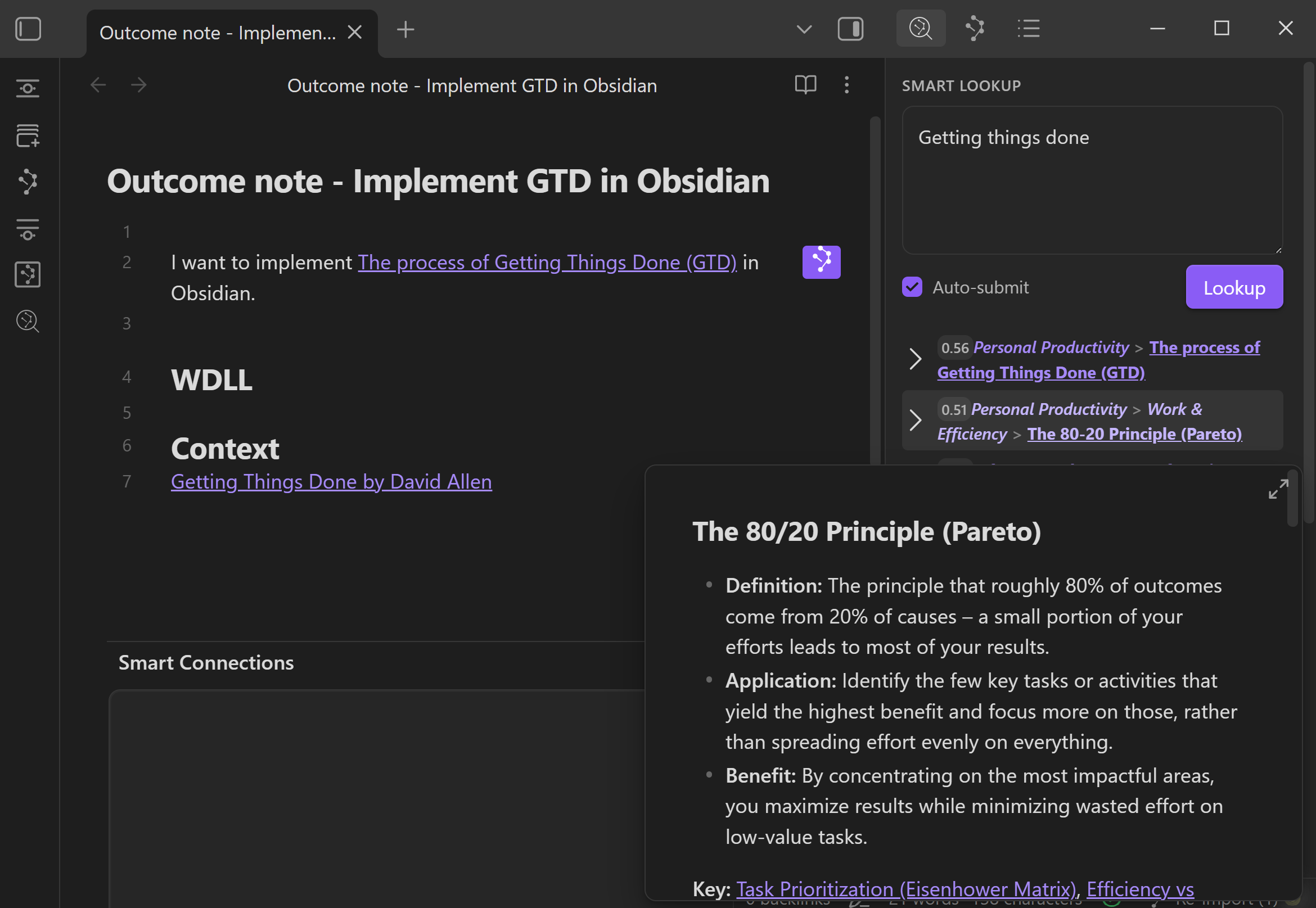
The question is:
What notes in my vault match this idea?
Useful query patterns:
notes that might clarify what done looks like for this outcome
prior decisions about [topic]
examples of [constraint, pattern, problem, or source type]
notes related to [idea] that might be useful as context
Smart Lookup is especially useful when the idea may be buried inside a longer note.
6. Decide where the link belongs
Where the link goes depends on what the link does.
| The link helps with... | I put it under... |
|---|---|
| judging the outcome | What Done Looks Like |
| giving AI or future me useful source material | Context |
| preserving a decision, example, or constraint | Context or the section it changes |
| deciding what to do next | Next action |
| optional reading that does not change the work yet | Reference |
The goal is not to create a perfect link taxonomy.
The goal is to make the current note better.
Common mistakes
Adding links because they are related
Related is not enough.
The link should tangibly improve the current note.
Treating Smart Connections as automatic organization
Smart Connections helps surface related notes.
Real organization happens when I decide what belongs and write why.
Linking without previewing
Preview first. Link second.
Building a huge related list before doing the work
A long related list can become another form of procrastination.
When I am trying to move an outcome forward, I usually want the few links that help clarify the finish line, build context, or delegate the next action.
Related
| When I need to... | I use... |
|---|---|
| Create the note that owns the outcome | How I use outcome notes to go from idea to outcome in Obsidian |
| Build a context package from useful notes | How I build context in my Obsidian notes |
| Copy the note and context as an AI assignment | How I use my notes as assignments for delegating work to AI in Obsidian |
| Keep delegated work attached to the note | How I manage chat threads in my Obsidian notes |
| Separate trusted notes from unreviewed material | How I maintain trust while leveraging AI in my notes |
| Read the Smart Connections view docs | Exploring the Connections view |
| Read the Smart Lookup docs | Smart Lookup search workflow |