
Template Context modal
This page is retained temporarily and may contain outdated details. Use the current Template Context modal documentation for current behavior. Start with Getting started with Smart Templates for the shortest verified workflow.
Template Context is the shared context-first workspace in Smart Templates 2.3.
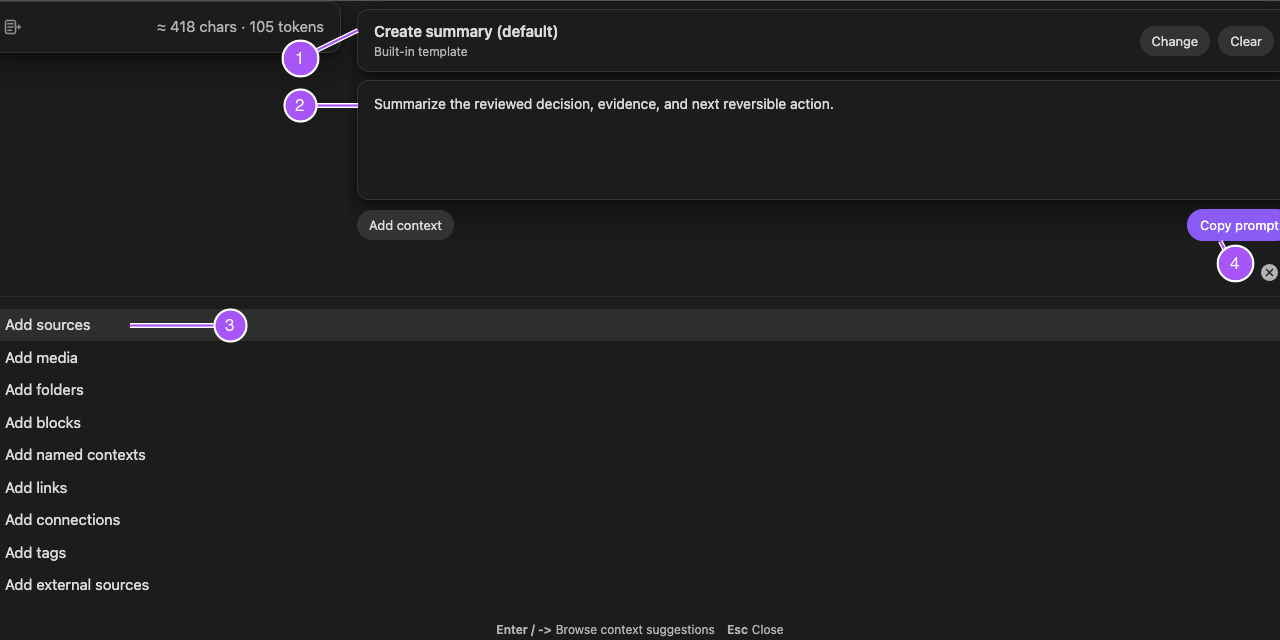
How it opens
Open it from:
- Smart Templates: Open template context in the Command Palette
- the Smart Templates ribbon action
- Open template context for a supported file
What it does
The modal keeps four parts of the request visible together:
- the current context package
- one or more selected templates
- task-specific instructions
- Copy prompt
Opening Add context shows source candidates. A source is not part of the request until you add it and it appears in the reviewed context.
Why context-first matters
Smart Templates starts from the work already in front of you.
- the current note can be the anchor
- selected editor text can become the anchor instead
- additional sources remain reviewable
- template choice happens after the context is visible
- the copied prompt can be inspected before it leaves Obsidian
Current output
Choose Copy prompt when the context, templates, and instructions are ready.
Paste into a clean composer and verify:
- the intended source material is present
- unrelated context is absent
- templates appear in the intended order
- the task-specific instruction is clear
Retired Templates v1 controls
Smart Templates 2.3 does not expose Generate, Regenerate, Insert, Create note, an output-review modal, or a per-request Templates model selector.
Those controls belonged to Templates v1 and should not be presented as current Pro behavior.