
Smart Loop FAQs
Smart Loop keeps an AI-assisted outcome, its supporting context, the delegated thread, and the reviewed result connected to one durable note.
What is the Smart Loop in 5 steps?
#Pick one desired outcome and create a note to manage the work.
- Clarify: define the desired outcome, what done looks like, constraints, and the next delegation question.
- Context: review the smallest source set that can support the request.
- Delegate: send the reviewed assignment to a model-backed thread and keep a durable reference in the outcome note.
- Review: compare the response with what done looks like; model completion alone does not count.
- Compound: promote one reviewed insight into the note or another reusable, traceable artifact.
| Step | Ready when... |
|---|---|
| Clarify | The outcome, what done looks like, constraints, and next question are explicit. |
| Context | A small reviewed source set is attached to the same outcome note. |
| Delegate | A compatible model receives the assignment and the note retains a durable thread reference. |
| Review | The completed response is compared with what done looks like. |
| Compound | A reviewed result improves the note or another reusable artifact. |
Review either reveals a usable result or improves the next delegation. Keep the same outcome note visible through all five steps.
Select a compatible model or another configured AI tool. Confirm that its saved thread reference reopens before relying on it for continuity.
Why does Smart Loop exist?
#A typical AI "workflow" often looks like this:
- the request is in a chat tab
- the source material is in your notes
- the next step is in your head
- the answer is somewhere else
- returning to the work means hoping AI retrieves the right context
That is not effective delegation.
That is fragmented work that prevents real progress.
Smart Loop gives delegated work a durable home. A single note holds the assignment, context, thread or result, review, next step, and deliverable.
Is Smart Loop a plug-in or a workflow?
#Smart Loop is a workflow.
It is the pattern of making the work clear, sending the note with context, and improving the note from the result.
Smart Plugins make that workflow easier inside Obsidian, but Smart Loop is not another plug-in to install.
Do I have to use Smart Chat?
#No.
You can use your preferred chat provider, model workspace, agent, or AI tool.
Smart Chat helps when you want the thread link, active/done state, or returned result attached to the note inside Obsidian.
It does not replace the chat tool you already use.
Which AI providers does Smart Loop work with?
#Smart Loop doesn't care which provider you use. Use your preferred chat provider, model workspace, agent, or AI tool.
The most useful providers expose a durable thread reference that can be linked from the outcome note. Confirm that a saved thread reopens before relying on it for continuity.
Do I have to change AI providers to use Smart Loop?
#Smart Loop does not require you to replace the AI tool you already use.
You can delegate through ChatGPT, Claude, Gemini, a local model, an agent, a model project, or another AI workspace.
Smart Chat helps when you want continuity inside Obsidian. A thread can be saved into the same note. A thread can also be marked active or done to make managing threads easier.
Do I have to let AI edit my notes to use Smart Loop?
#Using Smart Loop does not mean AI automatically rewrites your notes.
AI should not work ON your notes.
AI should work IN your notes.
Working inside the note creates leverage:
- package context
- delegate to AI
- review output
- keep drafts and threads visible
Manually improving the trusted note protects judgment. Clarify the outcome by hand. Delegate the work to AI. Compound progress by maintaining trust through careful note improvements that lead to better delegated work.
A note stays trusted when you decide what gets included.
What does Smart Loop look like in a simple demo?
#See the Smart Loop simple demo.
A simple demo keeps one outcome note visible across five states: Clarify, Context, Delegate, Review, and Compound. Keep the source set, thread, response, and promoted artifact traceable to that same note. If any link in that chain is missing, treat the demo as an illustration of the pattern rather than a completed loop.
What note should I start with?
#Start with a single note that already represents real work.
Good examples include a draft, project, decision, meeting, research question, support issue, or page you actually care about.
The note should be clear enough that you can judge whether the AI answer helped.
What should the note contain?
#Start with plain sections:
- outcome
- context
- chat or thread
- review
- next step
- deliverable
You can keep it simple. The point is that the work has a durable home.
What is Clarify -> Delegate -> Compound?
#Clarify -> Delegate -> Compound is Smart Loop reduced into the key moves.
| Move | What you do | What changes |
|---|---|---|
| Clarify: Make the outcome clear | Write the outcome, constraints, and useful context in a single note. | You and AI can understand what the work is trying to become. |
| Delegate: Send the note with context | Copy or package the note and the smallest useful supporting context. | AI starts from the work item, not a blank prompt. |
| Compound: Improve the note from what was learned by reviewing the delegated work | Review the output, keep or link the thread, and update a trusted section of the note. | The next pass starts stronger. |
After the behavior makes sense, the short name is:
Clarify -> Delegate -> Compound
Clarify means the work is clear enough to judge.
Delegate means AI receives the assignment with useful context.
Compound means the result improves the note, the next pass, or the final deliverable.
Review checks the output.
Compound improves the next run.
Done is when the output matches your understanding, intent, and expectations.
How long does it take to set up?
#A small first pass can be short, but completion depends on reviewing the result rather than on a timer.
- Clarify what done looks like: write 3-5 lines in an outcome note.
- Delegate the work by copy and pasting the outcome note into chat.
- Compound by improving the note based on the response.
The size of the outcome will influence how many iterations of the loop are necessary. Going from idea to outcome will continue to get faster if your notes remain trusted and operate multiple loops at the same time.
How do I know Smart Loop worked?
#You know it worked when the note where the work lives improves from a reviewed result.
A single section is enough.
Improve the outcome, constraints, context, review, next step, or deliverable.
When the note is better, the next AI request starts from a better place.
What if the delegated work didn't produce the desired outcome?
#Close the loop before moving on.
A clever response is not the finish line. And a bad response can still create real progress. Before moving on, use the review process to improve the note.
Even a weak answer can help.
If the answer is generic, the note may need a clearer outcome, better constraints, cleaner context, or a more specific next action.
Improve the note first. Then delegate again from the better note.
What if the answer is generic?
#Improve the starting note before copying more context.
A generic answer often means the note needs a clearer outcome, stronger constraints, cleaner context, or a more specific next action.
Then ask again from the better note.
How much context should I send?
#Start with the smallest useful context.
Context is a scope dial, not a dumping ground.
Start with the note that owns the assignment. Expand only when linked support matters or the answer names a real missing source.
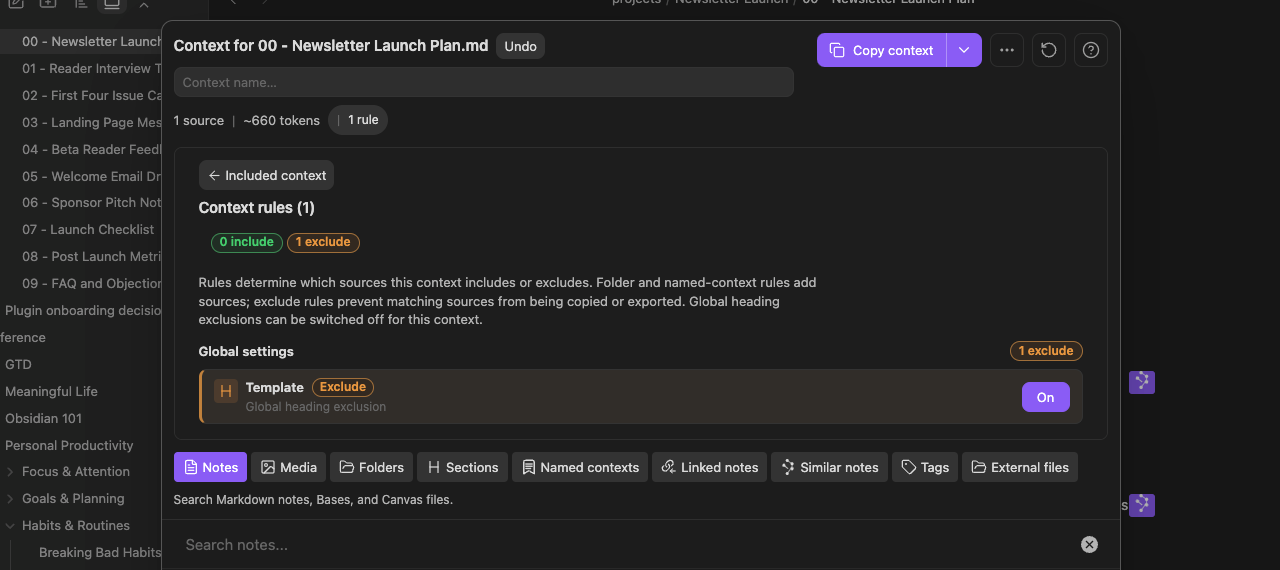
The Rules view shows one global Template exclusion in the package. Review each inclusion and exclusion before copying.
See Context - docs > Inspect and recover Context rules to understand each rule control and how to recover from a mistake.
Does Smart Loop work with agents, Projects, or model-owned workspaces?
#Yes.
Agents, Projects, and model-owned workspaces can all be useful places to delegate work.
Smart Loop gives them a better starting point and a better return point: the note keeps the outcome, context, review, and deliverable inspectable by the user.
Is Smart Loop only for Obsidian?
#Smart Loop is a workflow.
Smart Plugins make it practical inside Obsidian because notes, links, context, and thread state can live together.
The broader idea is portable: AI work improves when the assignment, context, thread, review, and deliverable have a durable home.
Do I need Pro to use Smart Loop?
#No.
When does Pro become useful for the Smart Loop?
#Pro becomes useful when a repeated workflow needs current capabilities such as external-path context, include/exclude Rules, graph-assisted source review, configurable Connections ranking, or large-vault readiness diagnostics.
Diagnostics help you check coverage and embedding readiness; measure performance separately. Model-backed Chat requires a compatible selected model, and Connect requires an explicit connected state before delegation. Templates can structure a reusable request before you send it to your chosen AI tool.
Does Smart Loop automatically edit my trusted notes?
#No. AI output can work inside a note before it earns a place in the trusted note.
You decide what gets promoted after review.
What is the fastest way to try it?
#Open a single note that already matters.
Write the outcome.
Add one constraint that would make an insufficient outcome obvious.
Copy the note or the smallest useful context.
Ask your AI tool for one outcome-focused answer.
Return to the note, review the answer, and improve one trusted section.
Is Smart Loop another agentic system or something else?
#Smart Loop is not another agentic system that takes more time to set up than it saves.
It is not more prompting.
It is not dumping your whole vault into context.
It is not replacing every chat tool or agent workspace.
It is not asking AI to overwrite your trusted notes.
It is a durable workflow around AI work, so the thread, context, next step, and latest draft can return to the note for review.
How do I know if the Smart Loop worked?
#You have not finished a Smart Loop just because you found a note, copied context, saved a thread, or received an AI answer.
Those are useful steps. They are not the finish line.
The loop finishes when the review process improves the outcome note or reveals a usable deliverable.
When the note is better, the next AI request starts better. The outcome note becomes a trusted resource for improving delegation.
Where should I go next?
#Read the main Smart Loop page for the workflow.
Use Smart Connections when you need related notes from the current note.
Use Smart Context when you need to send controlled context to AI.
Use Smart Chat when the thread should stay attached to the note.
Useful AI work becomes rework when the outcome, context, thread, review, and next action live in different places.
In 7 short emails, build one outcome note that helps you clarify, delegate, and compound useful AI output into real progress.