
Connect Pro FAQs
Find the next check for a connection problem, or get a direct answer about tools and review. For a new connection, use Getting started. For a worked example, open the documentation.
Troubleshoot your connection
Start with what you see rather than changing several settings at once.
| Symptom | Start here |
|---|---|
| Local MCP is on but not running | Read the startup error |
| The app cannot find the server or tools | Check the app's configuration |
| The wrong vault answers | Match the vault and server |
| One tool is missing or unavailable | Check that tool's requirements |
| The dedicated GPT cannot use the vault | Check Remote GPT |
| A proposal succeeded but the note is unchanged | Open its pending review |
| Apply is disabled or a file changed during review | Check the review requirement |
For support, use Advanced > Copy diagnostics in Connect Pro settings. It copies selected connection and integration fields, excluding credentials, vault identity, note paths, and request content. Review any screenshots or request details separately before sharing them.
Local MCP is on, but why will it not start?
#Read the error beside Desktop apps (Local MCP). For a reported port conflict, resolve the competing listener and select Retry, or choose an available port in Advanced > Local MCP port. Changing tool permissions will not fix a server-start error. Keep the vault open and use Copy diagnostics when the error persists.
Can I choose the Local MCP port?
#Yes. Advanced > Local MCP port accepts an integer from 1024 to 65535. Apply saves it and restarts Local MCP if enabled. Update existing desktop-app configurations to the new Server URL afterward; their saved URLs do not change automatically. Leave a working port unchanged unless you need a different one.
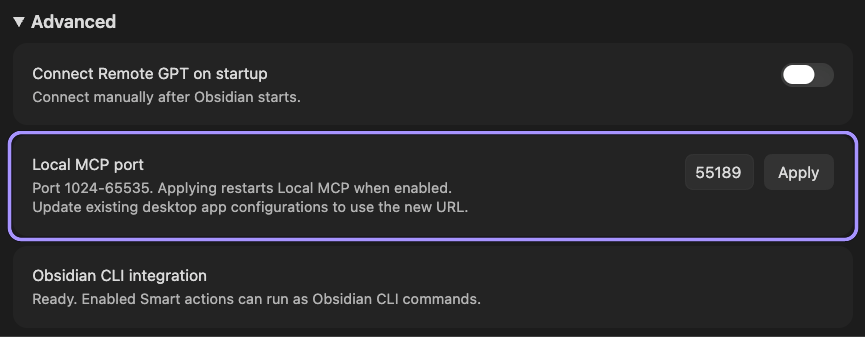
This capture shows the port control and restart guidance. It does not demonstrate a port change or reconnect test; the working port was left unchanged.
Why can my app not find the server or tools?
#Check that Local MCP says Running on this computer. Compare the app's URL with the current Server URL in this vault, then refresh the app's server or tool list. Follow your client's setup section, including the generated extension for Claude.
An old port, a configuration copied from another vault, or a remote/cloud connector pointed at 127.0.0.1 can prevent access. Do not expose the local listener publicly to work around this.
What should I do when the wrong vault answers?
#Stop using that connection. In the intended vault, open Set up a desktop app and compare its suggested name and URL with the app's configuration. For Remote GPT, check which running vault owns the active connection. Reconfigure the intended connection, then read a recognizable note before making changes.
What is Connect Pro?
#Connect Pro lets an AI app use enabled tools in your running Obsidian vault. You can read notes, find relevant sources, work with Smart Contexts, and propose corrections or moves. The Inbox reviews those dedicated proposals; it does not review every write-capable tool. Explore examples.
What changes in Connect Pro 2.0.3?
#The Inbox adds complete-note merges with native link handling and one final confirmation. Pending excerpt moves and complete-note merges separate the rendered Preview, change comparisons in Diff, and file operations and evidence in Details. A pending full-note merge can refresh after its source changes while preserving a rewritten insertion. The Local MCP port is also configurable. See the Inbox guide for the controls and limits.
Does Connect Pro require anything extra?
#Use Obsidian Desktop 1.12.2 or later, enable Connect Pro, and keep its required Pro access active. Keep the intended vault open. Your AI app must support the connection you choose.
Obsidian CLI is needed for Smart CLI and native CLI operations, not every Local MCP Smart action. Start with the setup guide.
Does Local MCP require Remote GPT to be connected?
#No. Local MCP and Remote GPT have separate controls. Either can run while the other is off. Turning one off does not stop the other or disable direct Smart CLI use.
What actions can Connect Pro run?
#The installed plugins and channel permissions determine the tool list. Check Tool permissions > Smart actions and the tools exposed in your app, rather than assuming every documented example is installed. The documentation identifies each example's requirements.
Do the individual CLI controls restrict every CLI route?
#No. Standalone CLI tools (MCP) controls dedicated native MCP tools. On Local MCP, Broad CLI access can keep a native command reachable through obsidian_cli even when its standalone switch is off. Remote MCP intentionally excludes that dispatcher regardless of the broad switch; only individually enabled, eligible dedicated native Tools can provide native-command access there, each with its command fixed internally. Remote GPT's native command access is separate too. Understand the permission boundaries.
Does Connect Pro ask before every action?
#No. Only the dedicated proposal tools defer source changes to Inbox review. Other enabled write tools can make changes directly. Your AI app may also ask for confirmation, but those dialogs are separate from Connect Pro's review process. Read, propose, or change.
Why did a proposal succeed without changing my note?
#That is the intended result: status: pending, source_files_changed: false, and a saved item key. Open Review > Connect Pro Inbox in settings to inspect it. Notes change only when that proposal is applied. Do not repeat the request just because it is waiting for your decision.
Which proposal tool should I use?
#Use propose_correction for one exact claim supported by reference evidence, propose_move_excerpt for a passage or an explicit complete-note merge, or propose_move_blocks for complete selected blocks and their children. A move removes content from its source; only a full-note merge with delete_source_file: true moves the original file to trash. Compare the tools and review steps.
Can I merge a complete note into another note?
#Yes. Use propose_move_excerpt with a whole-note source key, its complete exact current text, a different destination, and delete_source_file: true. Review the insertion in Preview, inspect Diff and Details, then choose Review merge.... The final Merge and move original to trash action saves and verifies the destination before moving the intact original to trash. You can use an existing destination or create a new note. Selected-block and ordinary excerpt moves retain their original notes; metadata is not automatically reconciled.
Can I correct a proposal before applying it?
#Yes. Edit the permitted replacement or insertion, change a move's destination, or reorder its originally selected blocks. In a tabbed excerpt or full-note review, use Edit proposed text. Done editing keeps a local draft, not an applied change. Review the refreshed preview before deciding. Corrections and selected-block moves retain their own review layouts. See the editor.
What is the difference between Preview, Diff, and Details?
#For a pending excerpt move or complete-note merge, Preview shows the formatted insertion in destination context and any fixed text left in the original. Diff compares the proposed rewrite, exact file changes, or source changes since the proposal. Details lists file operations, link behavior, and source evidence. A rewrite comparison is not the destination's before-and-after state. Use View original remainder when you need to inspect the source that will remain.
How do I confirm the reviewed changes?
#Choose Review merge... or Review move... for a tabbed move, or the displayed apply action for another proposal. The final confirmation lists the effects, affected files, and link consequences. The old inline approval checkboxes are no longer used. Cancel returns to the pending review without applying changes. Review and confirmation.
Will links follow a merged note?
#A complete-note merge that removes its source includes native Obsidian link handling, including older pending proposals. Your existing Obsidian preference determines whether updates are automatic or prompted. Read Details > Link behavior before confirming; reference handling happens during execution, not in a preflight scope table. Some references and heading or block targets may need attention. Native retargeting is not automatic anchor repair, and unavailable link support does not block the content merge. Ordinary excerpt and block moves do not retarget whole-note links.
What if I decline Obsidian's link prompt?
#The content merge remains applied and links remain unchanged. Unavailable support or a link-update failure also leaves the content merge applied. The Inbox records merge and native-link results separately. Do not apply the merge again to retry links; inspect the result and use any available link-only review or retry action. Link consequences.
Do I need a new proposal when the source note changes?
#Not for a pending complete-note merge. Reopen it or use Details > Source evidence > Refresh content review. An untouched, unchanged insertion follows the current source; a rewrite or explicit review draft stays preserved. When the source changes, Review source changes or Diff > Source changes since proposal compares the original proposal snapshot with the current source. Deliberately add any new evidence the preserved insertion still needs. If files change after confirmation, the stale merge stops and refreshes for another confirmation. Nothing is applied again automatically. A partial excerpt or selected block that no longer matches still requires a new proposal.
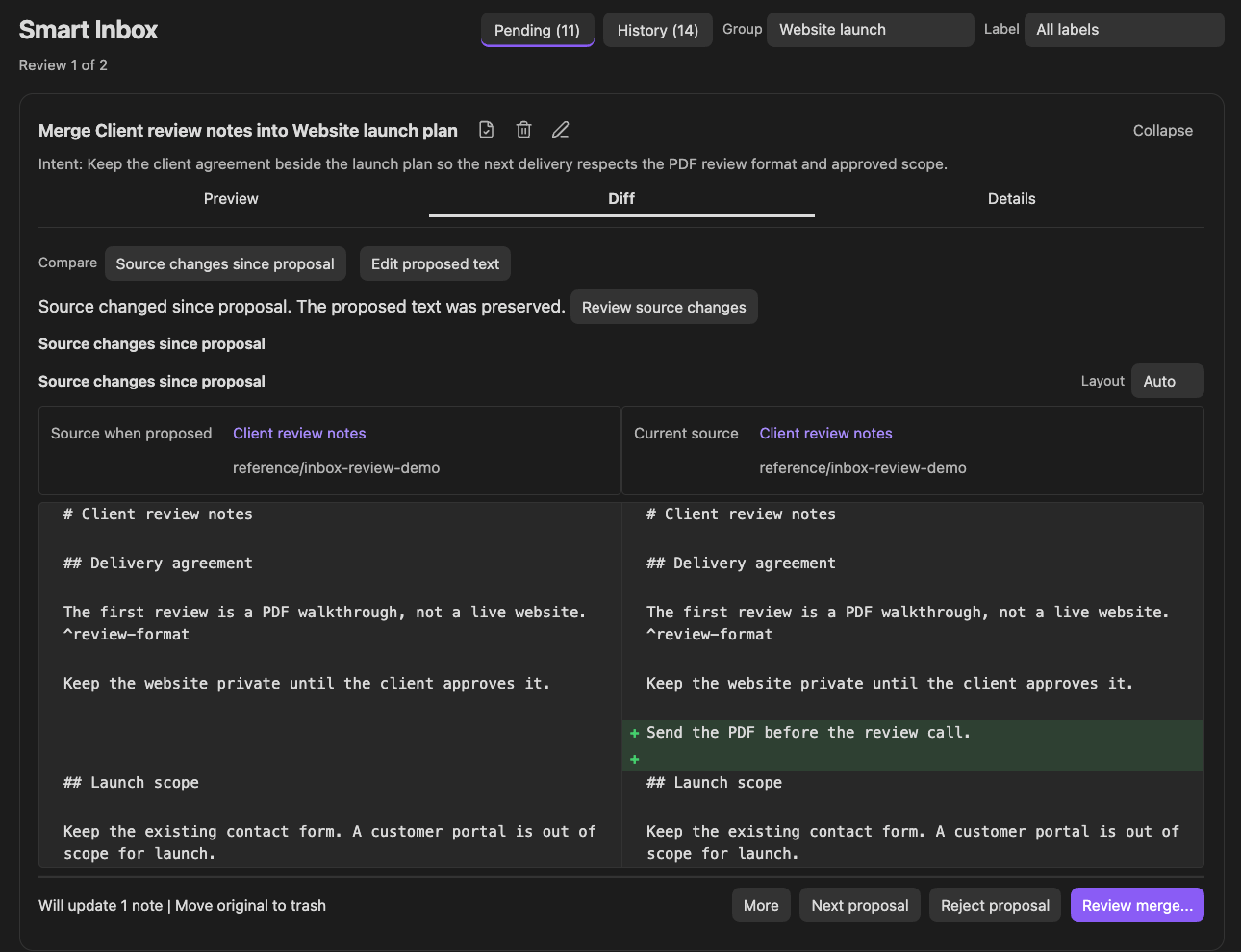
This comparison shows what changed in the source since the proposal: "Send the PDF before the review call." The preserved insertion is not one of these two comparison columns. The reviewer deliberately added the sentence to that insertion before confirming the merge. Refresh preserves the rewrite; it does not silently decide which new source text belongs in it.
Can a move create a new note?
#Yes. Choose Change destination... > Create new note... in a tabbed Inbox review, or explicitly request destination_mode: create with a new vault-relative .md or .txt path. Creation happens on application. Append mode requires an existing destination; it does not create missing notes or sections.
Does repeating a proposal create duplicates?
#An exact, still-valid pending repeat returns its existing key with deduplicated: true. A similar idea is not necessarily a duplicate, and changing only its reason or labels does not update that item. Inspect an existing review or recovery warning before retrying. Pending-result details.
What do Group, Label, priority, and History mean?
#Group and Label help filter independent items. Priority orders pending reviews from high to normal to low, then oldest first; it does not grant approval. History shows applied and rejected decisions, newest review first. Next proposal leaves the current item pending. Inbox overview.
Can I remove a proposal without rejecting it?
#Yes. Use More > Delete proposal... and its confirmation. This removes the review item without recording rejection feedback or changing source notes. Use Reject proposal in a tabbed move review when you want to retain the declined decision in History.
Can agents use my previous review decisions?
#Yes, through the enabled get_proposal_feedback tool. It can retrieve one item or filtered pages of saved proposals and decisions. It does not read current notes or authorize another change. Feedback fields and examples.
Does proposal feedback automatically learn my preferences?
#No. It supplies decision history, not a preference model. A rejection applies to the whole proposal; proposal_reason is the app's rationale, not your reason for rejecting it. Current instructions and current notes remain the basis for the next request. How to interpret feedback.
What does Manual recovery required mean?
#An application attempt left file changes or the saved decision unresolved. Inspect the named files and review state before trying another change. The item remains blocked; inspecting or rejecting it does not restore files or clear that requirement. Recovery guidance.
Can I undo an applied proposal?
#The Inbox has no Undo command. Use your backup or version-history workflow. Native link updates for a complete-note merge are not an Undo operation or universal anchor repair. Recovery after a failed application is not a guarantee of complete rollback, and History is a record of decisions, not a restore mechanism.
Is Tool action requests the same as Inbox History?
#No. Advanced > Tool requests > View requests shows retained completed request payloads from the current Obsidian session. It can include note content and does not show every failed attempt. Inbox History saves applied and rejected proposal decisions. An empty list does not rule out a failed request; a pending proposal is not an applied change.
Where did my old contradiction or move queue go?
#The unified Inbox uses its own saved items. It does not import or modify the earlier separate contradiction, Extract, or Merge stores; existing imported native items remain. Refresh your app's tools and use the current proposal names. Inbox tools.
Is my vault content guaranteed to stay on this device?
#No. Local MCP describes where the server runs, not where your AI model processes data. An app may send inputs and returned content to its provider. Use tools and sources you are comfortable sharing, and review tool access.
Can I use Smart Connect Pro GPT from another device?
#The dedicated GPT is separate from Local MCP. It needs access to the supported GPT integration, an active Remote GPT session, and your desktop vault running. A local server alone does not make the vault available remotely. Remote GPT setup.
Is Connect Pro the same as Smart Chat?
#No. Smart Chat provides its own in-Obsidian conversation experience. Connect Pro makes enabled vault tools available to an external client or Smart CLI. Inbox review applies to dedicated proposals, not every operation performed by either plugin.
Does installing Connect Pro migrate an older Smart Connect or Custom GPT Actions setup?
#Do not assume an older connection has been migrated. Configure and test the replacement before removing a working setup. Connection migration is separate from importing old Inbox records. Current setup instructions.
Can I expose Local MCP as a public API?
#Not as configured here. Its loopback-only endpoint is for a local app and does not require authentication. Do not publish it or forward it to the internet. The local listener is not a hosted public MCP or OpenAPI service.
Where is the Smart Connect app?
#Use the current Connect Pro plugin and its setup guide for this workflow. Older Smart Connect app instructions describe a different setup and should not be mixed with these connection steps.