
Smart Graph Pro v1.2
Turn a cluster into a working set
A graph that ends as a picture is a dead end. Smart Graph Pro v1.2 lets you recognize a meaningful region, review the actual notes inside it, and turn that decision into Context, Canvas, a note, links, or a PNG without selecting the sources again.
The graph becomes a place to decide what belongs together, not just a different way to look at the vault.
Update all installed Smart Plugins together, then restart Obsidian. Smart Graph Pro v1.2 requires Smart Environment v3.
A better semantic foundation for the graph
The shape of Smart Graph begins with embeddings, so Smart Environment v3 is a substantial part of this release. Graph gets a faster shared startup path, the Pro accelerated vector index, a broader built-in local model catalog, and the ability to switch embedding models without deleting the embedding set you may want to revisit.
That makes it easier to choose a lighter or multilingual model for a particular vault, compare how the semantic landscape changes, and return to the earlier model without treating the experiment as irreversible.
Shared drag-and-drop and menu actions also make Graph a more natural continuation from Connections, Lookup, Context, or the note already in front of you.
Learn more about the release of Smart Environment v3.
1. Find the region that matters
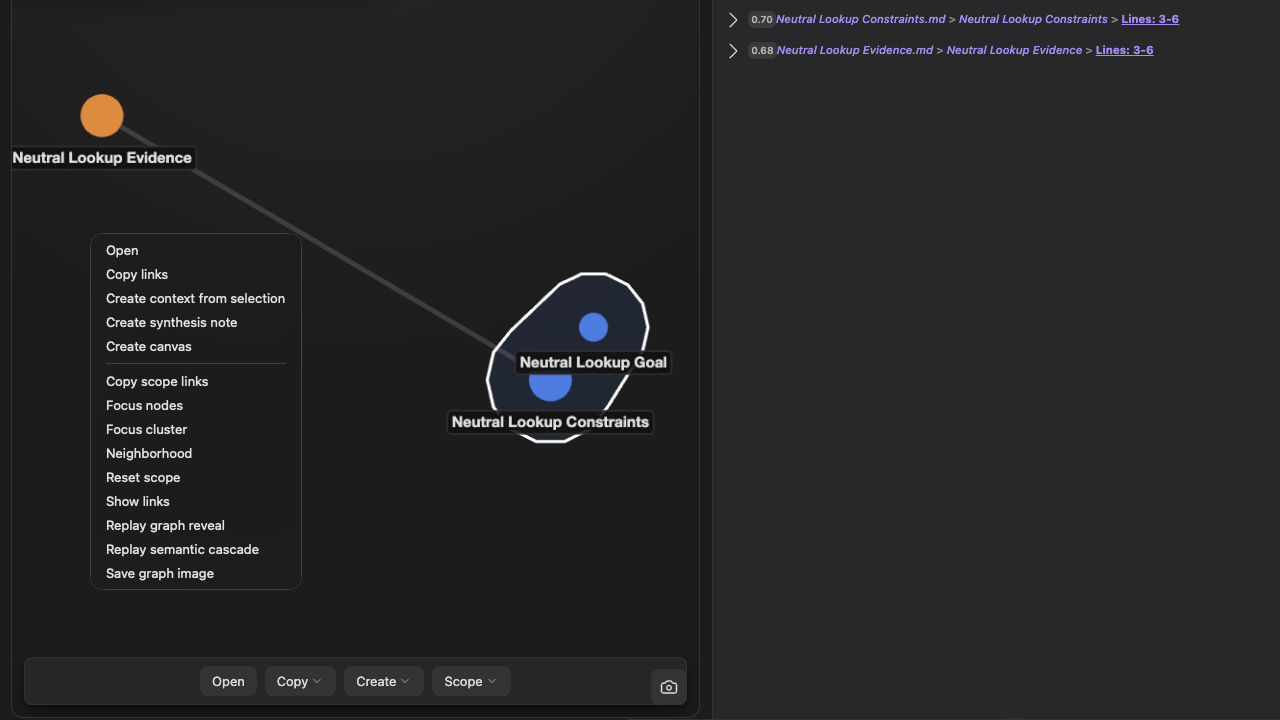
Select one note, several nodes, or a semantic cluster. Search while non-matches dim, drop indexed notes or folders onto the graph, or send a Smart Lookup result set into a new visual scope.
The surrounding shape remains visible, so bridge notes, isolated ideas, and neighboring clusters can change your understanding without changing the exact working set you are building.
2. Review the sources as notes
The new Notes panel turns the visual selection into a readable list. Selected clusters and notes remain grouped, and you can open a source, remove one item, clear the selection, or move the panel out of the way. Minimized and collapsed states keep the graph usable in smaller panes.
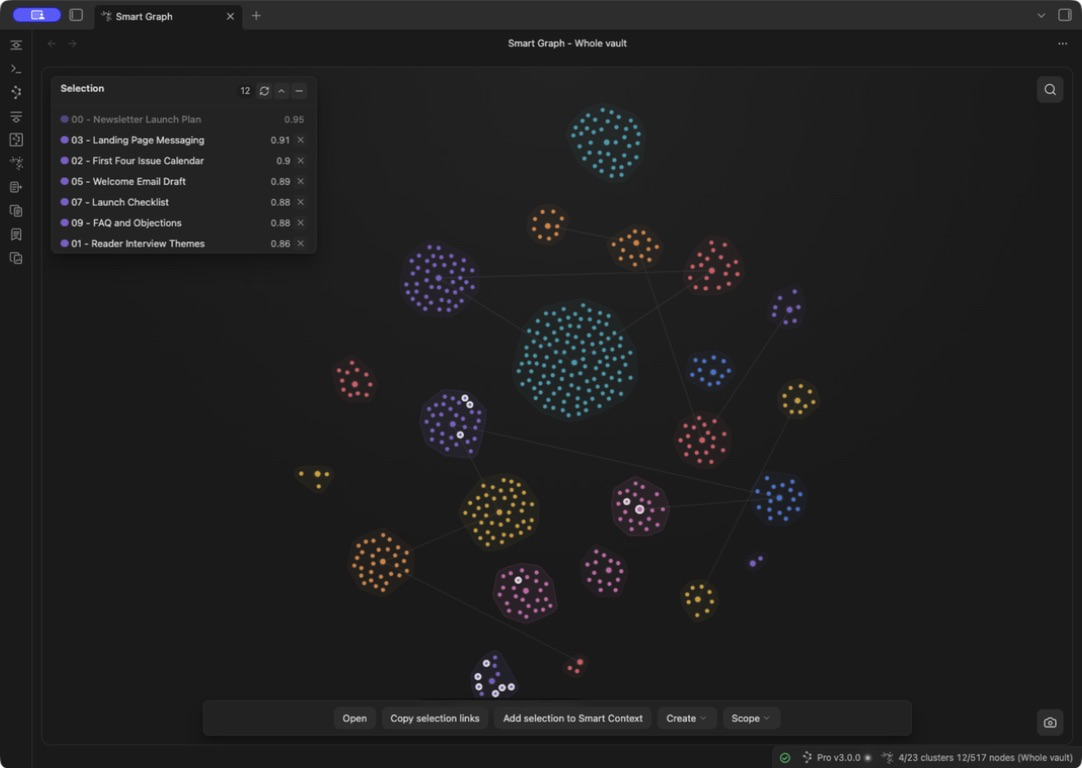
Link previews, authored-link display, graph reveal, and semantic-cascade replay help explain the region without forcing you to leave the visual and reconstruct the list elsewhere.
3. Turn the decision into work
From the same reviewed selection or scope, you can:
- Add the sources to Smart Context.
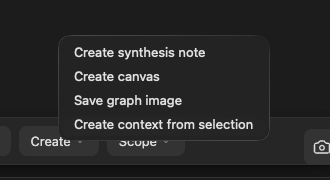
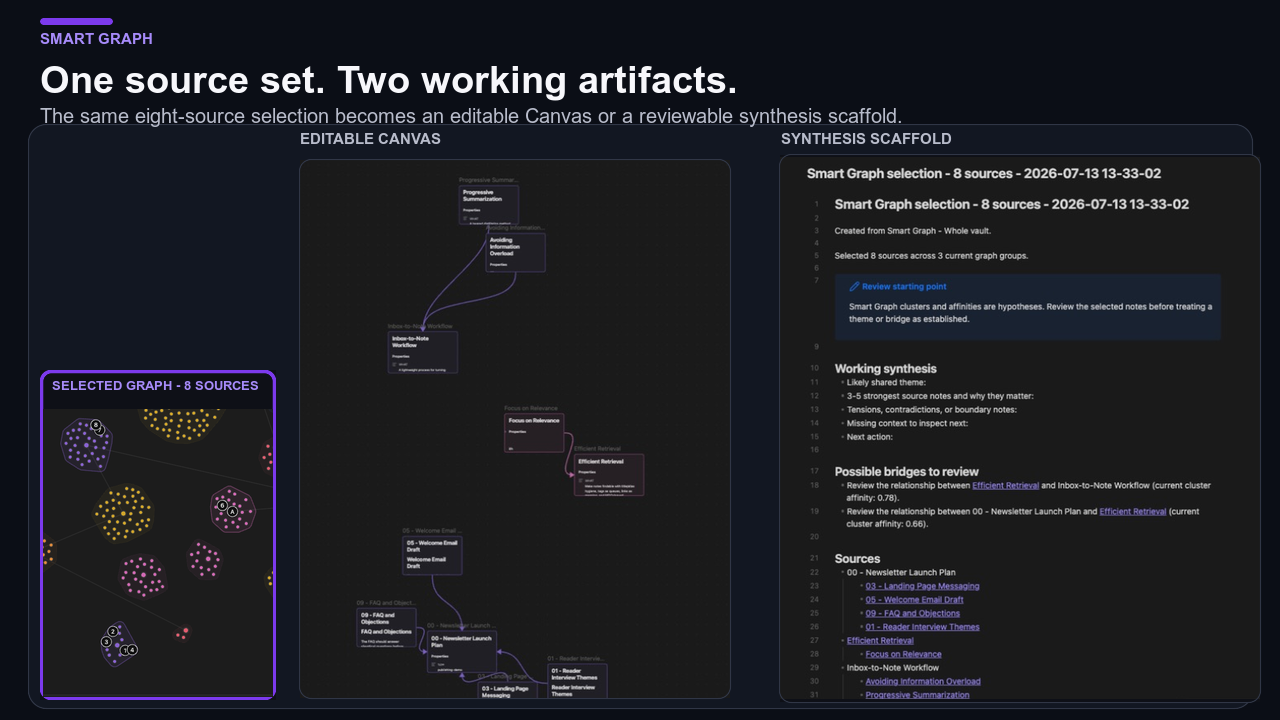
- Create an Obsidian Canvas.
- Create a source-linked note, with optional synthesis support.
- Copy selected or scoped links.
- Save the graph as a PNG.
One source set can become a spatial workspace, a written draft, reusable Context, or a shareable image without being selected again.
Before / After
| Before | With Smart Graph Pro v1.2 |
|---|---|
| A useful visual cluster often ended as a screenshot or memory. | Preserve the exact selection as Context, Canvas, note, links, or PNG. |
| It was difficult to review a dense region as ordinary notes. | The Notes panel makes the source set readable and editable. |
| Lookup and Graph required a manual handoff. | Send a reviewed Lookup result set directly into a visual scope. |
| Trying another embedding model risked discarding the earlier semantic index. | Smart Environment v3 keeps previous model embeddings available when you switch. |
| Refreshes and pane changes could leave stale graph state behind. | Deterministic refresh and lifecycle cleanup rebuild the graph more reliably. |
Supporting improvements
- Drag-and-drop visual feedback for indexed notes and folders.
- Search dimming, label prioritization, empty states, and performance reporting.
- More consistent Context, scope, link, and Create menus.
- Deterministic refresh and cleanup across close, reopen, pane movement, and new windows.
- Added the Notes panel for selected clusters and notes, including drag, minimize, collapse, clear, and remove controls.
- Added Canvas, note, optional synthesis, PNG, Context, scope, and link actions for reviewed selections.
- Added drag and drop for indexed items and folders with visual feedback.
- Added Smart Lookup handoff into Smart Graph.
- Added source-link hover, authored-link display, graph reveal, semantic cascade, and replay actions.
- Improved labels, search dimming, empty states, performance reporting, and action-overlay behavior.
- Fixed deterministic refresh and lifecycle cleanup across refresh, close, reopen, pane movement, and new windows.
- Updated Smart Graph Pro to Smart Environment Pro v3.2.0.
- Requires Smart Environment v3.0.0 or newer.
Learn more
Release notes
v1.2.2
Shape the graph around what matters
Start a graph from a Bases file, dim nodes by how recently their sources were edited, and remove selected nodes from the current graph without deleting the underlying notes. Opening and navigating graphs is also more reliable as you move between selections and panels.
Turn a graph selection into a note or Canvas
Move from exploration to a reusable artifact without leaving the graph. Creating a note or Canvas from the current selection has been streamlined.
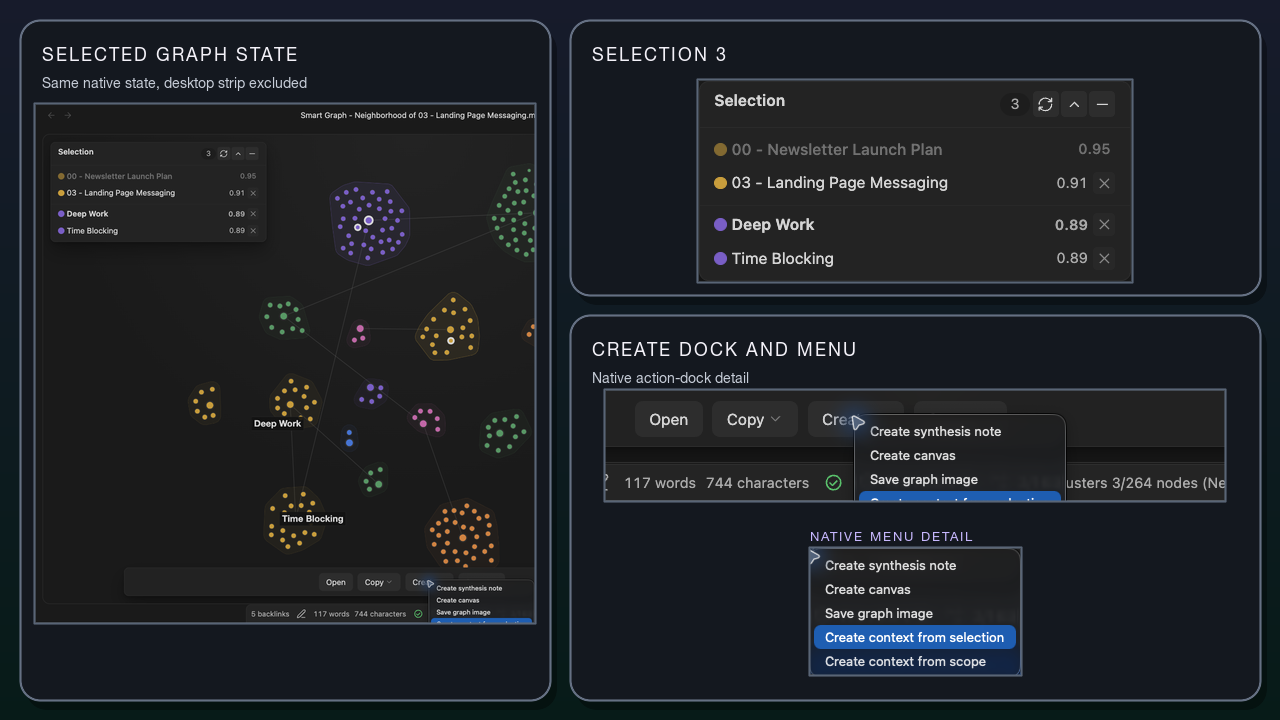
Turn the current graph selection into a note or Canvas from the Create menu.
Full release notes
Exploration
- Create graph scopes from Bases files.
- Dim nodes according to how recently their sources were edited.
- Remove selected nodes from the current graph scope without deleting the source notes.
Interaction and output
- Improved graph-open requests, deferred rendering, and view-state handling.
- Improved Escape-key behavior for clearing selections and managing panels.
- Streamlined Canvas and note creation.
- Updated the Connections-to-graph handoff to remain compatible with the revised Connections integration.
Reliability and maintenance
- Added cluster-graph decoding and simplified the related processing.
- Added an explicit error when required seeded-cluster graph support is unavailable in the index, and simplified the related ranking logic.
- Added automated checks for graph replay and PNG capture.
v1.2.1
Updated: Smart Environment
v1.2.0
Improved: compatibility with new windows
Improved: Connections list Graph integration using Smart Environment menu actions pattern
Refactor smart graph label handling and rendering logic
- Moved label-related constants to
smart_graph_utils.jsfor better organization. - Consolidated label measurement and collision detection functions.
- Enhanced label rendering logic to prioritize selected and search match nodes.
- Introduced new utility functions for generating action payloads and render signatures.
- Updated tests to cover new label admission logic and rendering status handling.
- Removed deprecated functions and streamlined label budget calculations.
Refactor smart graph utility functions and add tests for capture filename and search query normalization
Enhance smart graph rendering: add empty state handling and performance logging functions
Refactor smart graph actions: remove legacy code, introduce overlay component, and enhance utility functions
- Deleted
smart_graph_actions.jsand moved relevant functions tosmart_graph_utils.js. - Added new
smart_graph_actions_overlay.jsto handle UI rendering and action execution. - Simplified utility functions for selecting nodes and checking visible actions.
- Updated tests to reflect changes in utility functions and removed obsolete tests.
Add scope management actions: implement graph_add_scope_to_smart_context and graph_copy_scope_links, enhance smart_graph with scope item handling
Add PNG saving functionality: implement graph_save_png action and related utilities for capturing and saving graph images
Refactor render event handling: update payload structure and enhance error reporting in emit_rendered_event
Add notes panel component: implement smart_graph_notes_panel for enhanced graph interaction (displays selected clusters/nodes)
Enhance notes panel state management: implement cluster grouping logic and add unit tests for selection behavior
feat: enhance smart graph notes panel with drag-and-drop functionality and UI improvements
- Added dragging capability to the notes panel for better user interaction.
- Introduced minimized and collapsed states for the notes panel, allowing users to manage space effectively.
- Updated styles for the notes panel header and controls to improve usability and visual feedback.
- Implemented new control buttons for clearing selection and toggling panel states.
- Enhanced accessibility with ARIA attributes for interactive elements.
- Refactored panel rendering logic to accommodate new UI states and improve performance.
feat: add create canvas and create note functionalities with respective menus and actions
- Implemented graph_create_canvas action to create a canvas from selected items.
- Implemented graph_create_note action to create a note summarizing selected items.
- Added menus for creating canvas and notes in the graph actions overlay.
- Enhanced smart_graph_actions_overlay to handle new menu actions.
- Updated smart_env.config.js to include new actions for canvas and note creation.
feat: enhance smart graph notes panel with remove selection functionality
- Added a remove button for selected nodes in the notes panel.
- Implemented logic to handle the removal of selections from the graph.
- Updated styles for the new remove button to ensure consistency with existing controls.
- Enhanced search functionality to dim non-matching nodes and edges during searches.
- Introduced utility functions for managing source selection and search dimming states.
- Added tests to verify the new functionality and ensure existing features remain intact.
feat: implement note creation features with synthesis support and bridge review candidates
feat: enhance context menus with new actions for scope management and copying links
feat: hide save button when it's the only action in the smart graph actions
added: graph animation (reveal)
feat: add hover link functionality for source nodes and style adjustments for source links
Added: show links action
Added: graph reveal animation
Added animation action
Fixed: deterministic Smart Graph refresh
- Forced refresh now disposes the active Cytoscape runtime and replaces its graph container.
- Render revisions and latest-request coalescing prevent superseded work from committing graph, DOM, status, or rendered-event state.
- View close, reopen, and window migration invalidate pending renders and clean up listeners, observers, schedulers, replay state, and search timers.
Improved: Smart Context creation actions
- Moved selection and scope context creation into the Create menu while preserving the existing action keys.
- Hid the scope action when selection and scope resolve to the same source set.
Documented: Show links, Replay graph reveal, and Replay semantic cascade as release-supported actions
Implement graph_add_items_to_scope action and associated tests; enhance smart_graph with drag-and-drop functionality for indexed items
Add lookup_list_send_to_smart_graph action and associated menu for exploring lookup results in Smart Graph
Refactor get_dropped_folder_sources to improve path normalization and matching logic
Add drag-and-drop visual feedback for the smart graph main area
Updated: Smart Environment v3