
Smart Connect Pro v2.0
Delegate changes to AI - review them before they touch your notes
Connect Pro can now turn corrections and reorganizations suggested by ChatGPT, Claude, or another connected client into reviewable changes inside Obsidian.
Instead of choosing between manual copy/paste and letting an agent edit immediately, you get a third option: let it prepare the change, inspect exactly what will happen, adjust it if needed, then Apply or Reject it yourself.
The new Connect Pro Inbox makes delegated vault work practical while keeping the final decision in Obsidian.
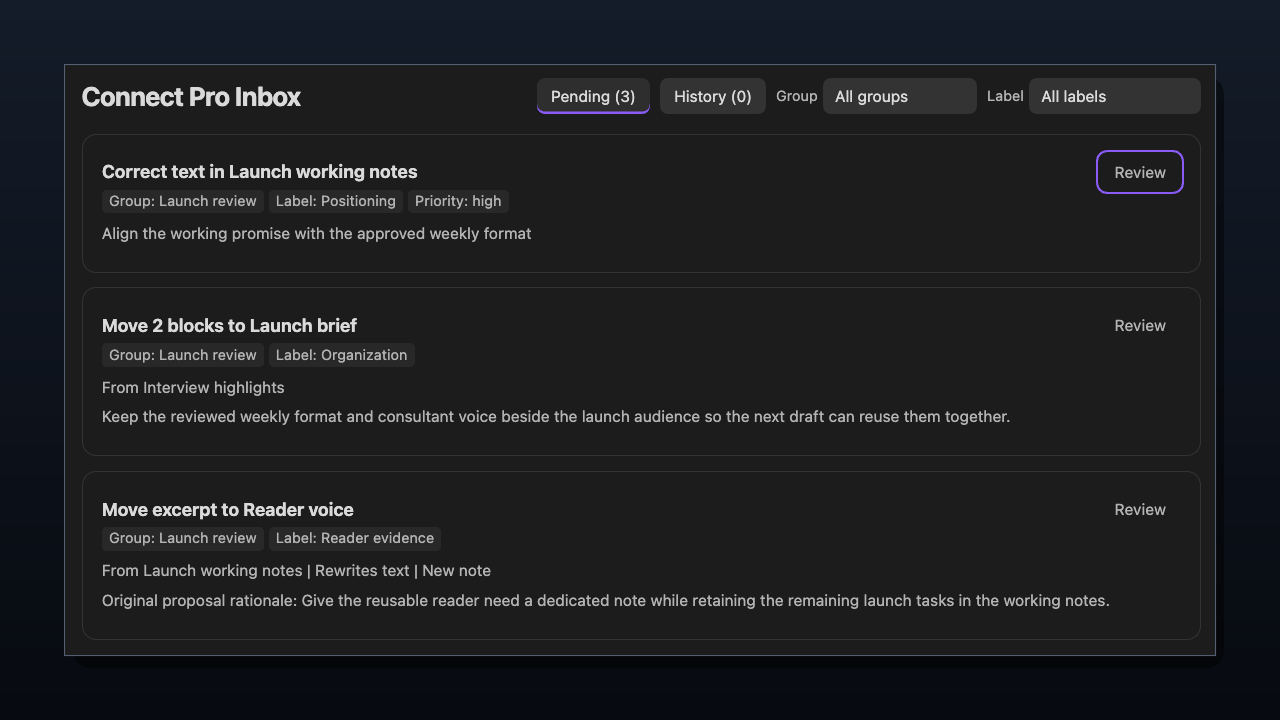
Corrections, block moves, and excerpt moves share one Inbox. All three items shown are Pending, with a separate Review action for each.
Let agents prepare real vault changes
Connected agents can now propose three kinds of changes without immediately editing your source notes:
- Correct a claim - replace one exact passage using supporting source evidence.
- Move an excerpt - relocate selected text, with optional revised wording at the destination.
- Move blocks - reorganize complete sections, including their child sections, in an explicit order.
Open the Inbox from the Connect Pro ribbon icon, command palette, or Connect Pro settings.
Pending proposals remain there until you decide what to do with them. Priority controls review order, while Group and Label make larger batches easier to navigate. Each proposal still has its own decision; a group is not a shared approval.
Inspect and refine the exact result
Corrections and excerpt moves include Changes, Before, and After views so you can inspect the resulting files before applying anything. A new destination has no Before view because the file does not exist yet.
You can edit the proposed replacement or insertion directly in the review, change the destination of a move, or reorder selected blocks. Done editing keeps a review draft without changing source notes; applying the proposal is a separate decision.
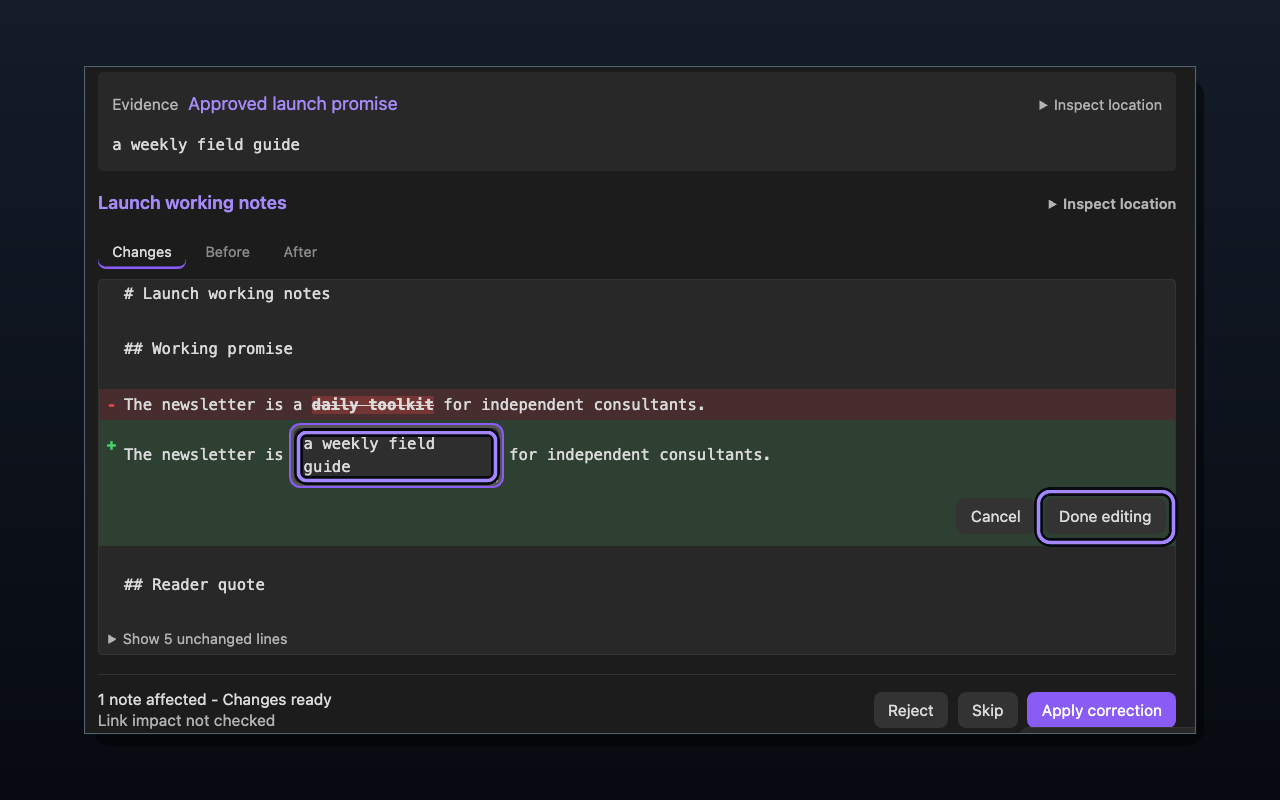
*Done editing keeps the proposed replacement as a review draft; it does not apply the correction. Check the evidence and refreshed diff before using the separate Apply correction action.*
For structural moves, Connect Pro shows the selected content, included child sections, resulting heading placement, and exact file changes.
If the source changes while you are reviewing it, inspect a fresh preview before applying. If the exact excerpt or selected block no longer matches, read the current source and make a new proposal.
Bring selected sections together without merging whole notes
In this separate captured example, Reader need from Reader interviews and Weekly format from Editorial plan are proposed for the existing Launch playbook. The selected text and heading levels remain unchanged; the destination and order are explicit.

Initial pending order: Reader need, then Weekly format. Up beside Weekly format changes that order; this preview does not show an applied move.
The reviewer then moves Weekly format ahead of Reader need, checks both removals in Source changes, and applies Move 2 blocks. The saved result below therefore follows the revised order, not the initial order shown above.

Saved result after review and application: Launch playbook keeps its original Audience section and gains Weekly format, then Reader need. Both source notes remain with their unselected sections.
This is selected-section movement, not generated synthesis, copying, or deletion of the original notes.
Stay in control: Apply, Reject, or come back later
Apply performs the reviewed change after checking the current source again.
Reject records the decision without changing the source files.
Skip leaves the proposal pending so you can return to it later.
Applied and rejected proposals remain available in History. History records decisions; inspect the actual affected notes to verify the resulting contents.
When an excerpt is both moved and rewritten, confirm the original removal and the rewritten insertion separately before Move and rewrite becomes available. A relevant edit requires a fresh preview and resets those confirmations.
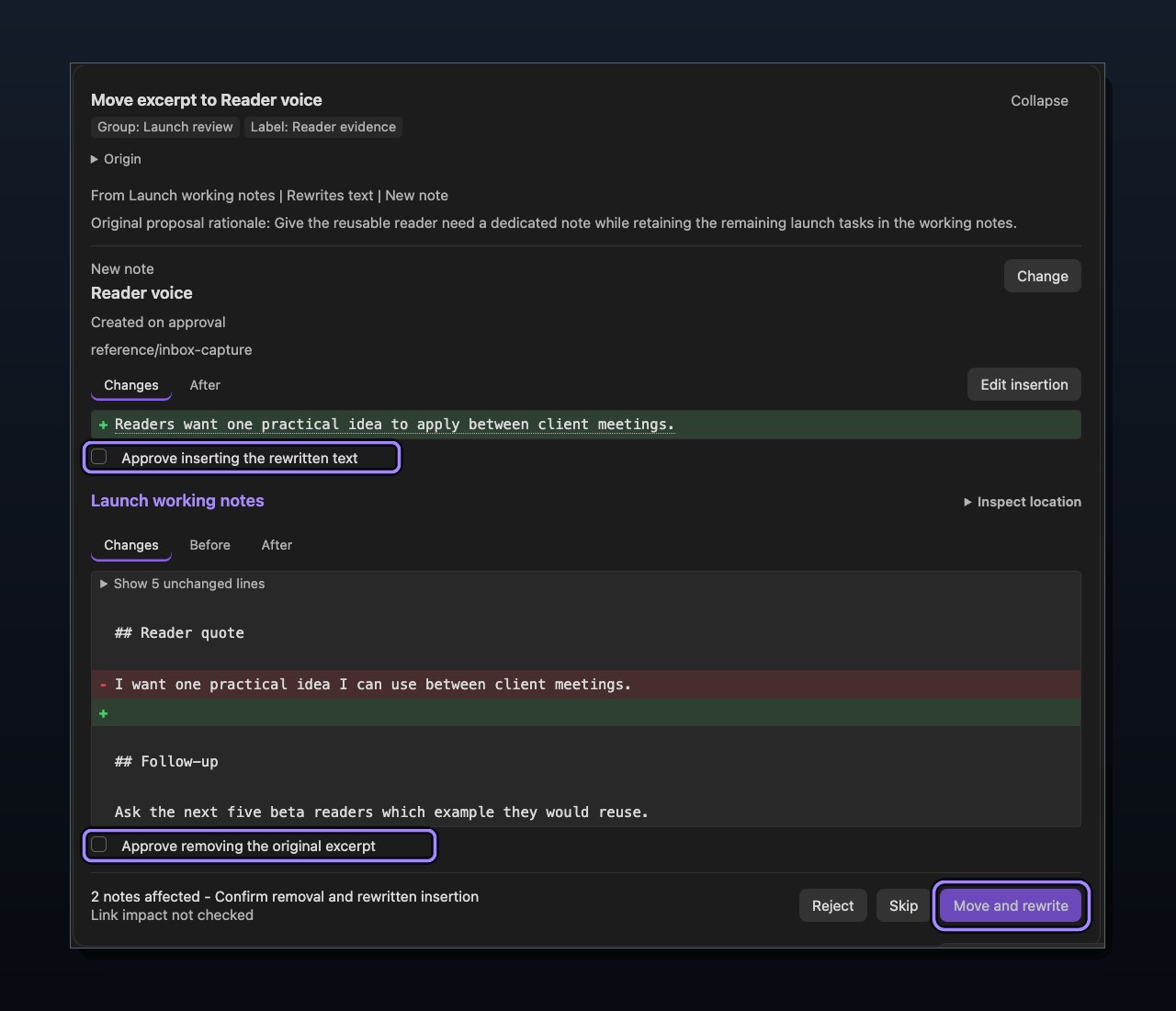
Both confirmations are unchecked, so Move and rewrite is disabled. Review the rewritten insertion and exact original removal separately. Link impact not checked remains an explicit limit.
Give future agents useful review history
The read-only get_proposal_feedback Tool lets connected agents retrieve saved proposals and review decisions.
Connected agents can inspect previous proposals and review outcomes, including available comparisons between proposed and applied values, to understand relevant prior decisions. Missing original comparison evidence is not proof that a proposal was applied unchanged.
This history is evidence, not an automatic preference system. Agents should still inspect current notes and follow your current instructions before proposing another change.
Use the same Smart Tools from MCP and CLI
Local MCP makes configured Smart Tools from your running Obsidian vault available to supported desktop clients.
Smart CLI Pro, or Smart CLI, uses the same underlying Smart Tool contracts for compatible command-line workflows. Calling a proposal Tool through CLI still creates a pending Inbox item; it does not bypass review.
Connect Pro settings make it easier to see which capabilities are available and which connector they are enabled for.
Local MCP runs independently of the legacy Remote GPT connection, so a desktop MCP client does not require that route to be connected.
Safer when the vault changes underneath you
This release includes substantial reliability work behind the Inbox.
Connect Pro rechecks the reviewed plan against current source content before applying it, detects stale reviews, verifies written changes, and attempts conservative recovery when an application fails partway through.
If file changes or the saved review decision remain unresolved, Manual recovery required blocks the affected proposal from application. Inspect the named files and saved review state before proposing another change. Inspection alone does not reset the block, and rejecting the item does not restore partially changed content.
When a change is already applied but source indexing needs a refresh, inspect the files and refresh indexing rather than applying the change again.
Try the propose-review-apply workflow
Connect a supported desktop client through Local MCP, refresh its available Tools, and start with one recognizable read from your vault.
Then use a disposable note for one small propose_correction, propose_move_excerpt, or propose_move_blocks request. A successful proposal returns status: pending and source_files_changed: false.
Check that the source note is unchanged, review the proposal in the Inbox, then Apply or Reject it. If you apply it, compare the actual affected files with the reviewed result. Pending is the expected proposal outcome, not a missing write to retry.
Know what is - and is not - held for review
Inbox review applies to the dedicated proposal actions. It does not automatically intercept every Tool or native Obsidian CLI write. Review availability for the channel you use; individual native-CLI controls do not restrict the broad obsidian_cli Tool.
Connect Pro does not currently provide automatic Undo, automatic link repair, or crash-atomic multi-file transactions.
Local MCP connects to the running vault on the same computer. The client you connect may still send returned content to its model provider.
If you used earlier experimental proposal workflows, use the current propose_correction, propose_move_excerpt, and propose_move_blocks names. Older separate contradiction, Extract, and Merge stores are not imported into the unified Inbox.
Learn more
Release notes
v2.0.2
Less setup. More time with your notes.
Connect Pro is easier to get started with, clearer about access, and more reliable when your Smart Plugins are on different versions.
Get connected without the guesswork. The refreshed settings put desktop apps and Smart Connect Pro GPT side by side, with separate controls for each. Desktop setup opens on first use, and your server URL, Claude extension, setup guides, and examples are easier to find.
Choose when Remote GPT connects. New installations now wait for you to connect. Prefer automatic startup? Turn it on in Advanced. Your existing saved preference stays unchanged, and Local MCP works independently.
See what you're allowing. Tool permissions make broad CLI access more visible and distinguish tools that edit notes directly from proposals you review in the Inbox. Review access before connecting, and open pending proposals from settings.
Keep working with fewer interruptions. A conflicting tool no longer prevents the rest of your Local MCP tools from loading, including when older Lookup versions are installed. Routine registration pop-ups are gone, with request details and diagnostics available when you need them.
Get connected or find something useful to try.
- Review AI-proposed changes in Obsidian - the new Connect Pro Inbox adds a human review step before supported delegated changes touch source notes.
- Correct exact claims with evidence - let an agent prepare a targeted replacement alongside the source evidence that motivated it.
- Move and rewrite excerpts - relocate exact text between notes or sections, with the option to refine what gets inserted at the destination.
- Reorganize complete sections - move blocks with their child sections in the exact order you approve, without silently rewriting their content or heading levels.
- Edit the proposal before applying it - refine wording, change destinations, reorder blocks, and inspect Changes / Before / After views from the same review.
- Protection against stale or unsafe applies - current source is rechecked before writing, stale plans require refresh, and unresolved recovery blocks unsafe retries.
- Agents can learn from prior reviews - proposal feedback exposes relevant applied, edited, and rejected history as evidence for better future proposals.
- Local MCP works independently of Remote GPT - use supported desktop MCP clients while the intended Obsidian vault is running, without requiring the legacy remote route.
- One Smart Tool surface across MCP and CLI - use the same configured capabilities from compatible desktop-agent and command-line workflows, with per-connector availability controls.
- A faster, cleaner review queue - ribbon access, pending-work indication, deduplication, History, Group, Label, and priority make delegated work easier to find and manage.
- Stronger failure and recovery handling - verified writes and conservative recovery make partial failures less likely to become destructive repeat attempts.