
Smart Dedupe
Smart Dedupe finds exact and semantically similar blocks so you can compare both sources before deciding what to keep or change.
Start with Getting started with Smart Dedupe for one controlled current-note scan.
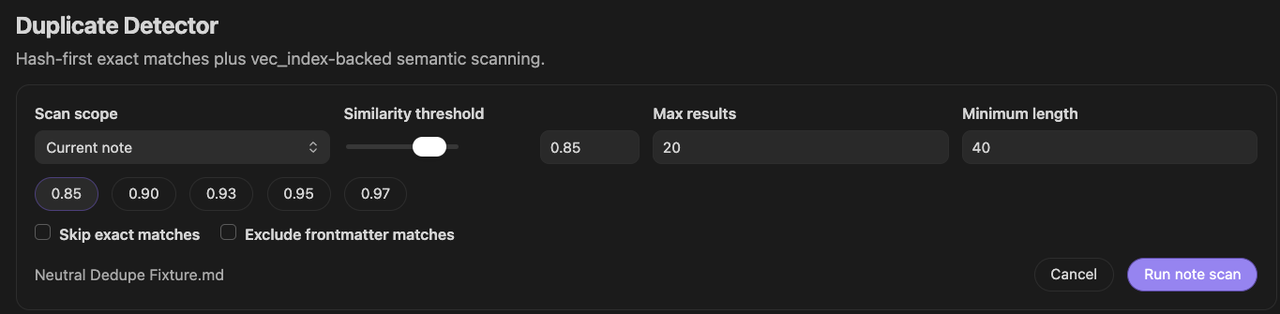
The persistent Duplicate Detector keeps the scan boundary, progress, and candidates in one view.
Smart Dedupe does not merge, archive, or delete notes. A high score or exact match still requires you to inspect both sources and decide what each should do.
Find duplicate and near-duplicate notes in Obsidian
Use Dedupe when repeated passages create conflicting drafts, repeated decisions, or bloated AI context. Use Connections when similar notes are useful neighbors rather than cleanup candidates.
Use Smart Lookup when you remember an idea or can phrase a question. Use Obsidian Search when you need an exact text match.
Prepare the first scan
Smart Dedupe is a Pro plugin. Use this sequence:
- Enable Smart Dedupe.
- Open a meaningful note.
- From the Command Palette, run Smart Dedupe Pro: Open Duplicate Detector.
Exact matching can find repeated text without embeddings. Semantic matching requires the relevant blocks to be prepared by Smart Environment. If semantic results are missing, check Smart Environment readiness before changing the threshold.
Scan the current note
The current-note scan compares blocks in the active note with candidates in other notes. It excludes pairs from the same note. Start here because the source of every comparison is easy to understand.
- Open the note that owns the passage you want to review.
- Choose Current note.
- Set a bounded threshold and result count.
- Keep exact matches visible for the first pass.
- Choose Run note scan.
Scan the full vault
The full-vault scan compares blocks across different notes. Use it after a current-note scan has taught you what useful and noisy candidates look like.
Before choosing Run vault scan, review the threshold, maximum results, minimum length, and exact/frontmatter options. A full-vault result set is bounded by those choices and may not contain every qualifying pair.
Open the persistent Duplicate Detector
Run Smart Dedupe Pro: Open Duplicate Detector. The current Detector is a persistent Obsidian view, not the older sequence of threshold, progress, and results pop-ups.
Keep the Detector open or return to its tab while a scan runs.
Configure the scan
Before running a scan, review:
- Current note or Full vault scope
- Similarity threshold
- Max results
- Minimum length
- Skip exact matches
- Exclude frontmatter matches
- Scan scope chooses the active note or the full vault.
- Similarity threshold sets the minimum semantic similarity.
- Max results bounds the review set.
- The checkboxes can hide exact matches or frontmatter matches.
Minimum length and the run action appear farther to the right in the full Detector.
Choose a similarity threshold
Higher values return stricter semantic candidates. Lower values broaden the set and usually increase false positives.
For a conservative first review, start around 0.90. Lower toward 0.85 when you intentionally want paraphrases or when the stricter pass returns too little. Change one setting at a time so you can tell what improved the result.
Bound the result count
Max results limits the collected review set. Use a number you can realistically inspect in one session.
A full-vault scan may stop after collecting enough qualifying semantic matches. The displayed set is sorted by score, but it is not guaranteed to be an exhaustive global top-N across the vault.
Exclude frontmatter matches
Enable Exclude frontmatter matches when repeated YAML properties or metadata blocks are not useful cleanup candidates.
Understand exact matching
Exact repeated text is checked separately from semantic similarity. An exact match can appear even when one or both blocks do not have embeddings.
Use Skip exact matches only after you have reviewed obvious repeats and intentionally want to concentrate on paraphrases.
Set the minimum length
Minimum length applies to the exact-hash pass only. Raise it when short exact repeats such as headings, labels, or boilerplate dominate. It does not filter semantic candidates; use Similarity threshold for weaker semantic matches.
Monitor progress
During a longer scan, the Detector shows the current phase, a progress bar, the processed and total block counts, Scanning..., and Cancel. It does not show the scanner's internal results_found value. Short scans may finish before the running state remains visible long enough to read.
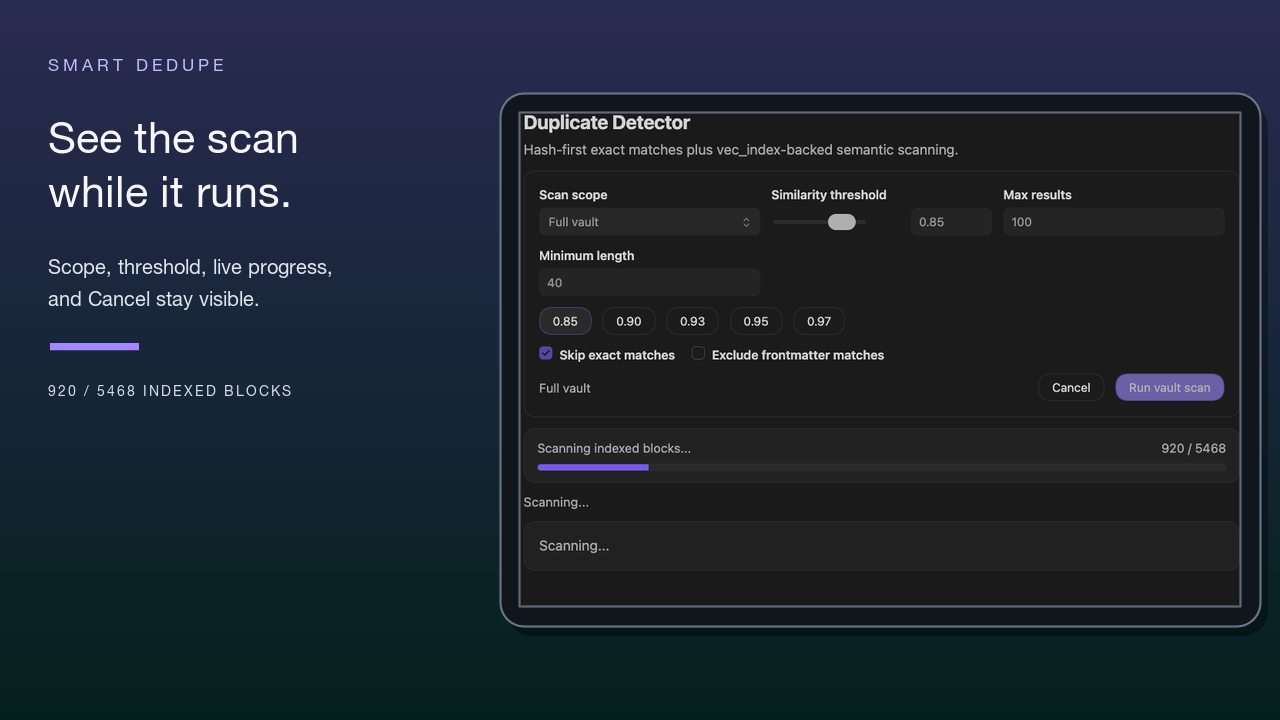
Why might progress be hard to inspect?
A small current-note scan can settle almost immediately. Continue with the completed result instead of rerunning only to watch the progress state.
Keep or restore the scan view
The current Detector is a persistent view, so it does not use the older pop-up minimize-and-restore workflow. Keep its tab open or return to the Detector while the scan is active.
Cancel a scan
Choose Cancel while a scan is running. Wait for Scan cancelled. and a scope summary ending in | cancelled. The run action becomes available again after the running state settles. Any candidates left in the view form a partial result set, not a completed scan.
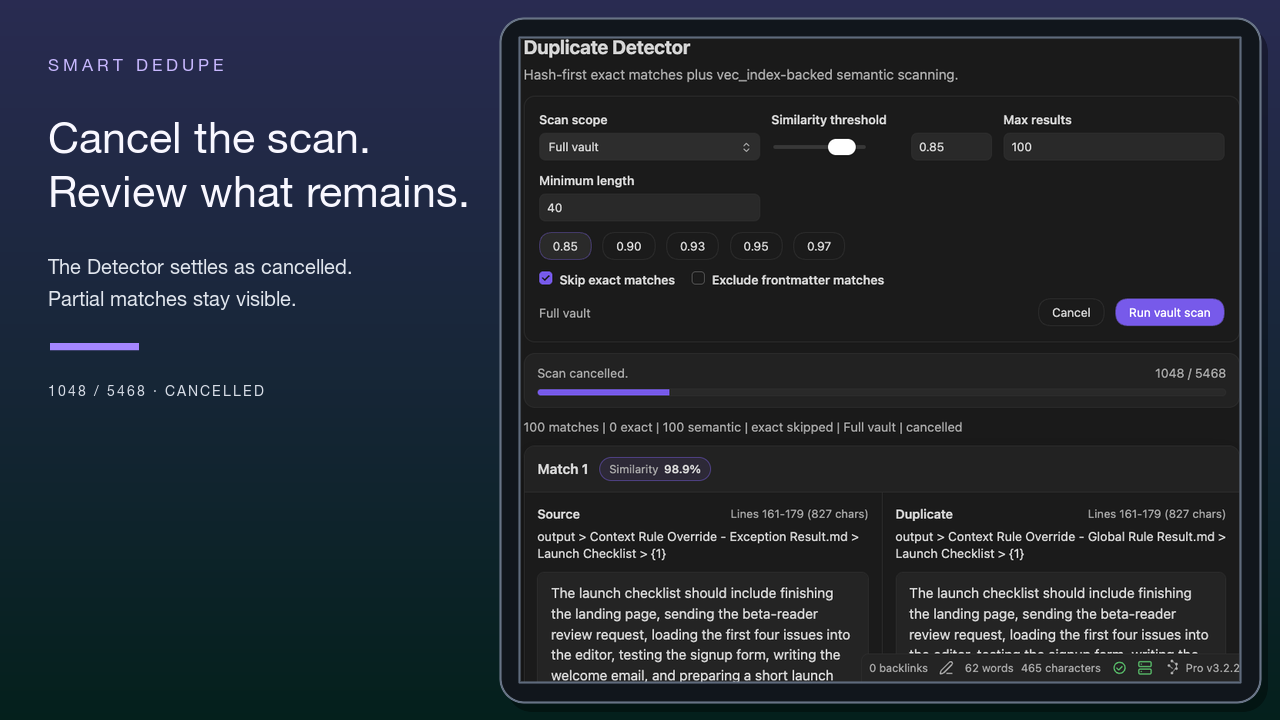
Can I cancel a full-vault scan?
Yes. Cancel it in the Detector. Treat the remaining candidates as incomplete.
Review candidates side by side
Each result shows two block previews with a similarity value and source identity. Check:
- whether the candidate is exact or semantic
- the Source and Duplicate note names
- the line ranges or headings
- enough surrounding text to understand each passage's purpose
A score helps order review. It does not tell you which passage is canonical or whether either should change.
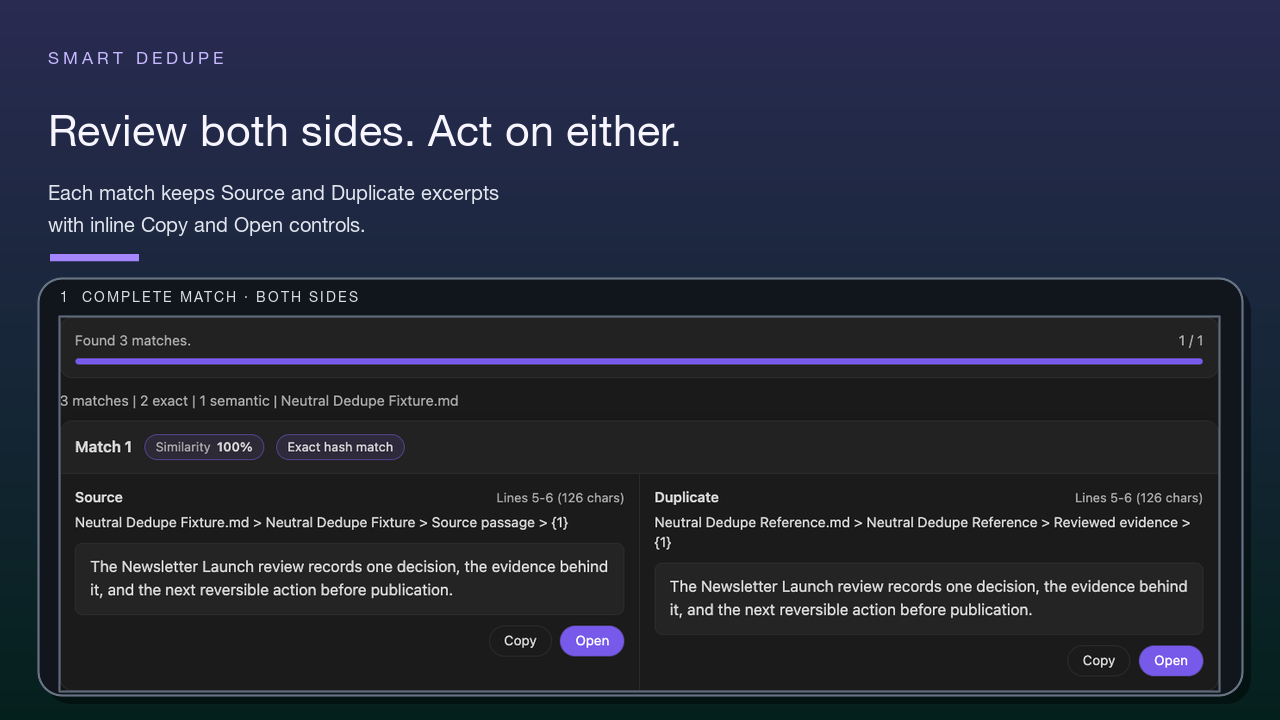
Copy or open a result
Use Open when the excerpt is not enough and you need the full note. Use Copy when you deliberately need the passage text for comparison. Neither action changes the notes.
Use Connections for useful related material. After cleanup, rebuild an affected AI package with Smart Context.
Decide what happens to the overlap
After reading both sources, choose deliberately:
- keep both because they serve different jobs
- rewrite one to make the distinction explicit
- consolidate useful material manually
- archive a genuinely redundant source through your normal workflow
- ignore the candidate
Does a score of 1.00 mean the blocks should be merged?
No. It is a strong overlap signal. The notes' roles and surrounding context determine the cleanup decision.
Does Smart Dedupe delete or merge notes automatically?
No. It presents candidates for human review.
Interpret result-set limits
No result set proves that every duplicate has been found. Threshold, scope, minimum length, exclusions, maximum results, embedding readiness, and cancellation all affect what appears.
A settled zero-result scan means no candidates matched the current boundary. It does not mean the vault contains no repeated material.
Troubleshoot a scan
| Symptom | First adjustment |
|---|---|
| No semantic candidates | Confirm block readiness. If the blocks are ready, lower the threshold slightly. |
| Too many weak semantic candidates | Raise the similarity threshold or return to Current note. Use Minimum length only to suppress short exact-hash repeats. |
| Boilerplate dominates | Enable Exclude frontmatter matches. Raise Minimum length. |
| Exact repeats hide paraphrases | Review the exact matches. Then try Skip exact matches deliberately. |
| Scan stops early | Wait for the status to settle. Treat any candidates as partial. |
| You expected automatic cleanup | Open both sources. Make the change manually. |