
Getting Started with Smart Chat
Use a Smart Chat provider codeblock in the note where the conversation belongs. The block can show ChatGPT, Claude, Gemini, or another supported provider.
Send one concrete prompt and receive one visible provider response. Opening the provider, inserting a block, or saving a bookmark is not yet a successful chat.
This page starts with Core provider codeblocks. They use provider web interfaces and do not require an API model or Smart Environment retrieval.
Choose the right Chat surface
| Surface | Use it when | First-win signal |
|---|---|---|
| Core provider codeblock | One note needs one provider such as ChatGPT, Claude, or Gemini. | The provider returns a visible response. |
| Universal Smart Chat codeblock (Pro) | One note needs a shared smart-chat codeblock for supported provider web threads or Smart Chat API Extension thread references. |
The selected provider returns a visible response, or the selected API model completes the intended response. |
| Smart Chat API Extension | You want a configured local or cloud model to answer in the Smart Chat workspace, optionally from approved notes. | A completed response appears with the intended model and context. |
For Smart Chat API Extension, use Smart Chat API Extension Getting Started.
What you will do
- Confirm that Core Smart Chat is installed and enabled.
- Open the note where the conversation belongs.
- Insert one provider codeblock.
- Open its provider surface.
- Send a concrete prompt.
- Confirm that a response is visible.
- If the provider creates a recognized durable URL, make sure that Smart Chat saves it.
- If Smart Chat saves the URL, reopen it.
- Make sure that the saved URL opens the same conversation.
Before you start
You need:
- Core Smart Chat installed and enabled
- one note where the chat thread belongs
- Obsidian desktop for the full embedded chat experience
- provider sign-in when that provider requires it
Core provider codeblocks use provider web interfaces. You do not need an API key, a configured chat model, or an Environment index for this workflow.
You can still use local models in Core with the Open WebUI codeblock if you already run Open WebUI locally.
Activate Core Smart Chat
Use this sequence:
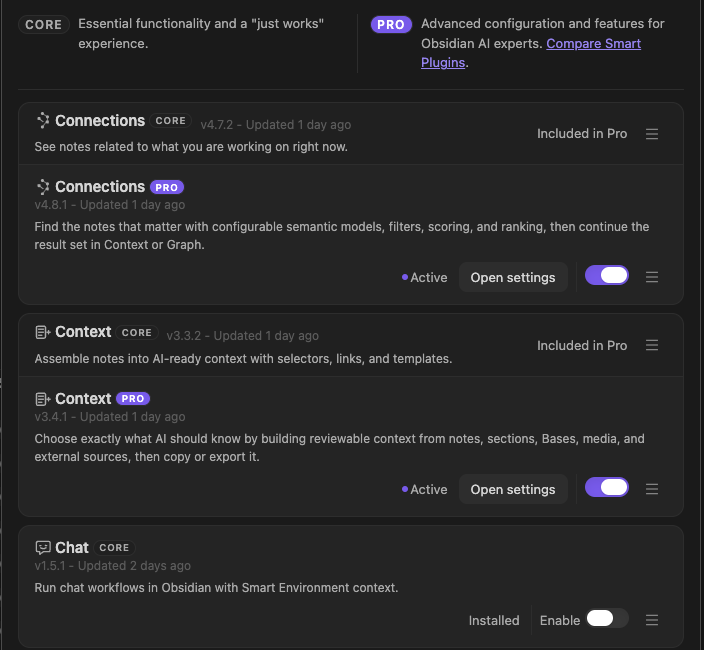
- Open Browse Smart Plugins.
- Find Chat.
- Follow the visible Install or Enable action.
- If Enable appears after installation, choose Enable.
- If the row shows a full Reload required... action, complete it.
- Open a provider codeblock.
- Send a prompt.
- Make sure that the provider returns a visible response.
1. Open the note where the chat thread belongs
Start from the note that owns the work.
Good candidates:
- project hub
- meeting note
- research note
- decision note
- bug report
- draft
- outcome note
The simple rule:
Put the chat thread in the note where future-you would look for it.
2. Insert a provider codeblock
Open the Command Palette in the owning note. Run the provider action that you need. For ChatGPT, run Insert OpenAI ChatGPT codeblock.
Other Core actions include:
- Insert Anthropic Claude codeblock
- Insert Google Gemini codeblock
- Insert DeepSeek codeblock
- Insert Perplexity codeblock
- Insert Grok codeblock
- Insert Google AI Studio codeblock
- Insert Open WebUI codeblock
- Insert Kimi codeblock
The ChatGPT action inserts:
```smart-chatgpt
```
Switch the note to Reading view so the provider surface can render. For fences, providers, and Pro differences, see Supported providers.
3. Open the provider surface
In Reading view, open the provider from the rendered block. If the provider requires an account, sign in.
At this point, distinguish these states:
| State | Meaning | Next action |
|---|---|---|
| Provider did not load | The web surface is unavailable or stalled. | Use Refresh. If sign-in is required, use Obsidian Web Viewer. |
| Provider loaded | The interface is visible, but no request has succeeded. | Enter the test prompt below. |
| Response visible | The provider returned an answer. | The first Chat win is complete. |
| Durable URL saved | Smart Chat recognized a provider thread URL and wrote it to Markdown. | Reopen it to verify continuity. |
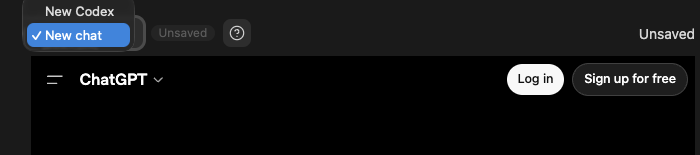
New chat and Unsaved identify a loaded provider surface, not a completed or durable thread.
4. Send the first prompt
Enter a small, useful prompt:
Create a five-item review checklist for this task: [describe the task in one sentence].
Keep each item specific and testable.
Replace the bracketed text with the task owned by the note.
Send it with the provider's normal send control.
You know Chat is working when the provider displays a response that fits the request. Use that response for the note's work. When you need more information, send one bounded follow-up question.
A provider can return a response while the block still shows a new or unsaved chat. Do not claim durable continuity yet. Wait until Smart Chat writes a recognized provider thread URL to the block. Reopen that URL. Make sure that it opens the same conversation.
5. Save the thread when a durable URL exists
After the provider creates a recognized conversation URL, Smart Chat can write the reference into the codeblock. Reopen the saved entry. Make sure that it returns to the intended conversation.
Example saved state:
```smart-chatgpt
chat-active:: 1700000100 https://chatgpt.com/c/example-active
```
If the surface still says new chat or no URL appears, the response can still be valid. However, the thread is not yet a durable note bookmark. Continue the provider conversation until it creates a recognized URL. Alternatively, use Copy link only when the current URL identifies the conversation.
Core stores saved URLs and Active or Done state in Markdown. It does not store the full provider transcript by default.
Optional: Mark active or done after review
Use Active or Done only after a saved thread reopens correctly.
| State | Meaning | Use it when |
|---|---|---|
chat-active:: |
The thread is still relevant, waiting, or in progress. | You need to return later. |
chat-done:: |
You reviewed the thread and closed the loop for now. | The useful output has been handled, promoted, saved, or dismissed. |
Done does not mean Smart Chat judged the answer correct.
Done means you reviewed the thread and decided the conversation is closed for now.
Keep the thread Active until its backing conversation reopens. Review the result. Change the thread to Done only after this review. Provider completion alone does not determine the state. See Mark done and Mark active.
What gets saved
A provider codeblock can hold saved Active or Done links. The provider URL and user-owned state stay in Markdown, while the full provider transcript remains with the provider. See Thread storage grammar.
When to use the universal Smart Chat codeblock
Smart Chat Pro adds the universal smart-chat codeblock. Use this sequence:
- Run Insert Smart Chat codeblock.
- Switch the note to Reading view.
- Choose a provider from New chat.
- Send a concrete prompt.
- Confirm that the provider returns a settled visible response.
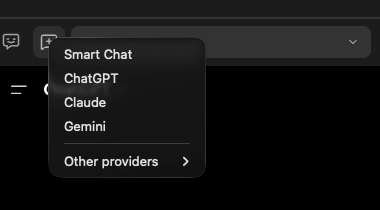
Choose the provider for the new thread.
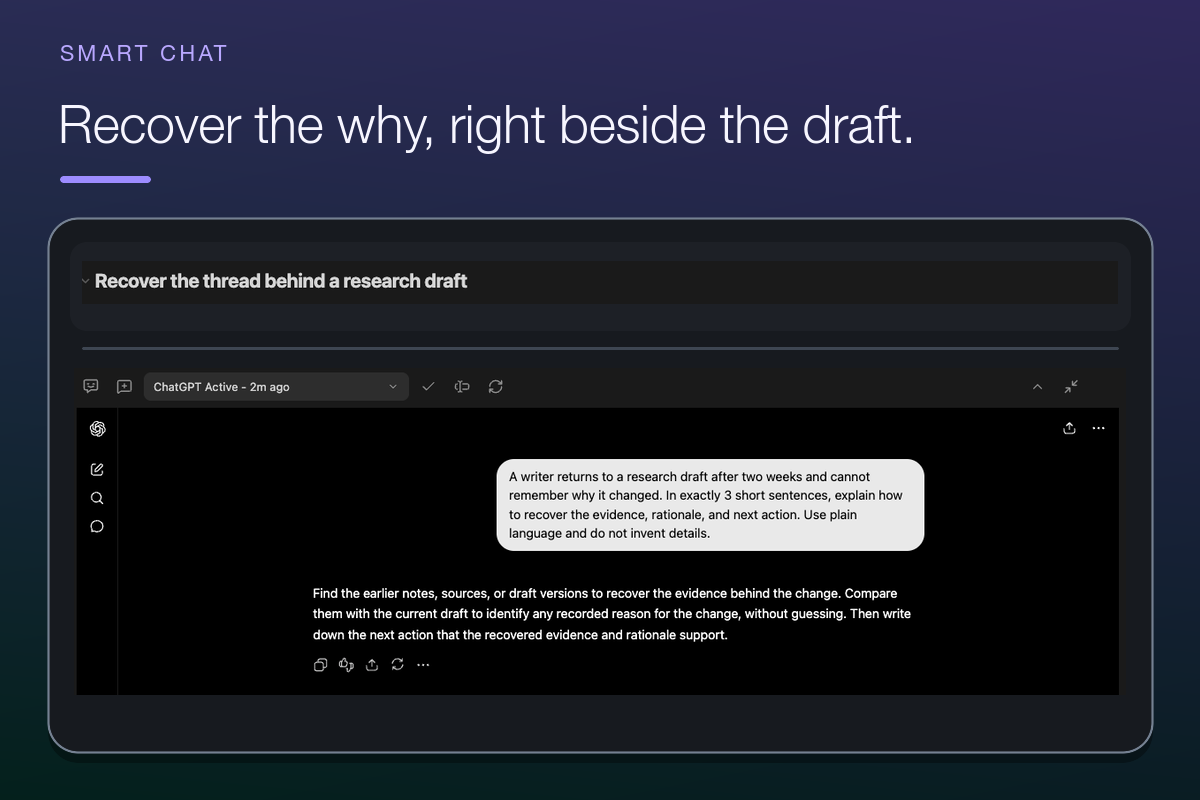
The visible response completes the provider-response check. A recognized provider conversation URL is still required before the thread becomes a durable note bookmark.
Use it when one codeblock needs a shared provider selector or several saved provider threads. Durable URL capture and Active or Done tracking remain separate checks.
Desktop vs mobile
| Platform | What to expect | Best use |
|---|---|---|
| Obsidian Desktop | Embedded provider surface, sending, URL capture, and thread controls | Full workflow |
| Obsidian Mobile | Saved URLs can remain useful as external bookmarks. The embedded provider workflow is unavailable. | Reopen saved conversations |
| Any text editor | Saved provider URLs and Active or Done fields remain readable Markdown | Recover known links |
On mobile, use saved URLs as bookmarks or external links. Use desktop for the full embedded provider interface. See the platform reference.
Recover the first workflow
| Problem | Recovery |
|---|---|
| Provider surface is blank or stalled | Use Refresh. If sign-in is required, complete it in Obsidian Web Viewer. Return to the block. Use Refresh again. |
| The provider rejects the prompt | Make sure that sign-in works. Make sure that the account has provider access. Make sure that the provider is available. Retry the same small prompt. |
| A response appears but the block still says new chat | Treat response success as complete, but not durable saving. Wait for a recognized conversation URL before relying on the bookmark. |
| A saved entry opens the wrong conversation | Return to the correct provider thread. Save or select its exact URL. Keep the record Active until continuity is confirmed. |
| The embedded provider is unavailable on mobile | Open an already saved URL externally or continue on desktop. |
Continue only when the first response needs more
| Next need | Continue with |
|---|---|
| Ground a provider request with a small reviewed source set | Smart Context Getting Started -> Docs |
| Find a source by meaning when you know the question, not the note | Smart Lookup Getting Started |
| Apply a specific vault change | Connect Pro Getting Started |
| Review Active and Done links across notes | Build a Chat Inbox |
| Use a configured local or cloud API model inside Obsidian | Smart Chat API Extension Getting Started -> Docs |
| Understand every provider, selector, action, and recovery path | Smart Chat codeblock documentation |
First useful result checklist
Before moving on, check:
| Check | You know it worked when... |
|---|---|
| Note chosen | The provider codeblock is in the note where the conversation belongs. |
| Block rendered | Reading view shows the intended provider surface. |
| Prompt sent | The provider accepted the concrete prompt. |
| Response completed | A visible response matches the request. This is the required first win. |
| Durability understood | A saved URL is trusted only after it reopens the same conversation. |
| Next step clear | You know whether to save the provider URL, use the universal Smart Chat codeblock, or move to Smart Chat API Extension. |