
Smart Dedupe FAQs
What is Smart Dedupe?
#Smart Dedupe finds likely exact and near-duplicate blocks across notes. It places candidates side by side so you can decide whether to keep them separate, consolidate useful material manually, archive a redundant source, or ignore the match.
Does 1.00 similarity mean an exact duplicate?
#It is a very strong signal, and an Exact hash match identifies identical normalized text, but neither tells you what the notes are for. Open both sources before merging, archiving, or deleting anything.
Can I cancel a scan?
#Yes. Choose Cancel while the scan is running. Wait for the Detector to settle before you start another scan. Treat any displayed candidates as a partial result set.
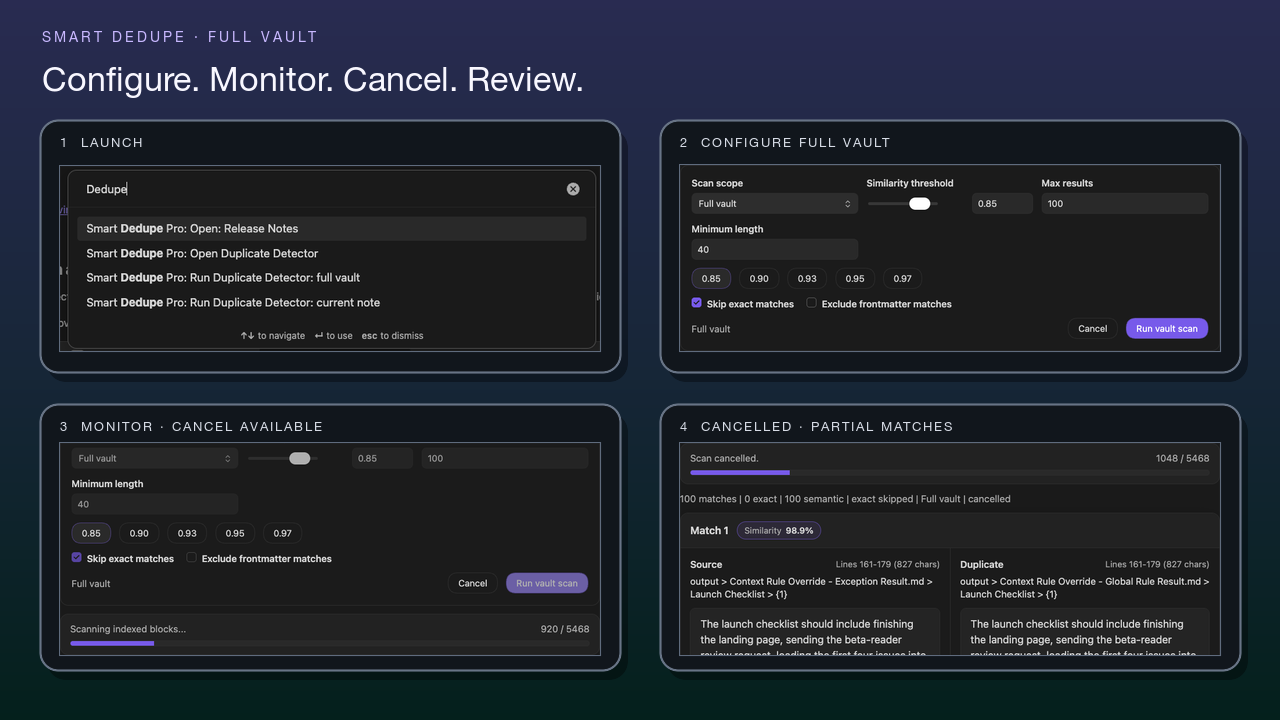
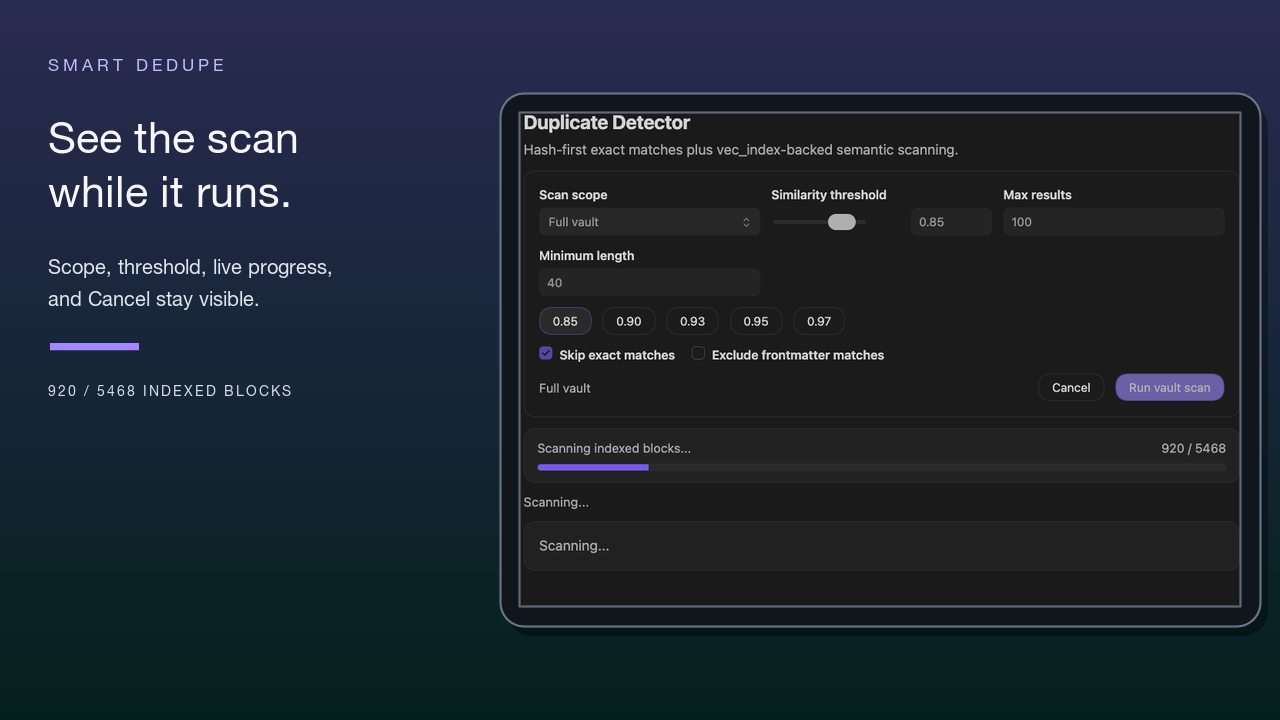
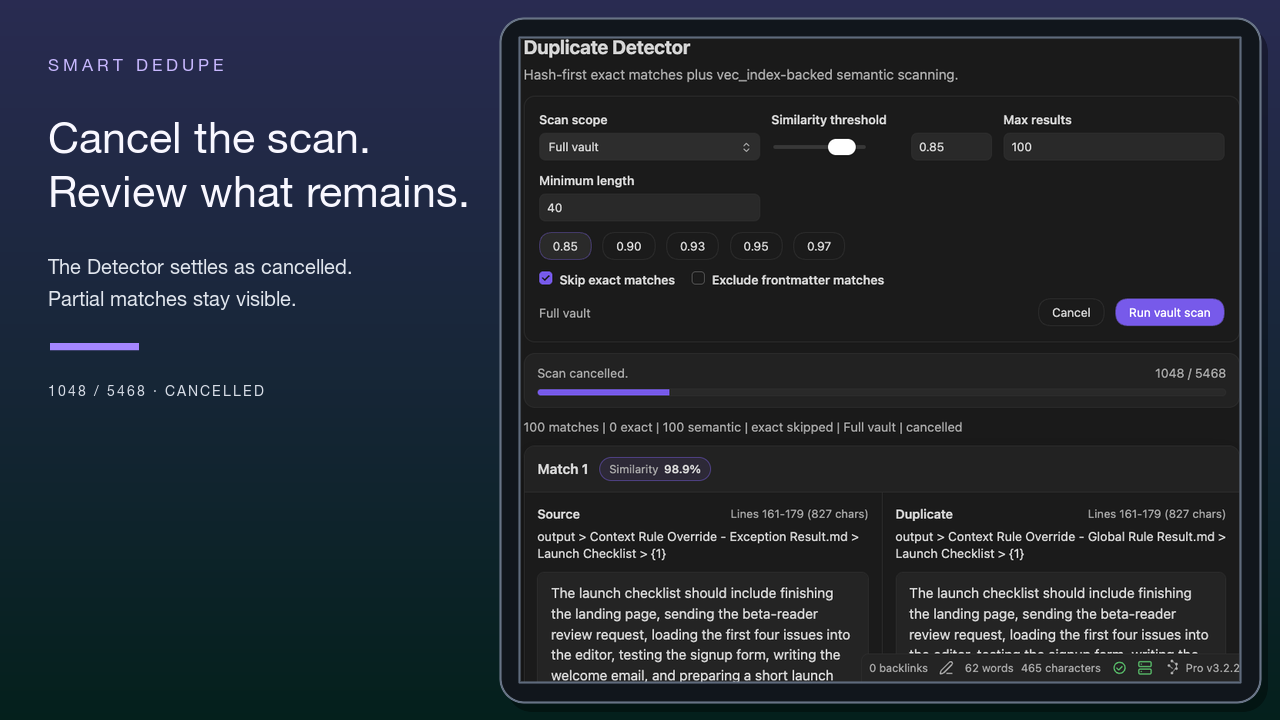
While a scan runs, you can monitor processed-note progress or cancel it. A cancelled scan keeps only the candidates found so far, so treat that result set as partial.
What is a good starting threshold?
#For a conservative first review, start around 0.90. Lower the threshold toward 0.85 when you intentionally want to find paraphrases. Raise it when weak matches create noise. The threshold controls which semantic candidates qualify, not whether two passages should be consolidated.
Does the running scan show how many results have been found?
#The Detector shows scan progress, processed-note counts, and Cancel, but not a running match count. Candidate rows are available after completion or cancellation.
Will this delete or merge my notes?
#No. Smart Dedupe is review-first. Copy and Open help you inspect a candidate, but cleanup remains a deliberate action in your normal Obsidian workflow.
How does it find duplicates?
#Smart Dedupe can use an exact-text pass and semantic similarity over prepared block embeddings. Exact matching can work without embeddings. Semantic matching requires Smart Environment to prepare the relevant blocks.
What if two similar notes are both useful?
#Keep them separate. Similar passages can serve different audiences, projects, stages, or decisions. Use Smart Connections when the relationship is useful. Use Dedupe only when the overlap creates rework, conflict, or context bloat.
Is Smart Dedupe just another Connections view?
#No. Connections is for discovering related notes from the current note. Dedupe is for reviewing repeated work and deciding whether anything should change.
Will cleanup improve AI output?
#It can make context easier to inspect by reducing repeated or conflicting source material, but it does not guarantee a better model answer. After cleanup, rebuild the affected package with Smart Context.
Will a full-vault scan be slow?
#It can be heavier than a current-note scan. Start with Current note. Use a stricter threshold. Set a bounded result count. Use Full vault only after you understand the controls and have a review session you can finish.
Do Source and Duplicate tell me which note to keep?
#No. They name the two sides of a candidate pair. Neither label tells you which note is the original or which passage you should keep.
Do zero results mean the vault has no other duplicates?
#No. Zero results only means that no candidates matched the settings used for that run. Scope, threshold, minimum length, exclusions, result limit, embedding readiness, and cancellation can all change what appears. Change one setting at a time before drawing a broader conclusion.
When should I use Lookup or Obsidian Search instead?
#Use Smart Lookup when you remember an idea or can phrase a question. Use Obsidian Search when exact text, titles, tags, syntax, or regex matter. Use Dedupe when you need to decide what repeated material to keep, combine, archive, or ignore.
What scope should I start with?
#Start with one current note where repeated material already creates a decision. Review one candidate pair to completion before broadening the scan.