
Option 1
Copy your current note (plus linked references)
Best when one note anchors the problem. Set link depth so definitions and evidence come along without unnecessary bloat.
Learn: Clipboard + depth
Official Smart Plugins site
Smart Plugins are independent third-party plugins for Obsidian. Smart Connections is the flagship plugin.
Stop pasting vague prompts. Build grounded context packages from your actual notes, then reuse them across ChatGPT and other AI tools.
Local-first by default. Smart Context runs inside Obsidian and exports to your clipboard. Nothing is uploaded unless you paste it.
Copy folders | Follow links by depth | Save named contexts | Keep prompts token-aware | Standardize output with templates | Export agent-ready bundles (Pro)
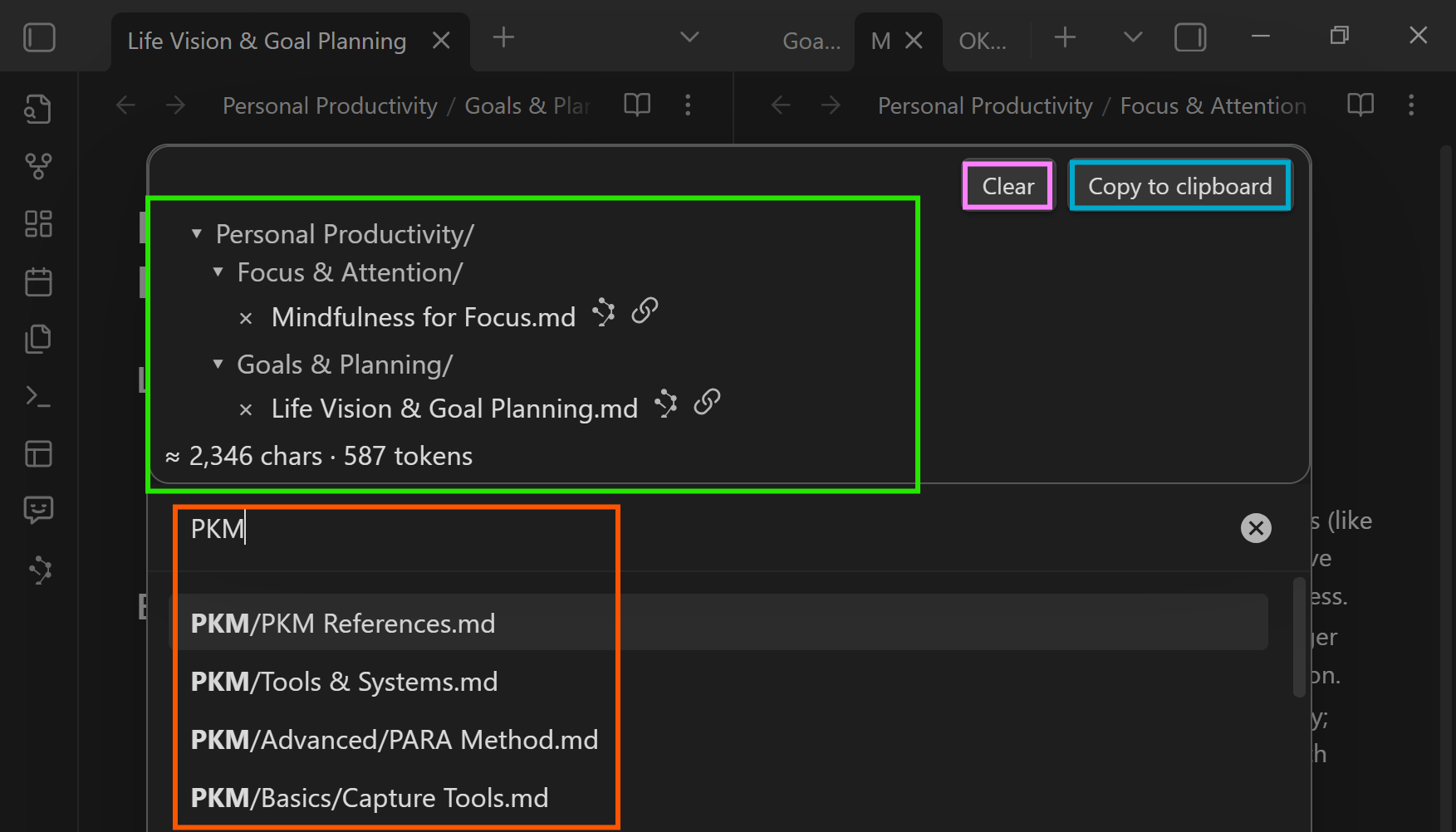
Fastest first win: follow the Getting Started guide and run one copy flow today.
AI can only reason with what you provide. Smart Context helps you copy the right notes, in the right shape, without exceeding your context budget. Pick the fastest path for your current vault.
Option 1
Best when one note anchors the problem. Set link depth so definitions and evidence come along without unnecessary bloat.
Learn: Clipboard + depth
Option 2
Best when work already lives in a folder. Capture one complete snapshot, then trim only if needed.
Learn: Folder workflows
Option 3
Best when you repeat the same work each week. Save a named context once, then reuse it across chats and projects.
Learn: Builder + named contexts
Want outputs that stay consistent? Use templates in Settings so every export has the same structure (headers, metadata, file tree).
Want the shortest reliable loop? Copy a note at Depth 0 or 1, then prompt: "Use only this context. Extract constraints first, then propose next actions."
Use Smart Context when your notes already contain the answer, but your AI replies still drift because the right evidence is not packaged together.
This is where Smart Context pays off: when your notes are right, but your prompts are not. Choose the job that matches your current friction and copy a pack that fixes it.
If every new chat starts with backstory, save a named pack once and reuse it.
Include: brief, constraints, decisions, latest status. Build it in the Builder .
"Using only this context, summarize current state, risks, and the top 5 next actions. Cite the note title for each claim."
If decisions keep getting lost between meetings, export a reliable prep + follow-up bundle.
Include: agenda, last notes, decisions, open tasks. Copy via Clipboard (or save as a named pack).
"Draft a prep brief and follow-ups with owners. Pull action items from the context and keep wording concise."
If your hub note cites the real sources, copy it with Depth 1 so the references come along.
Include: hub note + cited notes. Use Depth 1 to stay grounded.
"Summarize, list open questions, and cite sources by note title. If evidence conflicts, call it out explicitly."
If your writing help keeps drifting, bundle your rules and examples with the draft.
Include: outline, draft, tone rules, 1-3 examples. Standardize output with templates .
"Continue the draft in my voice. Follow the outline. Use only the provided references for claims."
If context keeps exceeding limits, treat depth and blocks as your budget controls.
Start at Depth 0. Expand only when needed. Use the size estimate as a budget signal.
"If this is too large, tell me what to remove first (in order) while preserving constraints and ground truth."
If the truth lives in screenshots, diagrams, or PDFs, export visuals alongside text.
Use Copy with media and paste into an image-capable model.
"Use both the text and images. Call out any visual gaps or mismatches with the written notes."
Coders and agents: pin external repos and files inside a note with the Codeblock workflow (Context Pro).
Start with Core for fast selection, named contexts, link depth, and predictable clipboard exports. Upgrade to Context Pro when you need media-aware copy flows, external sources, and agent-ready outputs.
Core plugin
Build precise bundles of notes and reuse them across prompts and projects.
Pro plugin In Pro plugins all-access
Advanced tools for context engineering: external sources, media-aware exports, and agent-ready outputs.
Already a monthly, yearly, or Founding supporter? Your supporter perks already include Context Pro features. No extra Pro plugins subscription is required.
Start simple, then level up to reusable packs, predictable templates, and Pro workflows.
Screenshots + the fastest first-win workflows.
Copy current note, selected notes, or folders with depth + size estimates.
Save trusted context packs and reopen them instantly.
Standardize wrappers, metadata, and file tree output.
Pin external repos/files in notes for agent-ready context.
Context Pro, Smart Chat, and more advanced workflows.
Quick answers to the highest-intent pre-install questions about compatibility, privacy, first wins, token budgets, and Pro workflows.
Smart Context helps you build grounded context packages from your actual Obsidian notes, then reuse them across ChatGPT and other AI tools. It reduces vague prompts by helping you copy the right notes in a clean, repeatable format.
Yes. Smart Context is clipboard-based, so you can paste exported context into ChatGPT, Claude, Gemini, Smart Chat, or another AI tool. The same context bundle can be reused anywhere that accepts pasted text.
Yes. Smart Context runs inside Obsidian and exports to your clipboard. Nothing is uploaded unless you explicitly paste it into another tool.
Follow the Getting Started guide and run one copy flow today: copy the current note, copy a folder snapshot, or build a reusable context pack. Most users can get a first grounded answer in under a minute.
Use the current note when one note anchors the task, a folder when the project already lives together, and a reusable pack when you need a curated working set you will reopen across sessions.
Depth 0 copies the starting note. Depth 1 adds directly linked notes. Depth 2 adds links of links, and deeper levels expand further. Start small and expand only when the extra evidence is needed. See Clipboard + depth.
Start at Depth 0, expand only when needed, and use the size estimate as a budget signal. If one note is too large, switch to a smaller selection or a curated pack instead of copying the entire folder.
Yes. The Builder lets you create, name, reopen, and reuse trusted context sets across chats and projects so you do not have to rebuild the same bundle every time.
Yes. Settings lets you customize context templates, item templates, wrappers, file paths, and file tree output so exports stay stable across workflows.
Core covers fast selection, link depth, named contexts, and template-driven exports. Context Pro adds media-aware copy flows, external files and repos, and deeper agent-ready workflows.
Yes, with Context Pro. Copy with media handles images and PDFs, and the Codeblock workflow lets you include external repos or files alongside note-based context.
Yes. You can send results from the Connections view to Smart Context, remove noise, and copy the curated pack. See the Connections view guide.
Build your first context pack now and watch your prompts level up. Start with the free Core plugin, then add Context Pro when you need media, external sources, and agent-ready bundles.