
Configurable Connections Algorithms
Connections Pro exposes score and ranking controls so you can tune connection results to match your current workflow.
Use this page as a practical setup guide: choose the right candidate pool, pick a score strategy, then add ranking only when you need extra shaping.
Setup flow (recommended)
- Choose a results collection key.
Smart Sourcesfor note-level discovery.Smart Blocksfor heading/block-level precision.
- Select a score algorithm.
- Start with
Cosine Similarityas a baseline. - Move to feedback or metadata weighting after you observe noisy or under-weighted results.
- Start with
- Optionally add ranking/post-process.
- Keep
Nonefor speed and deterministic score order. - Use
Re-ranking modelorRecency rankwhen you need final ordering tuned for a specific task.
- Keep
Quick decision guide
- If results are not relevant, adjust score first.
- switch collection (
Smart SourcesvsSmart Blocks) - change score algorithm before adding ranking complexity
- switch collection (
- If results are relevant but out of order, adjust ranking.
- keep score algorithm stable
- add
Re-ranking modelorRecency rank
- If results are relevant but keep surfacing known low-value notes, apply feedback-aware scoring.
- hide recurring noisy notes
- use
Similarity Adjusted by FeedbackorSimilarity Weighted by Feedback
Controls at a glance
- Results collection key selects Smart Sources or Smart Blocks as the candidate pool
- Score algorithm selects the primary ranking strategy
- Post processing allows a secondary rerank stage such as Cohere via Smart Rank when configured
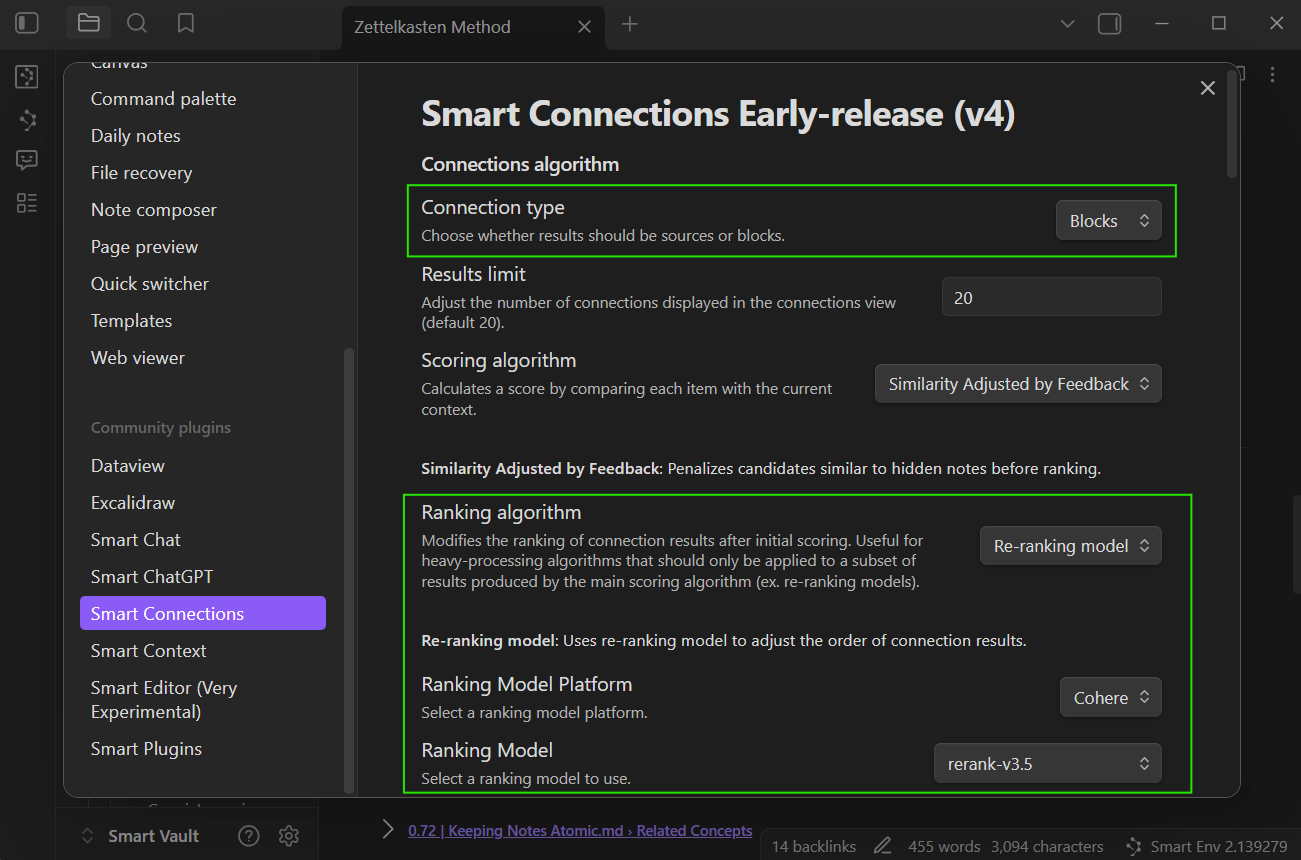
Score algorithms
| Algorithm | What it does | When to use |
|---|---|---|
| Cosine Similarity | Ranks by embedding similarity between the current note and candidates. | Default when you want stable, feedback-free results. |
| Similarity Adjusted by Feedback | Penalizes candidates similar to hidden notes. | When you want to reduce recurring noise. |
| Similarity Weighted by Feedback | Boosts candidates similar to pinned notes and dampens hidden notes. | When you actively pin/hidden to steer results. |
| Similarity Weighted by Key + Frontmatter | Multiplies similarity based on key fragments and frontmatter matches. | When metadata should emphasize or de-emphasize results. |
Practical presets
- Default, low-maintenance: Smart Sources + Cosine Similarity + None
- Reduce repeated noise: Smart Sources + Similarity Adjusted by Feedback + None
- Leverage explicit curation: Smart Sources + Similarity Weighted by Feedback + Re-ranking model
- Metadata-driven retrieval: Smart Blocks + Similarity Weighted by Key + Frontmatter + Recency rank
Ranking algorithms
| Algorithm | What it does | Notes |
|---|---|---|
| None | Keeps the original score order. | Fastest option. |
| Re-ranking model | Applies Smart Rank to reorder the scored list. | Requires a Smart Rank model in Smart Environment Pro settings. |
| Recency rank | Orders results by most recently modified items. | Returns score labels with time-ago hints. |
Score vs ranking boundary
- Score algorithms decide relevance for each candidate.
- Ranking algorithms decide final order of already-scored candidates.
- Keep metadata weighting (
key/frontmatter) in score actions and recency shaping in ranking actions for easier iteration.
Troubleshooting quick checks
- Results feel too broad -> switch to
Smart Blocksand re-run. - Same low-value notes keep returning -> hide them and use feedback-adjusted scoring.
- Valuable tagged/foldered notes are under-ranked -> configure key/frontmatter weights.
- Results are relevant but ordering feels off -> add
Re-ranking modelorRecency rank.
Example weighting config (Similarity Weighted by Key + Frontmatter)
Use JSON in the score algorithm settings:
{
	"key_weights": {
		"Projects/": 1.2,
		"Readwise/": 0.8,
		"#High-value heading": 1.3
	},
	"meta_weights": {
		"status:evergreen": 1.15,
		"type=spec": 1.1,
		"reviewed": 1.05
	}
}
key_weightsapplies substring matches to key/path/heading signals.meta_weightssupportskey,key:value, andkey=valuematchers.- multiple matches multiply together.
This is best for structural intent. Use recency ranking for freshness intent.
Tip
Try Smart Blocks as the collection for fine grained context when your notes have strong headings. Use Smart Sources for broader note level discovery.
Related pages
- Start with the user workflow: Exploring the Connections view
- Compare scoring behavior in question mode: Smart Lookup
- Apply algorithm changes to inline suggestions: Inline connections
- Configure and validate settings: Connections settings
- Ground model output with exported context: Smart Context Clipboard