
Smart Context FAQs
What is Smart Context for Obsidian?
#Smart Context packages selected Obsidian content so you can review exactly what will be copied, exported, or sent.
What should I copy first?
#Open the note that owns the task. Use the procedure for your installed edition:
- Core: Run
Smart Context: Copy current text to clipboard (choose link depth). In Copy context, select the Depth 0 row marked Current note. Selecting it copies immediately. - Pro: Select the Smart Context: Copy current ribbon action. Open Depth 0 - current note. Select Copy text.
Paste the result into a clean destination. Examine the result before you send it.
Use Builder only when the active note is not enough.
What do Depth 0, Depth 1, Depth 2, and Depth 3 mean?
#- Depth 0 starts with the current note and material it embeds. It does not follow ordinary links.
- Depth 1 - outlinks only also follows outgoing links.
- Depth 1 - include backlinks follows outgoing and incoming links.
- Higher depths repeat that traversal one link layer at a time.
Choose the smallest depth that contains the evidence you intend to send.
How do I know Smart Context worked?
#The pasted content must match the selected depth or reviewed Builder tree. For a model workflow, the answer must use details from those sources. Otherwise, it must identify a specific evidence gap. A copy notice alone does not prove the package is correct.
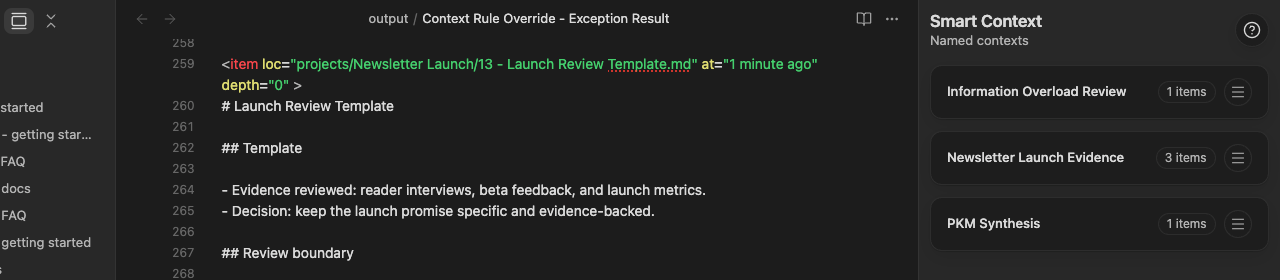
In this Pro example, the compiled result keeps the source wrapper, includes the reviewed Template section, and preserves the following Review boundary. For a current-note copy, perform the same check against the depth and source tree you selected.
Which source modes are current?
#Core Builder exposes Notes, Sections, and Named contexts. Pro adds Media, Folders, Linked notes, Similar notes, Tags, and External files.
Each result is a candidate until you deliberately add it. Review the active tree after every addition.
Which output should I choose?
#- Copy text for a readable context tree and source bodies in Core or Pro.
- Copy media for one composite clipboard image made from selected images and PDF pages in Pro.
- Copy ZIP for an archive file reference in Pro.
- Copy link tree for a compact source hierarchy. Core exposes a current-note link-tree command. Pro also exposes package menus.
- Copy with Template when Smart Templates is installed and the package contains items.
Copy text and Copy media are separate because some destinations handle text and images differently. When you need both, copy each output separately.
Use Copy link tree when the destination needs a compact outline of the source hierarchy instead of the note contents, and when that option is available. Use Copy text when the destination needs the contents of the sources.
Paste or open the result. Compare it with the reviewed package.
When should I use Builder instead of a direct file action?
#In Core, use Builder for source-by-source review, precise sections, source and token estimates, and named reuse. Use Pro Builder when you also need dynamic folder or tag groups, Rules, exclusions, media, or external files.
Run the command for your edition:
- Core:
Smart Context: Open new context in builder - Pro:
Smart Context Pro: Open new context in builder
In either edition, you can also select Smart Context: Open Builder.
Can I copy selected notes or folders directly from the file navigator?
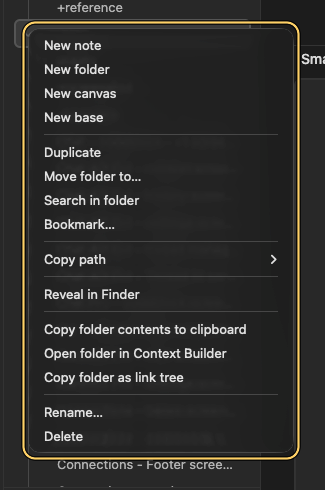
#Yes. For a direct copy:
- Select at least two supported notes or folders.
- Open the context menu.
- Select Copy selected notes as context or Copy selected folders as context.
The selection copies directly without a link-depth chooser. Select Open selection in Context Builder when you must:
- remove sources
- select sections
- estimate the package size
- save the package for reuse
Run Select folder to copy contents when a searchable folder picker is faster.
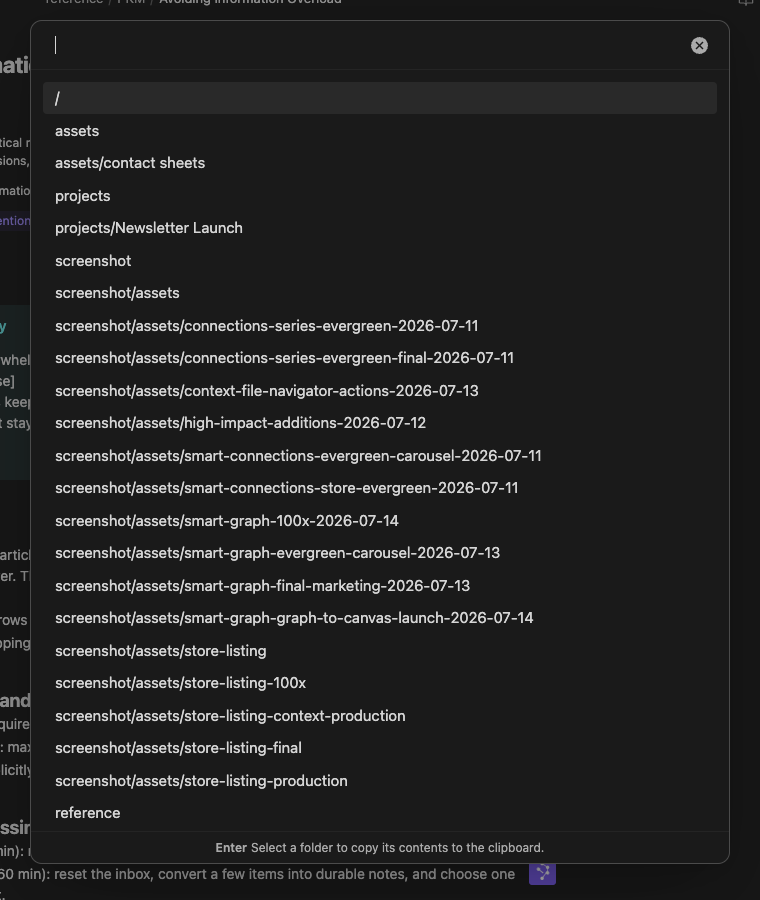
Direct file and folder actions use the supported content in the files or folders you selected. Use current-note copy when you want Smart Context to follow links from the current note.
How do Context rules work?
#Rules are a Pro feature. They record dynamic package boundaries. An Include can contribute a folder or another group. An Exclude can keep an exact child or heading out while the group remains included.
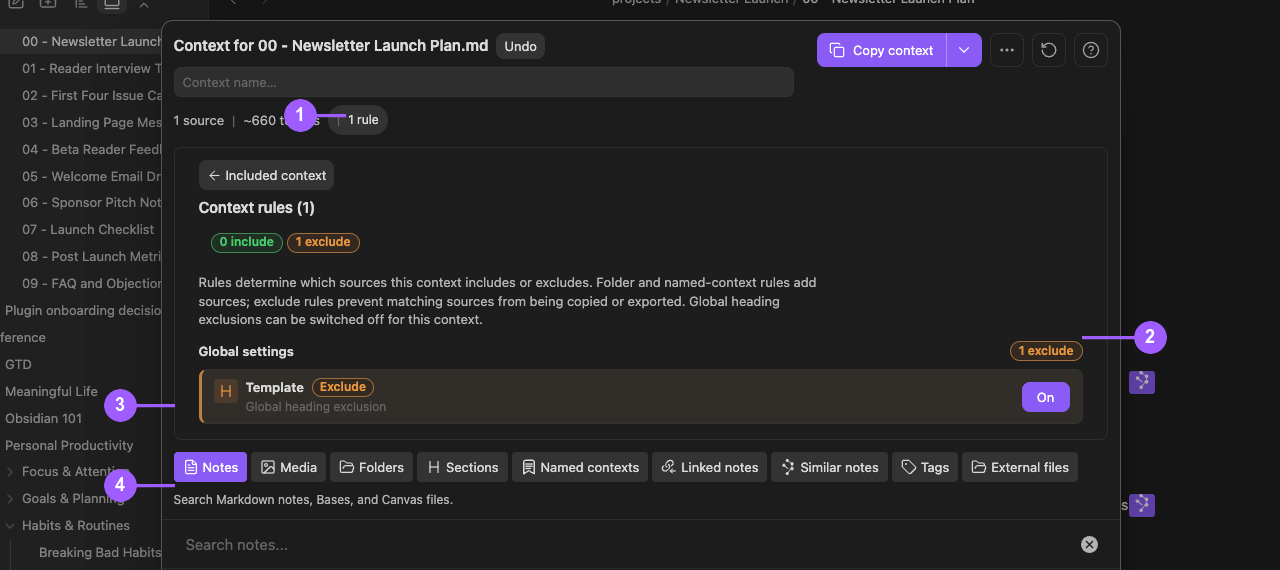
What the numbers show:
- The visible
1 rulechip preserves continuity with the reviewed package. - The global
1 excludecount and override show the current exclusion state. - The Template global heading-exclusion row is visibly On for this package.
- Source-mode tabs remain available while Rules are inspected.
An Include rule contributes a dynamic source. An Exclude rule keeps matching content out. Turning off a global heading exclusion creates an exception for this context without deleting the global rule. Copy again after any change. Examine the result.
Can I save reusable context sets?
#Yes. Name a reviewed package in Builder. Reopen it through Named contexts or the named-context dashboard.
Recheck source availability and size before reuse. In Pro, also check Rules. Saved groups can expand when Pro rules resolve, so the Builder source count can be larger than the dashboard item count.
How do I review a named context before reuse?
#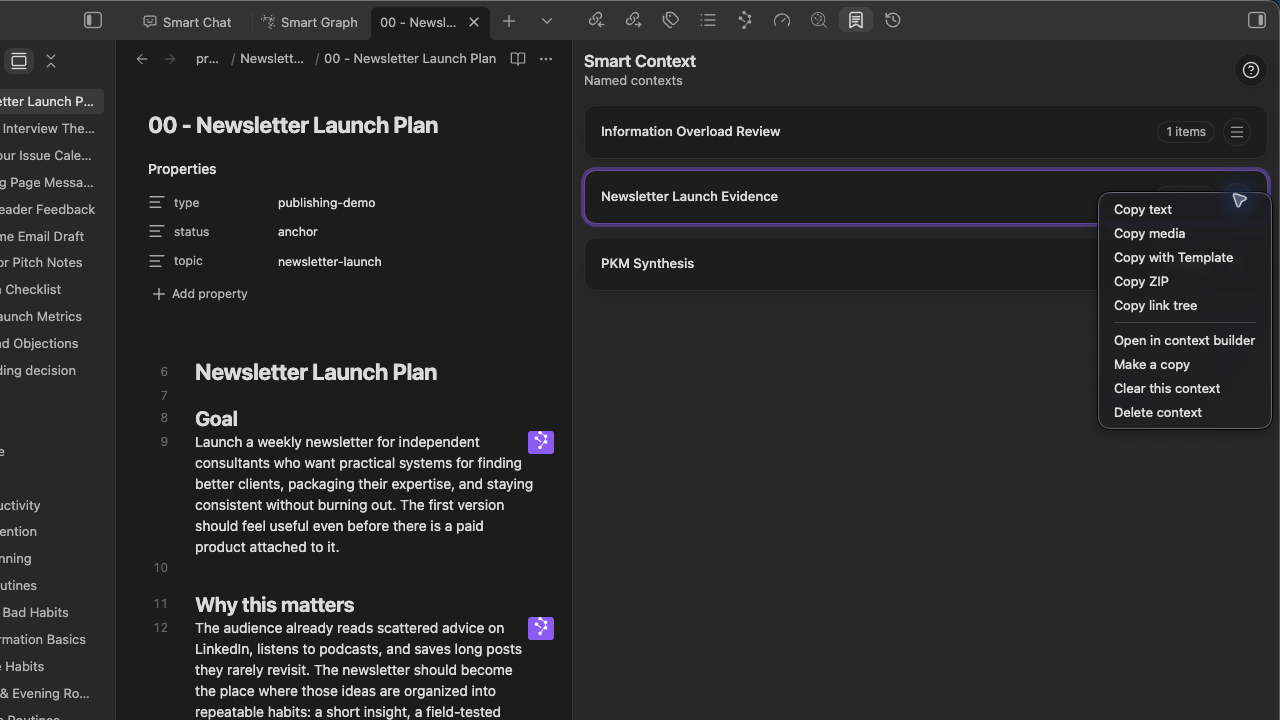
- Open the dashboard.
- Make sure that the saved name and item count are correct.
- Select Open in context builder before copying.
Make a copy, Clear this context, and Delete context change the saved definition. Make sure that the selected name is correct before you use these actions.
What is the difference between a named context and a codeblock?
#Use a named context when the same reviewed package should be reused across tasks. Use a Smart Context codeblock when the source manifest should remain visible inside one note.
Simple rule:
Named context = reusable package. Codeblock = visible manifest attached to a note.
What can a Smart Context codeblock contain?
#Core codeblocks accept local note paths and ctx:: named-context references. Pro also accepts supported relative external include or exclude lines.
Run the codeblock command for your edition:
- Core:
Smart Context: Insert codeblock - Pro:
Smart Context Pro: Insert codeblock
Compare the fenced source with the rendered tree. After you copy or open the codeblock in Builder, make sure that each path resolves to the intended source.
Can I send Smart Connections results into Context?
#Yes. Select Send to Smart Context from a reviewed Connections result set. Make sure that the same sources appear in Builder. If the action is unavailable, open the Smart Plugins Store. Install Smart Context if it is not installed. Enable Smart Context if it is disabled.
How do I keep a package small enough to review?
#- Start from one task-owning note.
- Add a Section when only one heading matters.
- Prefer reviewed Linked notes over broad discovery.
- Remove irrelevant direct sources.
- Inspect Rules for items inherited from folders or tags.
- Treat the token estimate as directional, not provider-exact.
Can I include only part of a long note?
#Yes. Add a Section, heading, or block instead of the whole note. Examine the resolved package before copying. This keeps unrelated material out of the package.
Can I customize the copied format?
#Yes. Smart Context settings provide XML, Markdown, JSON, and custom output templates. The context template can insert {{FILE_TREE}}. Item templates can use path, name, modified-time, link-depth, extension, and current-note variables. Test the format with a small package. Examine the pasted result before you use the format broadly.
What if a source is missing or a folder is truncated?
#Restore or remove a missing source. If a folder is marked truncated, use one of these actions:
- Narrow the folder.
- Use a Section.
- Split the package.
Cancel an incomplete-output confirmation unless a partial package is intentional.
What if Copy media is too large?
#In Pro, reduce the number of selected images or PDF pages. Lower the media resolution if necessary. Copy again. Examine the composite image in the destination.
What if the clipboard result is empty?
#Make sure that the package contains at least one included item. In Pro, make sure that Rules did not exclude everything. Keep Builder open. Reduce the package. Retry the copy. In Pro, use ZIP when a clipboard workflow is unsuitable.
Does Smart Context upload my notes?
#Smart Context assembles the package in Obsidian. Content can leave Obsidian when you copy, paste, export, or send it to another application or provider. Inspect the package before sending sensitive material.
See the Privacy Policy.
Can I use Smart Context with ChatGPT, Claude, Gemini, or Smart Chat?
#Yes. Smart Context prepares a reviewed package for another destination. Check the included sources. Then paste, upload, or attach the package. The destination receives the content you send under its own privacy and retention terms.
Does Smart Context change my notes?
#Building or copying a package does not rewrite source notes. Saving a named context stores the package definition. A codeblock changes a note only when you choose to insert or edit that manifest. Rules change the package boundary, not the source files.
Can I include images and PDFs?
#Yes, with Pro. Add the intended images or PDF pages through Media. Select Copy media. Smart Context places one composite image on the clipboard. Make sure that every intended image and page appears in the destination.
Copy media includes only the images and PDF pages it finds. Run Copy text separately when the task also needs note text, paths, or other written source material.
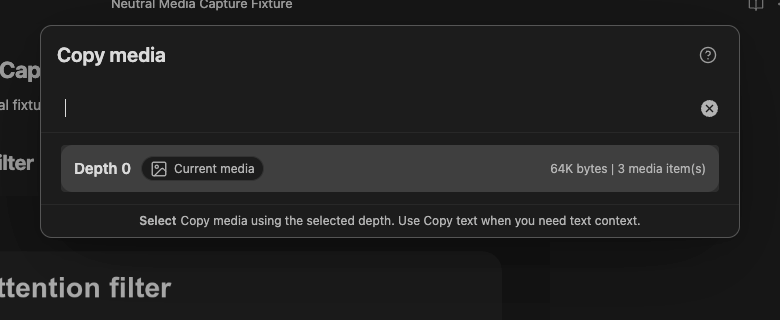
The chooser reports the media found at the selected depth before copying.
What does the Copy media count tell me?
#It shows how many media items Smart Context found in the current note, selection, or context. An unexpectedly small count usually means that the selected depth did not reach every attachment.
Why did an image or PDF not appear in Copy media?
#An image embedded in the starting note can be available at Depth 0. An attachment reached through a link requires enough depth to reach it. Check the media count, then retry in an empty composer that accepts pasted images. Use Copy text when the destination is text-only.
Can I include repos or external files?
#Yes, with Pro on desktop. Use External files or supported relative-path codeblock syntax. Prefer portable paths such as ../example-project/src. Explicitly exclude generated output or tests.
Expand the resolved tree. Make sure that included files are present. Make sure that excluded folders or patterns are absent before copying.
Can I include Canvas or Bases?
#Yes. Core and Pro Notes mode searches Markdown notes, Bases, and Canvas files. Pro adds richer Bases rendering and advanced workflows. Add the source. Then examine the resolved tree.
After copying, inspect which Canvas nodes, embedded cards, Base rows, filters, properties, and rendered text reached the destination. Do not infer the compiled output from the source view alone.
Copying text from a Canvas includes supported content from its file cards. It does not preserve card positions, groups, or edge meaning. Use Copy media or another visual output when the arrangement itself matters.
Why did a Base copy more rows or records than I expected?
#The rows visible in the Base are not always the exact copy boundary. Builder shows the resolved tree. Depth 0 uses the rendered Base; Depth 1 follows known linked notes. Filters, properties, links, rendered text, and relative this.file or this.note references affect the compiled output.
What if a Base does not appear as a Context source?
#Make sure that the .base file exists, then try adding it through Builder > Notes. For version-specific troubleshooting, use the current Context documentation, because older Environment or exclusion labels may no longer match the interface.
What should I do when a Base omits a required reference?
#Check that the Base displays the link or record you need. Widen to Depth 1 only when a known linked source is missing. When you need exact control, add the required note directly in Builder instead of increasing depth again.
What does Context Pro add over Core?
#Core covers the first useful workflow: current-note copy with a depth chooser. It also supports direct selected-note and folder copy, Builder note and block selection, named contexts, note and named-context codeblocks, template-driven exports, and Canvas sources.
Pro adds:
- images, PDF pages, and other Media sources
- external files, folders, and repositories
- dynamic folder and tag groups in Builder
- exclusions and heading filters
- richer Bases rendering and advanced workflows
Direct folder copy is Core. Dynamic folder and tag groups in Builder are Pro. Basic .base source handling is not a Pro-only claim.
Does Smart Context work on mobile?
#Yes for supported in-vault notes, sections, named contexts, codeblocks, and text copy. External file and folder browsing requires desktop filesystem access, and external items in a desktop-created named context cannot resolve on mobile. Clipboard limits vary by device and destination. Begin with a small package. Examine the pasted result before you send it.