
Copy context from Bases files without losing linked references
Obsidian Bases is a great selector. Smart Context is a great exporter.
This integration connects them:
filter a .base file down to the exact rows you care about, then copy a deep, link-preserving context bundle you can paste into chat, delegation briefs, or summaries.
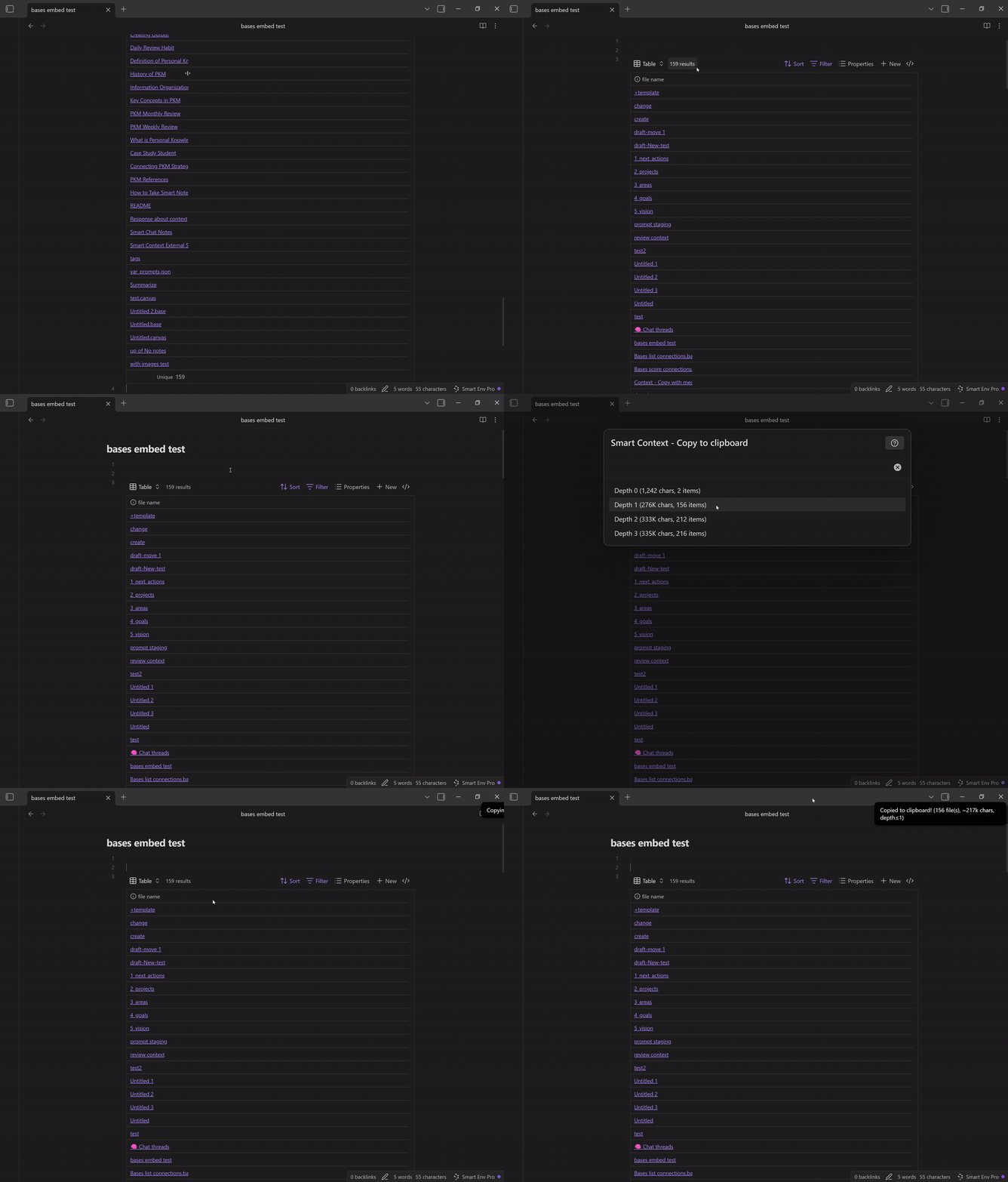
Use Bases to choose the records.
Use Copy to depth to export the records plus the linked references that make them understandable.
Why this matters
Bases often becomes the place where "the truth" lives:
- a project backlog base
- a CRM or people base
- a reading queue base
- a bug triage base
- a weekly planning base
But exporting that into a useful context bundle is usually painful:
- copying a table loses meaning
- links break
- referenced notes do not come along
- the recipient (human or AI) lacks surrounding context
Copy to depth from a Base solves that.
Your output stays grounded because it keeps the links and pulls in the referenced material.
Quick start (under 60 seconds)
- Open the
.basefile that represents your working set. - Filter/sort until only the rows you want are visible.
- Run Copy to depth (Smart Context).
- Choose a depth (start with 1).
- Paste into Smart Chat (or anywhere) and ask for the outcome you want.
If your goal is delegation, start with Depth 1.
Depth 2+ is powerful, but it can explode size fast.
Depth cheat sheet (how to choose)
Think of depth as "how many link-hops to include".
- Depth 0: only the selected/visible items (fastest, smallest).
- Depth 1: include direct links from those items (best default).
- Depth 2: include links of links (use when you know the references matter).
- Depth 3+: only for small, highly curated sets.
A practical heuristic:
- Delegation brief -> Depth 1
- Summary/report -> Depth 1 (maybe 2)
- Deep research synthesis -> Depth 2
- "Build me a full spec" -> Depth 2, but filter hard first
One-minute demo: turn a Base into a delegation brief
Scenario: you have a Base that tracks a project (tasks, notes, decisions). You want a teammate (or AI) to pick up the thread without a meeting.
- Filter the Base to the project rows that matter (top priority, in-progress, blocked).
- Copy to depth at Depth 1.
- Paste into Smart Chat and use this prompt:
Prompt you can copy:
- "Using only the attached context, write a delegation brief with:
- Goal
- Current state
- Key constraints
- Open decisions
- Next 10 actions (sorted by leverage)
- Risks + mitigation
- Questions that must be answered to proceed"
Outcome: the brief contains the records plus the linked context that makes them interpretable.
Best workflows this unlocks
1) Bases -> Smart Chat (grounded work, fewer hallucinations)
Use Bases to choose the scope, then chat with only the exported context.
Good for:
- planning
- writing update notes
- synthesizing decisions
- producing task lists that match your actual data
Related: Smart Chat overview and Smart Context Builder.
2) Bases -> "copyable handoff" for humans
Copy to depth produces a bundle that works in email, Slack, tickets, and docs.
The links remain actionable so the recipient can verify details.
3) Bases -> repeatable reporting
If you run weekly updates, Base filters become your reporting template:
- "Show only Done this week" -> copy -> summarize
- "Show blocked items" -> copy -> unblock plan
- "Show high-priority backlog" -> copy -> next sprint proposal
Tips for high-signal outputs
- Filter first. Bases is where you reduce the candidate set.
- Keep the bundle small. Better: 10 high-signal rows than 200 rows of noise.
- Use Depth 1 by default. Depth 2 is for when you know references matter.
- Prefer "visible working set" over "entire base". Your attention is the product.
Troubleshooting
The copied output is too large
- Lower depth (2 -> 1, or 1 -> 0)
- Reduce the number of visible rows (tighten filters)
- Remove heavy notes from the visible set (images, long logs, raw dumps)
The result lacks needed context
- Increase depth by 1 (0 -> 1, or 1 -> 2)
- Ensure the key "explainer" notes are included in the Base view
- Consider creating a small "Context anchor" note and linking it from the records
Related pages
- Smart Context Builder: build and refine reusable bundles
- Smart Context Clipboard: copy context with controlled link depth
- Smart Chat API integration: use the exported bundle as grounded chat context
- Connections in Bases: add relevance scoring inside Bases to choose rows faster