
Smart Milestones
Smart Milestones are a guided, in-app checklist that helps you learn Smart Plugins by doing the smallest actions that unlock real value.
Instead of reading docs first, you can:
- Do one "first win" action
- Watch it get checked automatically
- Click any milestone to open the relevant docs when you want details
- Open Milestones.
- Complete the next unchecked item in the top group.
- Use the feature once in a real note.
- Repeat until you hit the workflow you care about (linking, lookup, context, chat).
Where to find Milestones
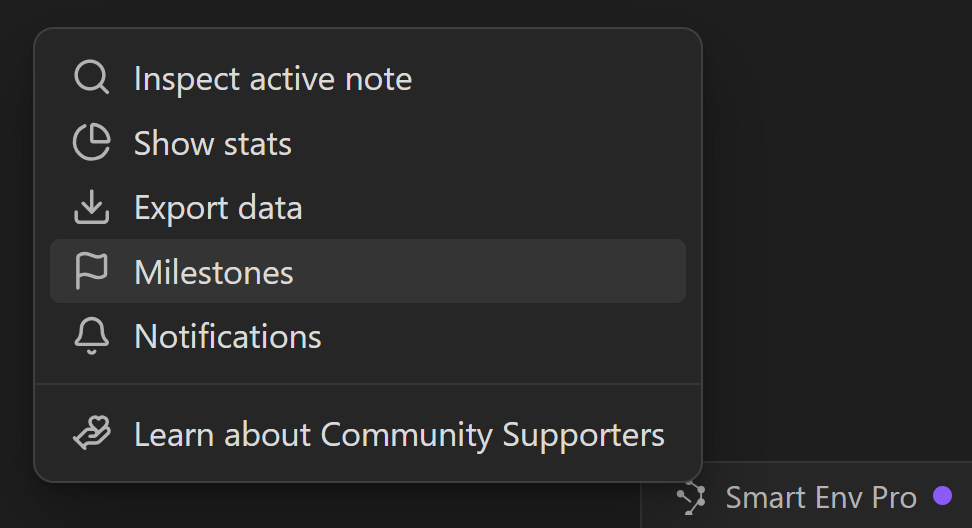
Milestones live in the Smart Environment status bar menu.
- Click the Smart Environment indicator in Obsidian's status bar.
- Choose Milestones.
How Milestones work
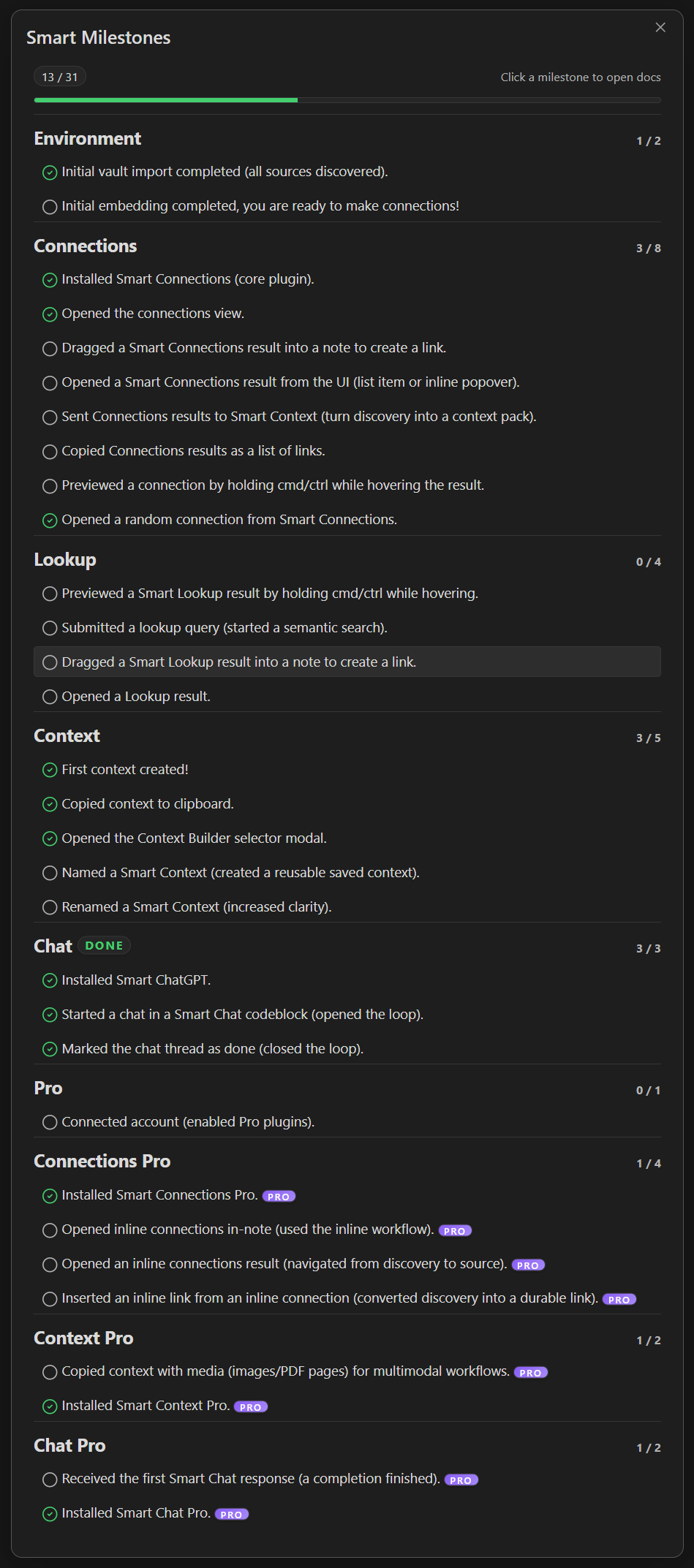
The Milestones modal is organized by feature area (Environment, Connections, Lookup, Context, Chat, and Pro).
What each line means:
- Each line is a "first time" action (open a view, run a command, drag a result, copy a context).
- A milestone checks itself the first time Smart Plugins detect you did it.
- Click any milestone to open the relevant docs (so you can go deeper only when you need to).
- Some milestones are labeled PRO. Those are optional and are there to show what is possible with Pro plugins enabled.
How to read the UI quickly
- Progress bar: how many milestones are complete overall.
- Group counters (example:
3/8): your progress in that feature area. - Check icon: complete.
- Empty circle: not complete yet.
- PRO badge: requires Pro plugins.
Your fastest first win
If you only do a few milestones, do these in order.
1) Finish setup (Environment)
Complete the Environment milestones so the rest of the features can work:
- "Initial vault import completed (all sources discovered)."
- "Initial embedding completed, you are ready to make connections!"
Connections and Lookup depend on embeddings. If embedding is still running, Milestones will reflect that.
2) Make your first meaningful link (Connections)
This is the shortest path from "I have notes" to "my vault is connected".
- Open the Connections view.
- Preview 1-2 results (Cmd/Ctrl hover).
- Drag a result into your note to create a link.
Optional but useful:
- Open a random connection (it teaches you the "browse by meaning" behavior fast).
3) Use Lookup once (Lookup)
Use Lookup when you remember the idea, not the exact words.
- Submit a lookup query (start a semantic search).
- Open a result.
- (Optional) Drag a Lookup result into a note to create a link.
4) Copy a tiny context pack (Context)
This is the bridge from "I found the right notes" to "I can paste grounded context into chat".
- Create your first context.
- Copy context to clipboard.
- Open the Context Builder selector modal (so you know where saved packs live).
5) Close a loop with chat (Chat)
This turns "random chats" into trackable work.
- Start a chat in a Smart Chat codeblock (opened the loop).
- Mark the chat thread as done (closed the loop).
Milestone notifications
When you complete a milestone, Smart Environment can show an achievement notification.
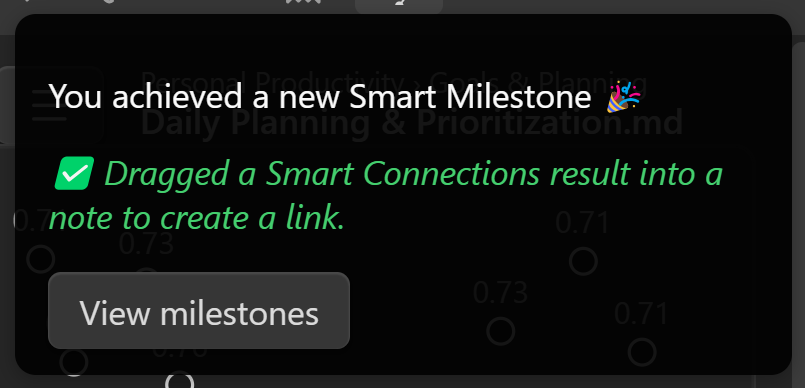
Use View milestones to jump back to the Milestones modal and pick the next action.
Pick a path based on what you are trying to do
You do not need to complete everything. Use Milestones like a menu.
If you want "related notes while writing"
Focus on Connections.
Next: try Inline connections so relevance shows up inside the editor.
If you want "search by meaning"
Focus on Lookup.
Goal: run one query, open 1-2 results, link the best one.
If you want "better AI answers with less copy/paste"
Focus on Context.
Next: use Context Builder feature for reusable packs and Context clipboard feature for one-off exports.
If you want "threads that are organized inside your notes"
Focus on Chat.
Next: use Chat codeblock so each thread lives where the work lives.
About Pro milestones
Pro milestones exist so you can:
- see what is possible,
- evaluate Pro by completing 1-2 high-signal actions,
- adopt only what actually improves your workflow.
If you are not using Pro, ignore PRO milestones and focus on completing the core milestones in Environment, Connections, Lookup, Context, and Chat.
Troubleshooting
"I did the thing, but it did not check"
Most milestones are detected the first time you perform an action. If one does not check:
- Do the action once more (slowly, in the same Obsidian window).
- Close and reopen the Milestones modal.
- Confirm prerequisites are complete (for example, embeddings must be ready before Connections and Lookup can work well).
"Do I need to complete every milestone?"
No. Milestones are onboarding, not homework.
Complete the ones that match your workflow, and ignore the rest.
Ready for your first win?
Open Milestones from the Smart Environment status bar, complete the next unchecked item, and follow the docs link to go deeper.