
Keep Smart Chat threads clean, searchable, and actionable
When Smart Chat use scales, thread sprawl quietly erodes flow: finding the right thread takes longer, stale experiments pile up, and active work gets buried.
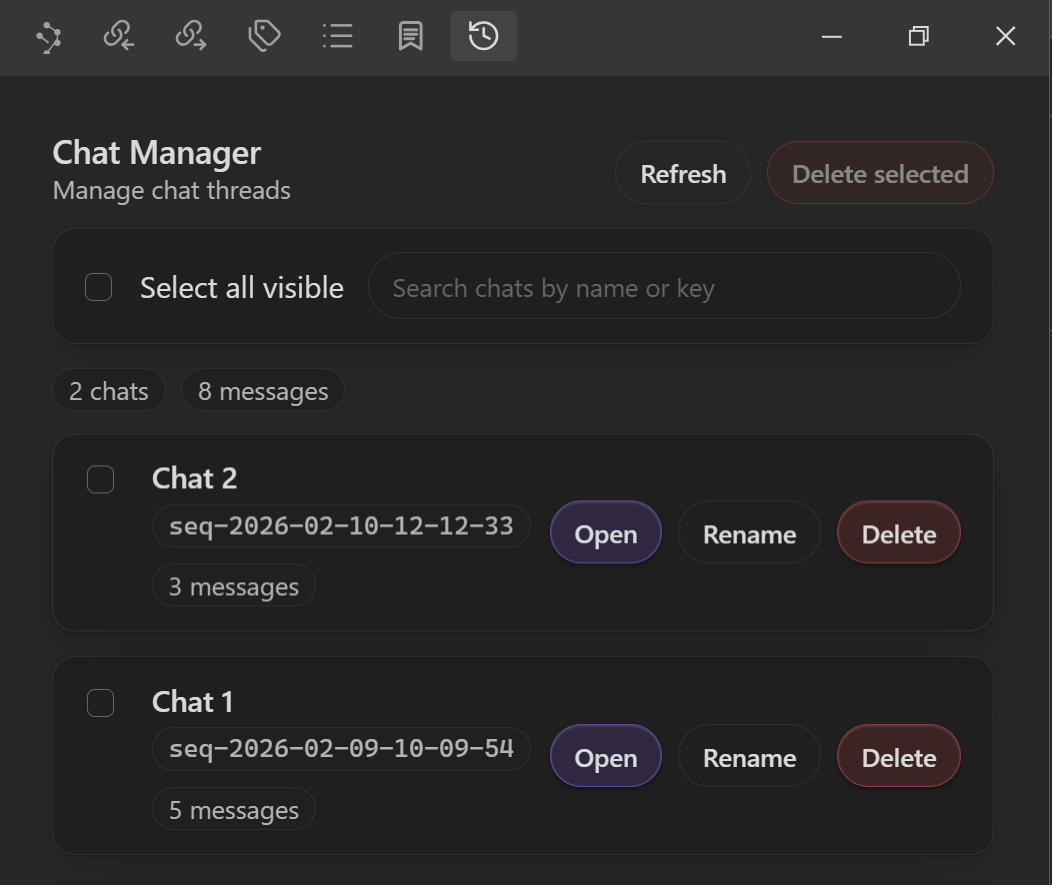
Chat Thread Manager gives you one focused dashboard to keep conversations organized without leaving Obsidian.
You can:
- Find the thread you need in seconds.
- Rename or clean up old threads safely.
- Jump back into active work immediately.
Why it matters
- Faster retrieval: locate active threads by name or key.
- Lower clutter: safely remove stale threads with inline confirmation.
- Smoother continuity: open a thread directly in Smart Chat and continue where you left off.
- Better visibility: scan thread/message counts before cleanup.
What you can do
- Open any thread directly in Smart Chat.
- Rename threads inline (no prompt popups).
- Delete one thread or bulk-delete selected visible threads.
- Track thread and message counts at a glance.
Setup
- Install Smart Chat Pro in Obsidian.
- Open the command palette and launch Chat Thread Manager.
- Use search, select-all-visible, and per-row controls to manage threads.
- Click Open on any row to continue the conversation in Smart Chat.
Workflow playbook
- Search first: filter by thread name or key to narrow to the working set.
- Bulk cleanup: select visible rows, then confirm bulk delete inline.
- Fast context switch: open a thread without leaving manager flow.
FAQ
Does deleting a thread require confirmation?
Yes. Single and bulk delete flows both use inline confirmation controls.
Can I rename without leaving the manager?
Yes. Rename is inline in each row.
Will I lose context while managing threads?
No. Open launches the selected thread in Smart Chat so you can continue immediately.